 Abeer Arora
 For any organization, backups are important to recover data in the event of data loss. But managing large database backups is different from what it seems. Manually managing backups occasionally is fine, but when the database is large, that’s where things get tricky. Therefore, automating them is one way to ease the task.
I just wanna backup automatically
byu/simp_pimp_001 inatlassian
On the other hand, automated database backups help you to schedule database backup tasks & eliminate the need to manually start backup jobs repeatedly. A third-party automated database backup tool is a way to do so.
Let’s learn how to automate database backup using a third party tool.
Why Automate Database Backups?
Automating the job is far better than depending on someone to run the backup every time. Automating helps in:
- Avoid missed backups: Humans do make mistakes. So, yes, they can forget to schedule SQL Server database backups, especially when multiple databases need regular protection. Whereas automation helps to reduce this dependency.
- Maintain a consistent schedule: An automated database backup tool can run according to a selected schedule rather than relying on someone to start every backup. In short, just set the schedule frequency for backup jobs and you’re good to go.
- Reduce repetitive work: Running the full backup process for each database takes more time than usual. On the other hand, with automation, you can simply set the backup configuration once; the recurring process doesn’t require the same setup every time.
- Protect frequently changing databases: Databases with frequent changes may require more frequent backup points like incremental or differential backups. With automation, it is easy to establish backup frequency around workload and business recovery requirements.
- Respond to backup failures: A reliable automation setup should alert you when a backup doesn’t complete successfully. Practically, it is not possible with manual approaches.
Top Reasons to Automate Database Backup Using a Third Party Tool
A third-party database backup tool is a solution designed to handle large database backup tasks outside the database’s primary management interface. It allows you to:
- Connect multiple databases as needed depending on the business environment
- A tool may help you to select backup types like full, incremental, or differential backups
- Set recurring schedules based on the database’s changing frequency
- Choose storage destinations to securely save the backup file
- Compress backup file sizes of large databases so that it takes less storage space
- Encrypt backup files for more data protection because backup files do contain sensitive information.
- Set retention rules to remove older backups
- Monitor backup history to keep an eye on the process
- Receive alerts when the backup job is done or if something happens in between
- Restore databases because backup is only feasible when the data can be recovered completely
Top 5 Software for Automating Database Backups
If you want to automate database backups without writing scripts or managing separate backup jobs, then here are the top 5 best database backup tools that you can go for:
1. Prapl SQL Backup Software: This SQL Backup tool is a Windows desktop application to simplify database backup management. The software helps you to schedule an automatic database backup from more than 10+ database engines. Prapl provides the only solution that is 100% desktop-based, which helps you to keep you databaase at your desired location. Like local PC, Google Drive, One Drive, AWS S3, External Drive, etc. Thus, you can add unlimited servers for unlimited database backups. This application is best for teams, individuals, and businesses looking for an easy-to-use database backup tool that supports multiple database engines and combines scheduling, compression, encryption, security, retention, and restore management in one application. Moreover, it supports multiple database engines, including PostgreSQL, MySQL, MariaDB, SQL Server, MongoDB, and more.

2. SQL Backup Master: SQL Backup Master mainly focuses on scheduled SQL Server database backups for users. It is also a Windows-based program. In addition to these, it can store backups to local or network folders, NAS, FTP/SFTP, and many cloud storage destinations. It also supports full, differential, and transaction log backup approaches.
3. Zamanda Backup Tool: For businesses in need of centralized backup management, Zamanda offers database backup and recovery solutions. Online backups, full and incremental backup levels, scheduling, encryption, compression, and cloud or other storage destinations are all supported by this backup solution.
4. SQLBackupAndFTP: SQL Server, MySQL, and PostgreSQL database backups can be scheduled using SQLBackupAndFTP easily. Additionally, this tool offers you email alerts, backup monitoring, encryption, compression, retention, and restore features. It is best for the business who are looking for an easy-to-use solution for automating backup jobs.
5. Handy Backup Tool: Handy Backup Tool is a program that offers a specific Microsoft SQL Server backup plugin. Beyond databases, this software allows you to back up files, directories, websites, and other data sources too. So, organizations that are managing different kinds of data from the same application can benefit from its built-in scheduler feature. It can execute backup jobs at defined times or on a regular basis as needed.
How to Automate Database Backup Using Prapl?
Steps to automate database backup using a third-party tool:
Download it first and open it. Then, launch the Prapl SQL Backup Tool on Windows and select New Backup. Thereafter, connect to your database
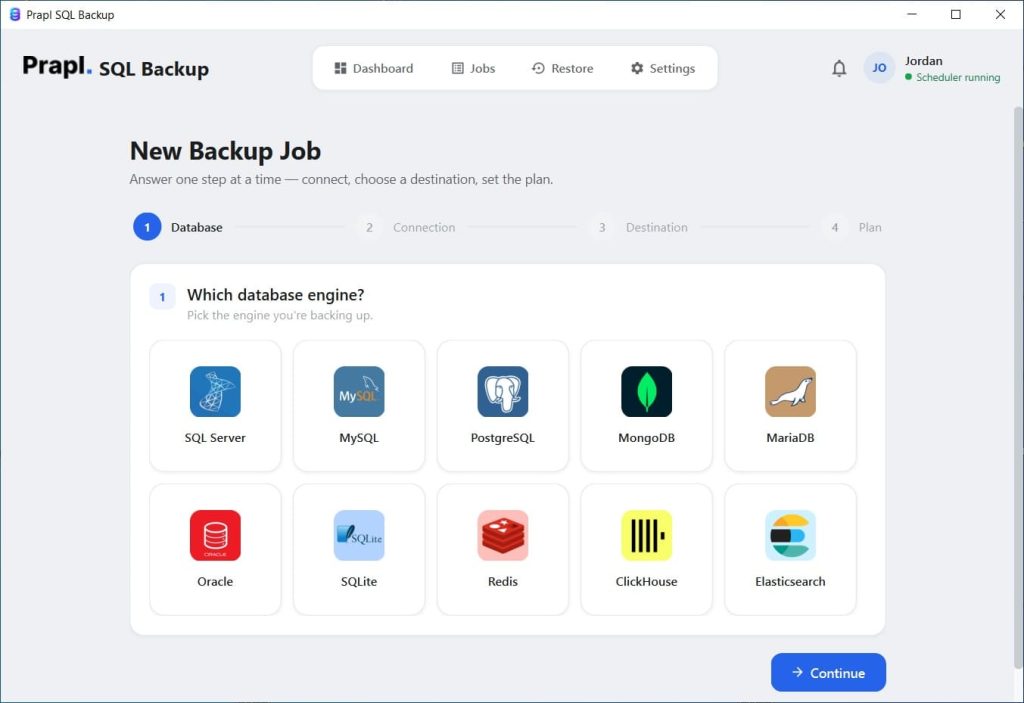
Now, choose the database engine and fill in the login connection details.
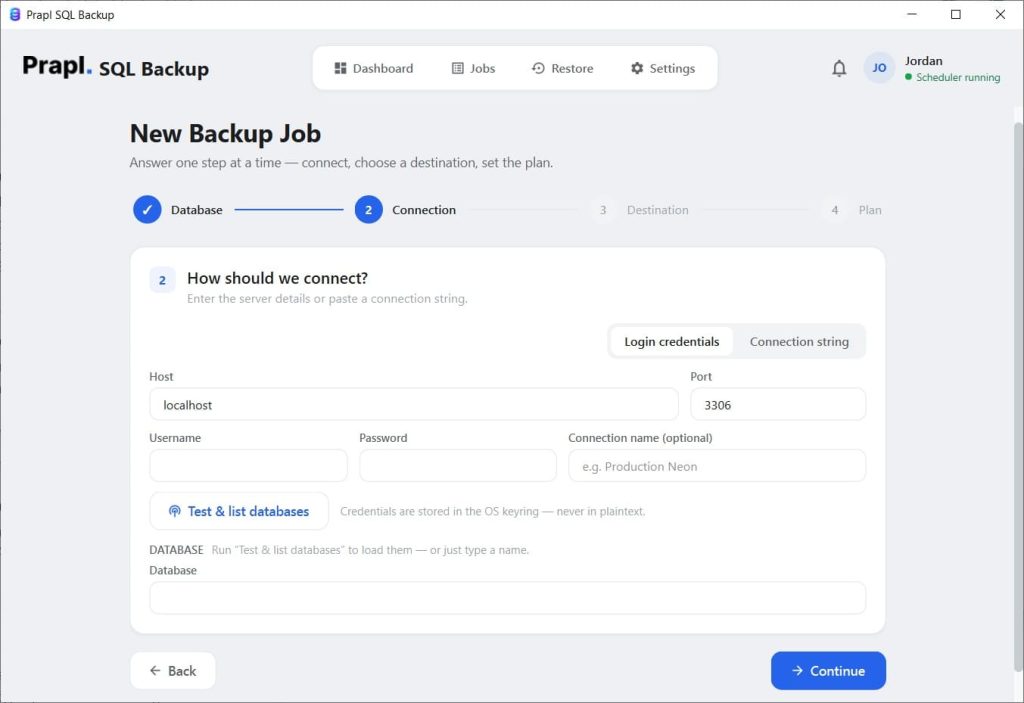
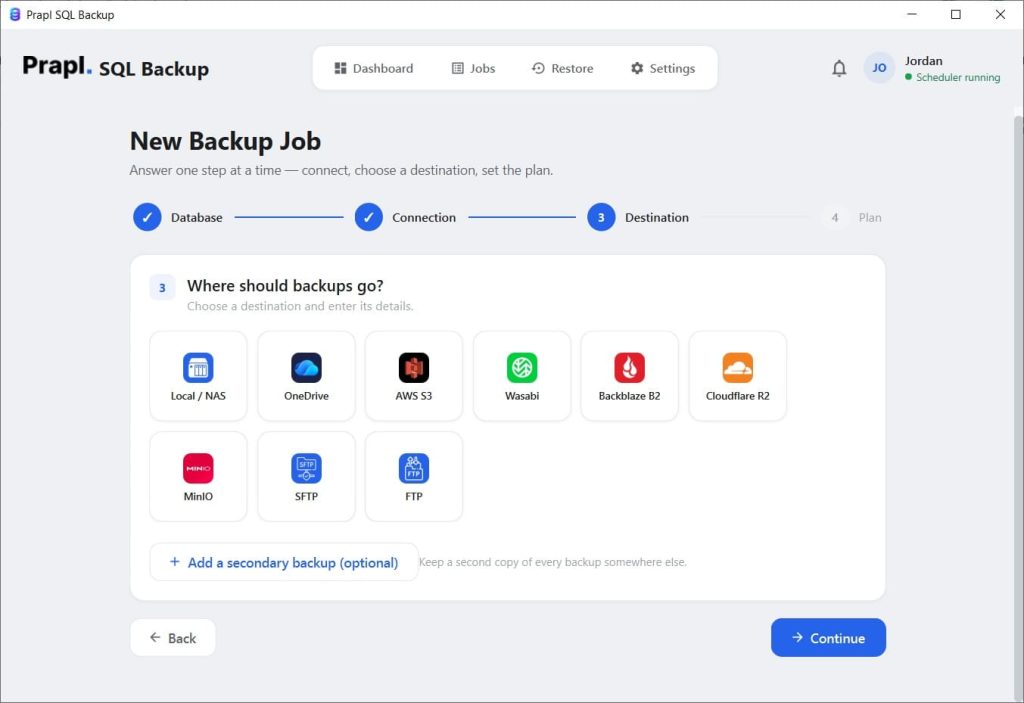
After this, select the Database or multiple databases you want to include in the backup job from the interface. Choose the Destination as desired.
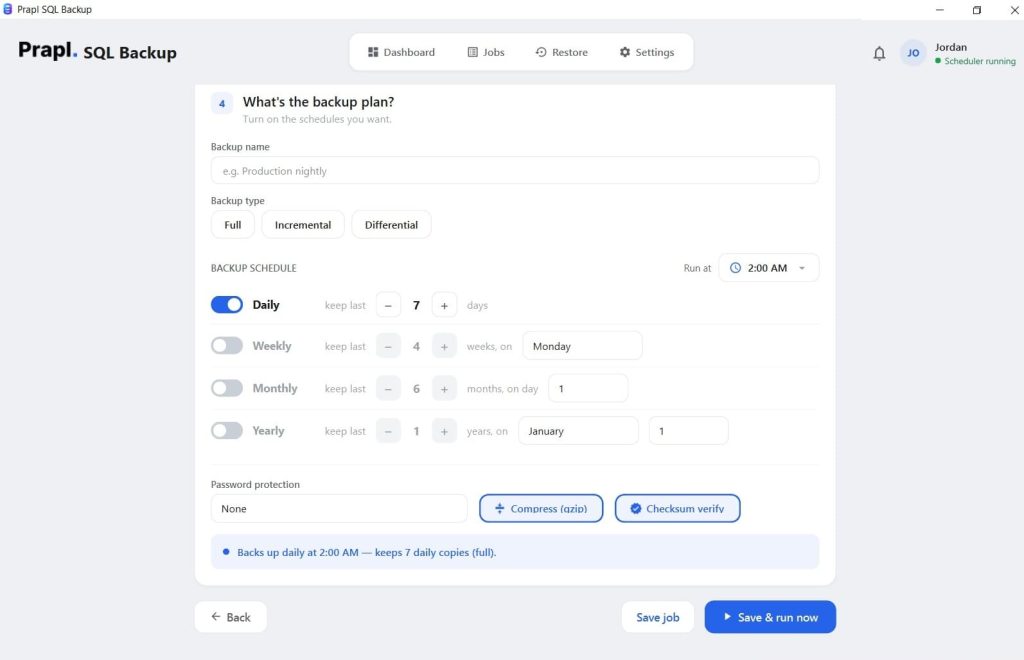
The next step is to configure the Backup type and set the backup schedule frequency based on your data recovery needs for your business. Finally, click the Save and Run Now button and monitor the backup jobs when done.
Final Words
Automating the backup jobs not only helps you to focus on the other core competencies of the business but also helps to perform the backup jobs seamlessly. Therefore, automating database backups using a third-party tool will be a smart choice for you.
But choosing reliable third-party software can sometimes be hectic because the choice depends on your database environment, storage capacity, backup frequency, and other details too. Therefore, choose wisely.
Because a good tool should do more than just create backup files of the primary databases. In short, it should help you schedule backups, store them securely, manage retention, monitor backup activity, and recover your data when needed. So, automate database backup using a third party tool like Prapl SQL Backup software. It is one of the applications that comes with an easy-to-use interface. As your database and backup needs increase, a reliable backup tool can reduce repetitive tasks and simplify the management of your database security strategy.