PostgreSQL logo MS SQL Server · 2008 R2 → 2025 · Express · Standard · Enterprise · Developer· Windows Authentication · named instances

Microsoft SQL Server Backup Tool

With SQL Server Database Backup you can create full, Differential or Transaction-Log backups, schedule backup tasks, encrypt backup files using AES-256, compress large databases and restore when you need them. A complete utility to backup SQL Server database to local machine, NAS or cloud storage. Download and Try it for free. Zero Setup - database tools included.

99.9%
Backup success
5 min
To first backup
256-bit
AES-GCM
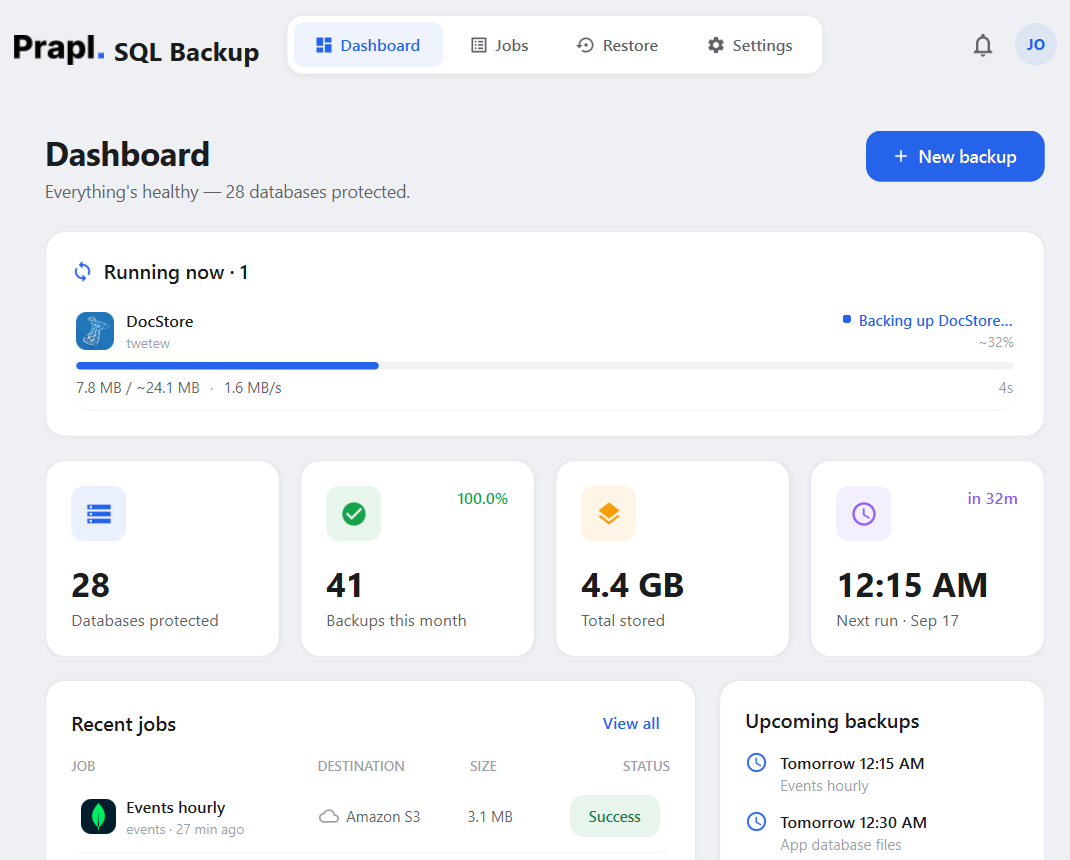
sql server backup software backup sql server database microsoft microsoft sql server database utility software interface
analytics · backed up 2 min ago
Cron Schedules/ RESTORE DATABASE/ BACKUP DATABASE/ .bak format/ streaming gzip/ AES 256-GCM/ Amazon S3/ SFTP/
2016-2025
SQL Server
Local/Cloud
Storage Options
256-bit
AES-GCM encryption
Full/Differential
Scheduled Backup
Why It Matters

Why Use SQL Server Backup Software?

A single disk failure, poor deployment or ransomware assault can permanently take down the SQL Server database. You can restore a recent copy with a backup. Recovery, then, is a restore rather than a rebuild.

Prevent Long-Term Data Loss

Records can be erased in seconds via hardware malfunctions, corrupted MDF/LDF files, lost tables, or unintentional DELETE. A new copy is always available thanks to automated scheduled backups. You can get the most recent point and carry on working rather than losing years' worth of data.

Recover from an Attack by Ransomware

Your database may be encrypted or erased by malware, and the data is rarely restored by server cleaning. You can retrieve encrypted copies that are kept in multiple locations following an attack. Recover from backup instead than paying a ransom or rebuilding by hand.

Migrate Uninterrupted

There are always risks associated with moving a database to a new server, instance, or host, including incomplete imports, corrupted.bak files and missing rows. The original is safeguarded by full backup. Therefore, the failed migration is rollback rather than disaster..

How it works

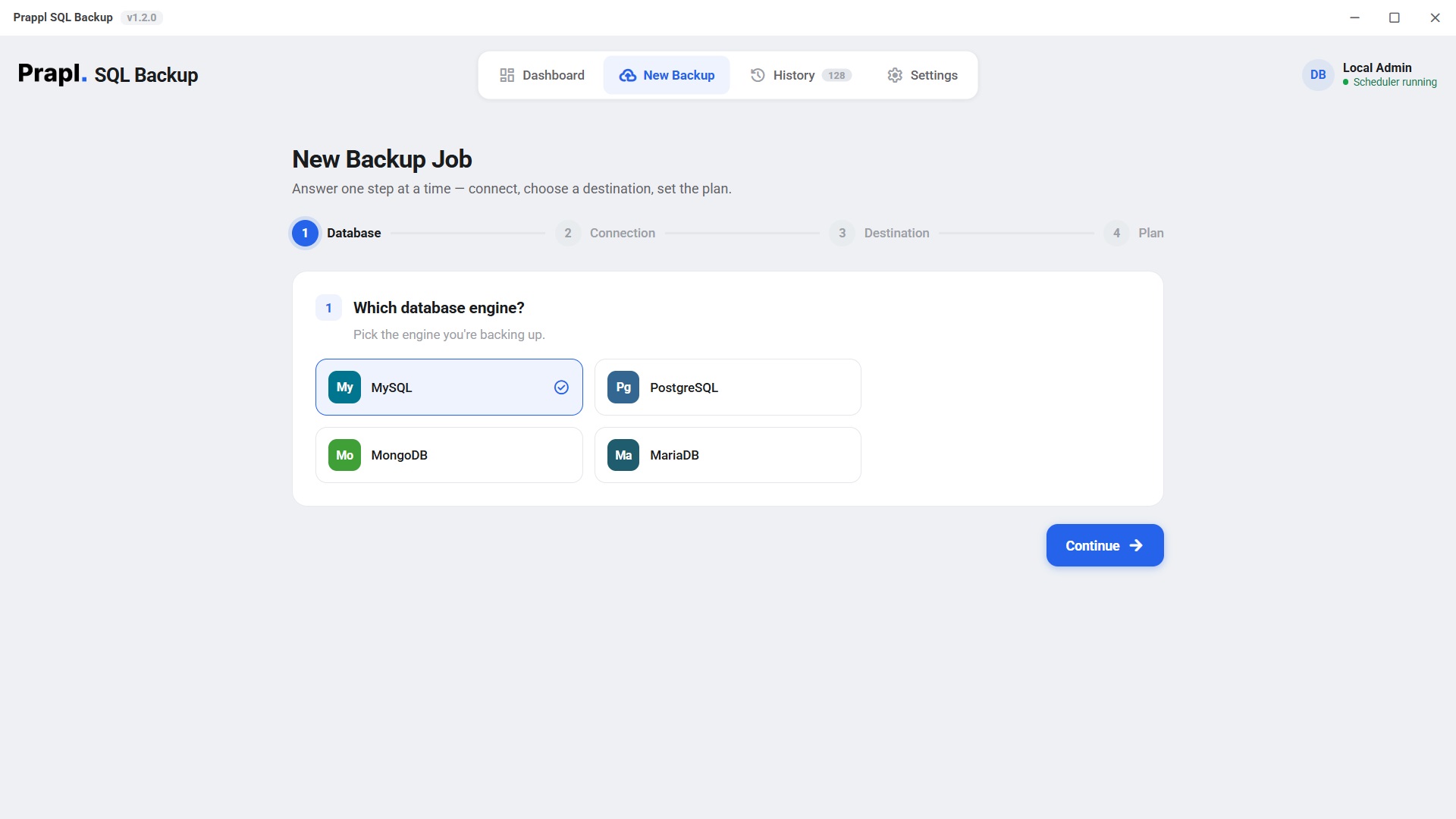
How to Backup SQL Server Database?

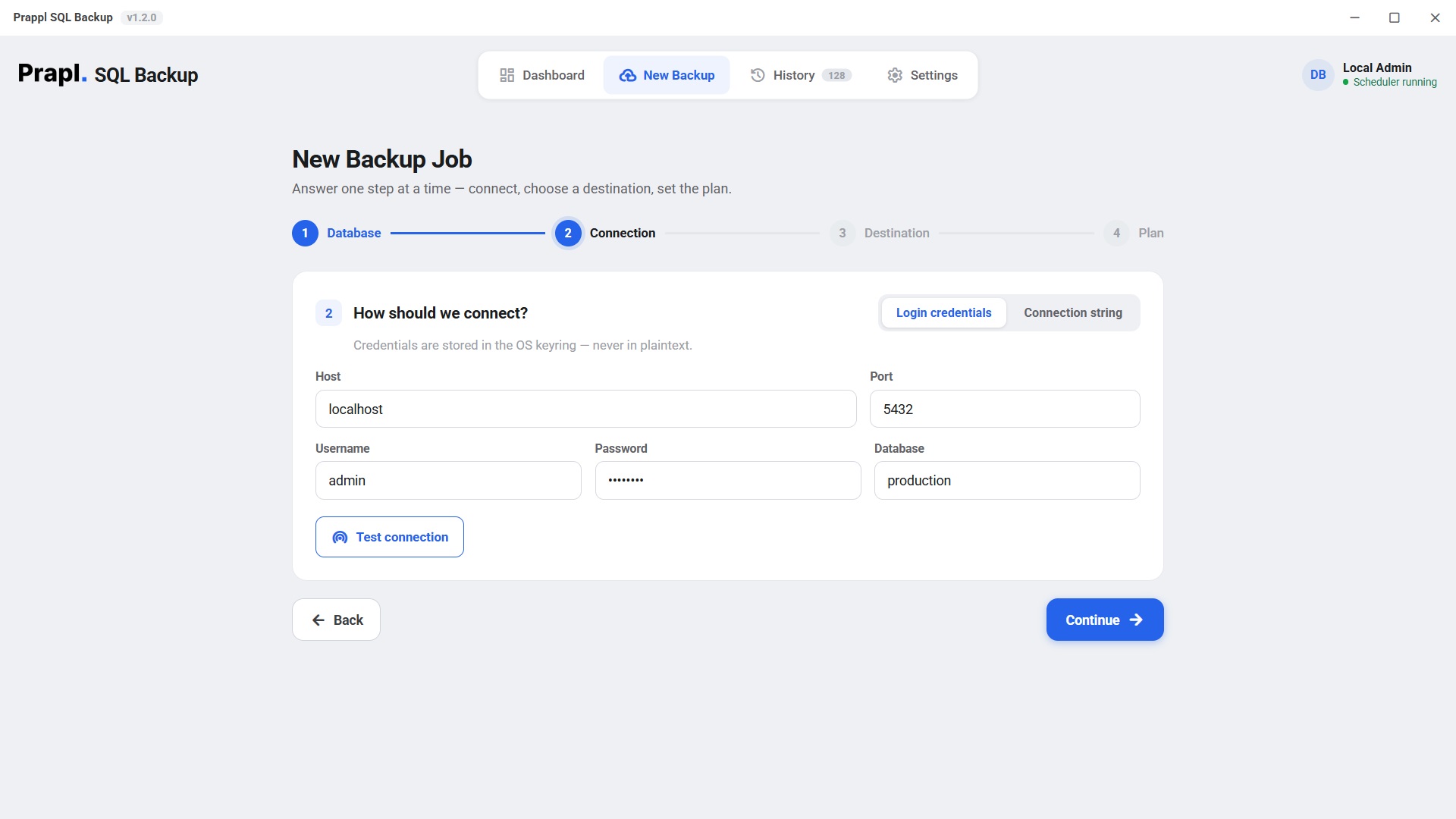
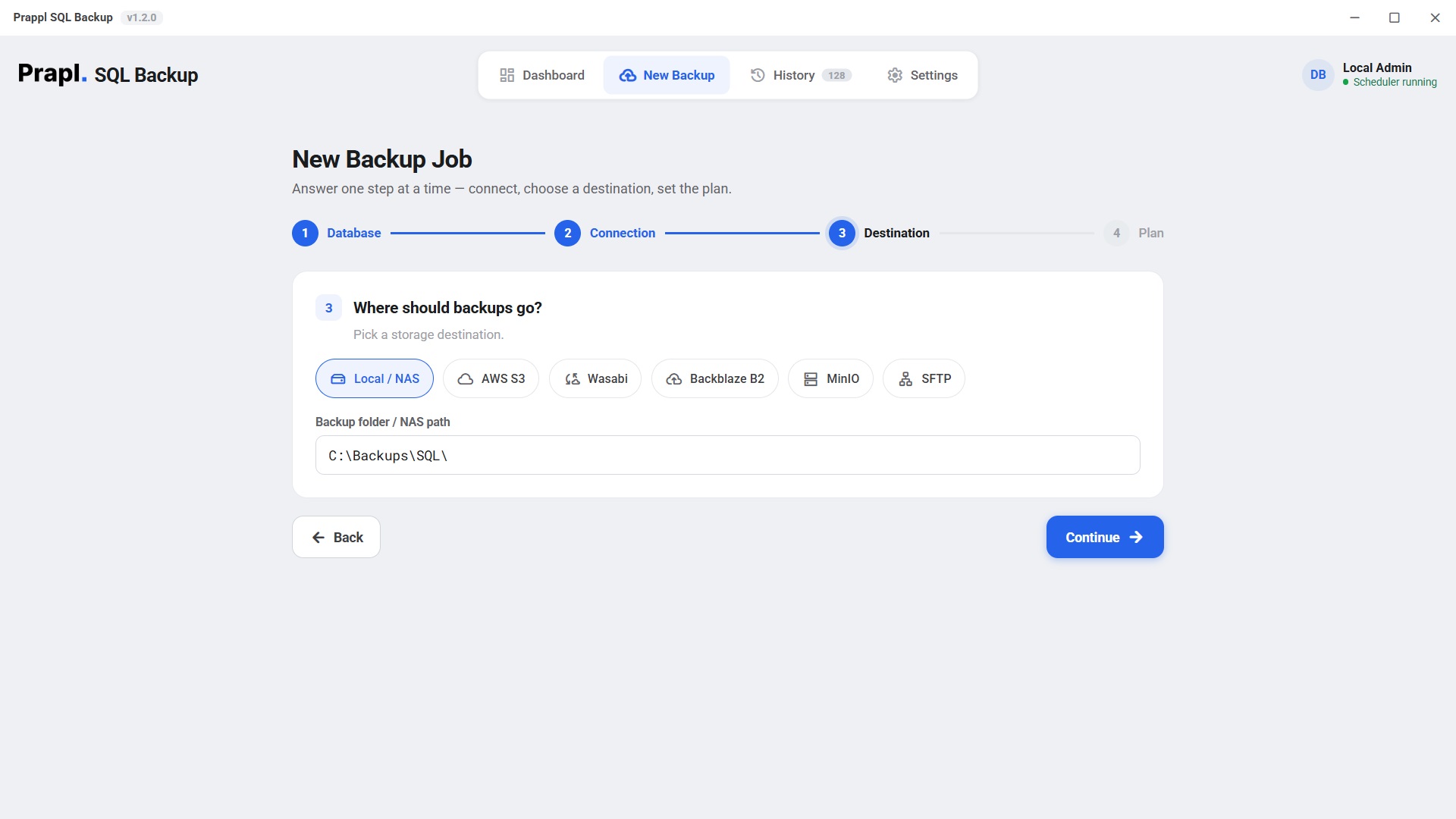
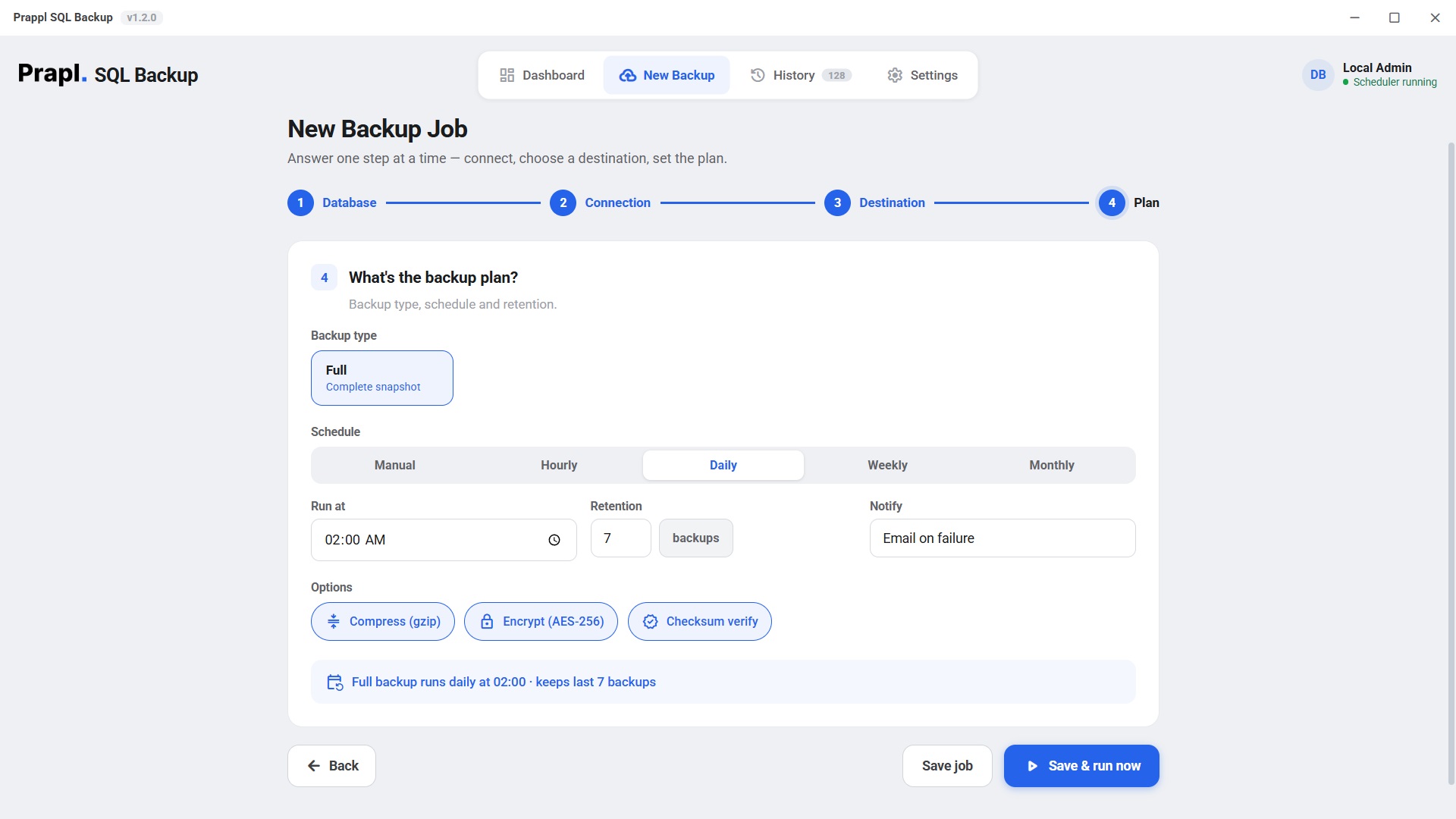
The backup and restore process is kept straightforward by the Microsoft SQL Server Database Backup utility: select your database, connect, decide where to save it and configure plan.

Works Everywhere SQL Server Runs

Backup Your MS SQL Server Database Wherever It's Running

Whether your Microsoft SQL Server is installed on physical server, virtual machine, cloud environment or inside a container, the SQL Server backup tool provides a simple and consistent backup experience. Just connect to your SQL Server instance, select the database, choose a storage location, and the software creates secure backup copies automatically.

Local instance Named instance SQL login Express to Enterprise

Local instance

Any SQL Server instance from 2008 R2 to 2025 — Express, Standard, Enterprise or Developer — installed on your own physical server or in-house hardware. Connect with Windows Authentication on a local instance, or with a SQL login on a named instance, and the tool backs up every database you tick.

2008 R2 → 2025Express to EnterpriseWindows or SQL authnamed instances
Step 2 Connection
ServerSQLSRV01\SQLEXPRESS
Port1433
Usernameleave empty for Windows Authentication
Password••••••••••
Databaseanalytics
Test & list databases Connected

A SQL Server on this machine connects automatically with Windows Authentication — nothing to type.

Named instance

Back up an Amazon RDS for SQL Server instance by pointing the tool at its endpoint over an encrypted connection. Your backup copy lands in the storage you choose — local, NAS or your own cloud bucket — so you keep a copy that is independent of the RDS snapshot schedule.

TLS / Encrypt=yesinstance endpointSQL authentication
Step 2 Connection
Hostmydb.abc123.us-east-1.rds.amazonaws.com
Port1433
Usernameadmin
Password••••••••••
Databaseanalytics
Encrypt connectionYes
Test & list databases Connected

SQL login

SQL Server running inside VMware, Hyper-V, KVM, Proxmox, VirtualBox or an Azure/EC2 virtual machine connects exactly like a physical server. Give the tool the host and port of the VM, and scheduled backups run the same way they do on bare metal.

VMware · Hyper-VKVM · ProxmoxAzure VM · EC2
Step 2 Connection
Host192.168.1.50
Port1433
Usernamesa
Password••••••••••
Databaseanalytics
Test & list databases Connected

Express to Enterprise

A SQL Server on the same machine is detected automatically with Windows Authentication — nothing to type. For a remote server, open Advanced Options and enter the host name or IP, port, user name and password, then click Test Connection before you save the job.

auto-detected locallytest connectionhost + port
Step 2 Connection
Serversql.example.com
Port1433
Usernamesa
Password••••••••••
Databaseanalytics
Test & list databases Connected

Open Advanced options for a SQL login, a named instance or a custom port.

Key Features

What the MS SQL Server Backup Tool Gives You

Full or Incremental Backup

Two ways to backup, so you are not copying everything every single time. A full backup makes a complete copy of the database. Every table, row, index and object in one file, you can restore all on its own. An incremental backup is significantly faster and smaller since it only stores the data that has changed since the previous backup. To achieve total security while consuming less time, storage, and bandwidth, periodically do full backups with incrementals in between.

Automated Scheduled Backup

Creating daily database backups by hand takes a lot of time and is simple to forget. The built-in schedule in this SQL server backup tool automatically generates backups in accordance with your selected schedule. Hourly, daily, weekly, monthly, and custom schedules are among the available schedules. Backup automatically secures your database after it is configured and requires no human intervention.

Flexible Storage

Having backups in several places enhances disaster recovery and guards against hardware malfunctions. For extra security, you can make several backup copies with this tool. It offers multiple saving options such as Local Drive, NAS, Amazon S3, Wasabi, Backblaze B2, MinIO, FTP, SFTP, Cloud Storage and many more. You can store backup SQL Server database to PC, external hard drives, network attached storage, etc.

AES-256 Encryption

Databases often contain confidential business information. To keep your data secure, every backup is protected using AES-256 encryption before it is saved or uploaded. It provides an additional layer of security against unauthorized access. Only users with the correct encryption password can access the backup file.

Backup Compression

Large backup files can be produced by large SQL Server databases. It automatically compresses backup files up to 70–80% before saving them to save storage space. Without compromising data integrity, compression reduces disc usage, expedites uploads to cloud storage, and improves backup management.

Backup Monitoring

Keeping an eye on backup jobs is crucial to maintaining the security of your database. Every backup process is recorded by the software, which enables you to examine both successful and unsuccessful tasks, start and finish times, and comprehensive error data from a single dashboard. This aids administrators in promptly identifying problems and confirming the successful execution of planned backups.

Intelligent Retention Strategy

Older backup files might quickly take up important storage space when new backups are made. Using rules you specify, such as retaining the latest seven days' worth of backups, four weekly backups, or monthly backups for a predetermined amount of time, the smart retention tool automatically maintains backup history. This keeps storage under control and organised while guaranteeing that you always have recent recovery points.

Restore the Database

Database backups are just half of the protection plan. It will assist you with SQL Server database backup and restoration. You can restore your backup if your data is lost as a result of ransomware, hardware malfunctions, unintentional deletions, corrupted databases, or server breakdowns. Tables, records, indexes, stored procedures, views, and other database objects are all preserved when your database is restored.

Multiple Database Support

To manage different database platforms, separate backup tools are often required, which increases management complexity and effort. This backup solution addresses that problem by allowing you to protect many database engines from a single application. If you need to back up MySQL, PostgreSQL, MariDB, MongoDB, and many more, it provides a unified interface to configure, schedule, monitor, and manage backup jobs.

Inside a Backup

How Your Data Moves Through the Process

Every backup runs through four automated stages. From the native dump to encrypted storage. It is designed to protect data without interrupting your database

1 · Native
Backup Database
2 · Shrink
Compress
3 · Secure
Encrypt
4 · Ship
Store

Native SQL Server backup

The process starts with SQL Server's own BACKUP DATABASE command, so the copy it produces is a standard .bak file. Tables, rows, indexes, stored procedures and views are all captured, and the database keeps serving your application while the backup runs.

-- what the app runs — SQL Server’s own command BACKUP DATABASE [analytics] TO DISK = 'analytics_full.bak' WITH COPY_ONLY, CHECKSUM

Shrink the backup file

The .bak file is compressed as it is written, which typically cuts it down by 70–80%. A smaller file uses less disk, uploads to cloud storage far quicker and keeps a long retention history affordable.

# streamed in chunks — never loaded into RAM analytics_full.bak analytics_full.bak.gz 2.41 GB 612 MB (75% smaller)

Secure it with AES-256

Before a single byte leaves the machine the backup is encrypted with AES-256-GCM. The key is derived from your password with scrypt and every 64 KB chunk gets its own nonce, so a stolen backup file is unreadable without your password.

key = scrypt(password, salt) # AES-256-GCM · 64 KB chunks · unique nonce each

Ship it and prune

The encrypted backup is sent to every destination you configured — Local/NAS, Amazon S3, Wasabi, Backblaze B2, MinIO or SFTP. Retention rules then remove the copies that have aged out, and the whole run is written to the job log.

upload s3://bucket/analytics/... prune: keep-last-N per destination · write log

The app runs this for you — there is nothing to type.

The part that matters

A backup you can't restore is just wasted disk

Recovering a SQL Server database takes four steps in the app: choose the job, choose the point in time, choose what to do with it, review. The tool then downloads the backup, decrypts it, decompresses it and hands the .bak to the server’s own RESTORE DATABASE. Press play to watch every step.

Full, differential and transaction-log backups chain automatically: the tool restores them in order with NORECOVERY and only finishes the database on the last file — that is what gives you point-in-time recovery.

Restore: analytics from Amazon S3
Locate backupfind the key in the destination
Downloadpull the encrypted object · 612 MB
Decrypt & verifyAES-256-GCM integrity check
Decompressrestore the original dump · 2.41 GB
RESTORE DATABASErelocate the data files, restore as analytics_restored
sqlserverbackup · encrypt · analytics
Plaintextanalytics_full_20260627.dump.gz
scrypt(password, salt) → 256-bit key · fresh nonce
Ciphertext
FormatMAGIC(9) · SALT(16) · [ LEN · NONCE(12) · CT+TAG ] × N
256-bitAES key
96-bitnonce / chunk
64 KBchunk size
Built With Security at every Stage

Watch How Microsoft SQL Server Backup Utility Secures Your Data

Database backups contain sensitive data, such as financial, human, customer, and application data. This backup solution protects your backup files before they are stored. If someone acquires unauthorised access to your storage location, the encrypted backup cannot be decoded without the correct encryption key.

Password Based Key Protection

It does this by generating a strong encryption key from your password through a secure key derivation process which makes guessing your password via brute force attacks more difficult. This provides greater security for your SQL Server backup files.

Data Integrity Verification

During the backup of SQL Server database process, it verifies the integrity of backup data to ensure it has not been altered or corrupted during compression, encryption or storage. This helps ensure your backup remains reliable and ready for restoration whenever needed.

Secure Credentials Storage

Your SQL Server connection credentials are stored securely using your operating system's protected credential storage rather than plain text files. This reduces the risk if unauthorized access to database usernames and passwords while improving the overall security of your backup environment.

Direct Backup Transfer

Your SQL Server backup is transferred directly from your system to the selected storage destination. It does not route backup data through third-party servers, giving you complete control over where your backup files are stored. If you choose local storage, NAS, cloud storage, FTP or SFTP, your data remains under your control.

Your data, your storage

Your data. Your choice.
Your storage.

The SQL Server backup tool is a desktop application, not a hosted service — it runs on your machine and writes each backup straight to the storage you picked. Nobody charges you per gigabyte, and no copy of your database ever sits on somebody else’s server.

Choose any destination — or several at once
This PCany folder
External driveUSB or disk
NASnetwork share
OneDriveyour account
Amazon S3your own bucket
S3-compatibleWasabi · B2 · MinIO
FTPyour own server
SFTPyour own server
No per-GB fee from us Encrypted before it leaves Send to several at once

No storage bill from us

You pay us once for the software — never for gigabytes. Point a job at a folder on your own PC or NAS and the storage costs nothing at all. Prefer the cloud? Use your own Amazon S3, Wasabi, Backblaze B2, MinIO or OneDrive account and pay their rate directly, with no markup in between. Back up 10 GB or 10 TB — the price of the software does not move.

Your database never passes through us

This is a desktop application. It runs on your machine, connects straight to your database and writes the backup straight to the destination you chose. Nothing is uploaded to our servers on the way, so we never hold a copy of your data — and it is encrypted with AES-256 before it leaves, so even the storage provider only ever sees ciphertext.

Your passwords stay on your machine

Database passwords are never written into a configuration file and never sent anywhere. They are kept in the Windows Credential Manager, and the settings file only stores a reference to the entry. If you switch on the optional online monitoring, it reports job status only — name, success or failure, size and duration. Never your data, never your credentials.

How it compares

PostgreSQL Backup Tool vs a DIY cron job vs cloud snapshots

The honest trade-offs. SQLBackup is built for scheduled, encrypted, portable logical backups you actually control.

CapabilitySQL Server BackupDIY sqlcmd + Task SchedulerManaged cloud snapshots
Automatic scheduling Built-in cronManual crontab Provider default
Client-side AES-256 encryption Always Plaintext dumpsAt rest, provider-held keys
Offsite to your own storage S3 · SFTP · NASScripts you maintainLocked to provider
Portable — restore anywhere Standard .bak, RESTORE DATABASE RESTORE DATABASE Same provider only
Failure alerts & history Email + log Fails silentlyBasic console
You hold the keys Always
Software cost$9/mo, flatYour timeStorage + egress
Storage cost Your own storage · no per-GB feeYour own storagePer-GB, metered

The SQLBackup team

Database & backend engineers · makers of SQLBackup

This software has been developed by engineers who have successfully backed up Microsoft SQL Server databases to local folders in real-life situations also successfully restoring databases from backups in scenarios involving server crashes, database corruption, or data deletion. Download the desktop app and try it for 15 Days for free.

User Reviews

Custumer Feedbacks

Have a look to the feeback we had received globally after using Prapl SQL Backup Software

Your Storage, Your Data, No Data Leak Policy

Built for Every SQL Server Environment

Whether managing just a single database or hundreds of production databases, our SQL Server backup software simplifies the complexity of backup management for all situations, from small businesses to large enterprises. Get the peace of mind that comes with automated backups, secure storage and reliable recovery solutions to ensure your most important business data stays protected.

🏢

Enterprise Organizations

Large organisations run their businesses based on critical data stored in SQL Server – financial records, customer information, ERP system, internal applications etc. This solution enables the enterprise’s IT team to automate backup processes, secure backup file using advanced AES-256 encryption technology, store multiple recovery copies of data at different locations (local and cloud).

🏪

Small & Medium Businesses

Small businesses often lack dedicated administrators, making regular backup difficult to maintain. It provides an easy-to-use interface that allows businesses to automate backups without writing scripts or performing complex configurations.

🧑‍💻

Software Development Teams

Developers frequently make changes to database structures, stored procedures and application data during development and testing. Creating regular backups before deployments provides a reliable recovery point if an update introduces unexpected issues.

🗄️

Database Administrators

Managing multiple SQL Server instances and databases can be challenging as your infrastructure grows. This enables DBAs to configure backup jobs, monitor backup history, manage storage locations and restore databases from a single application.

🤝

Managed Service Providers

Service providers responsible for maintain client databases need a dependable backup solution that supports multiple environments. This allows MSPs to configure separate backup jobs for different customers while storing backups securely on local storage, cloud storage, Amazon S3, etc.

☁️

Cloud & Hybrid Infrastructure

Organizations running SQL Server on physical servers, virtual machines or cloud-hosted infrastructure can use the same backup workflow across all environments. If your databases are hosted on-premises or in cloud virtual machines, it creates secure backups and store them in your preferred destination.

Technical specs

System Requirement & Basic Information

Storage Required
500 MB Minimum (1 GB Recommended)
RAM
1 GB Minimum (2 GB Recommended)
Versions
SQL Server 2008 R2 - 2025 · ships up-to-date client tools · version-mismatch detection
Compression
Streaming gzip — constant memory, no temp bloat
Encryption
AES-256-GCM, key via scrypt, per-file salt, per-chunk nonce · secrets in OS keyring
Destinations
Local/NAS, Amazon S3, Cloudflare R2, Wasabi, Backblaze B2, MinIO, SFTP, FTP/FTPS, OneDrive
Scheduling & retention
Manual / hourly / daily / weekly / monthly · keep-last-N per destination
Platforms
Windows 10/11 · desktop app and headless CLI/agent
SQL Server backup FAQ

Questions, answered

Follow the steps below:
  • Run the Prapl SQL Backup Tool and click on + New Backup.
  • Choose SQL Server as the engine. Connect and tick the database.
  • Select destination location and click Continue.
  • Configure backup settings and click Run.

No. SQL Backup Tool has a fixed price. You use your own storage, so there are no additional storage fees from us. Whether you back up to your local drive, network storage, or your own cloud account, your storage remains under your control.

You do. All backup files are stored in the location you choose. We never store your database backups anywhere, giving you complete ownership and control of your data.

No. The software does not impose storage limits or charge based on backup size. The only limit is the available space in your own storage destination.

Many backup solutions charge recurring subscription fees based on the amount of data you store. SQL Backup Tool follows a different approach: you purchase the software at a fixed price and use your own storage. This means your data stays with you, and you never pay us extra for additional storage capacity.

The tool works across SQL Server 2016, 2017, 2019, 2022, 2025, in Express, standard and Enterprise editions.

Yes. It handles both backup and restore in one place. Create encrypted backup and restore it when you need to recover.
One tool, every database

Also backs up your other databases

One flat price covers every engine on the machine. Explore the others:

Incremental SQL Server backup Software

Download the desktop based SQL Server Backup Software and create full or incremental backup of Microsoft database to a local folder or cloud server. Try for 15 Days for free.

15-day free trial 14-day money-back No auto-renewal