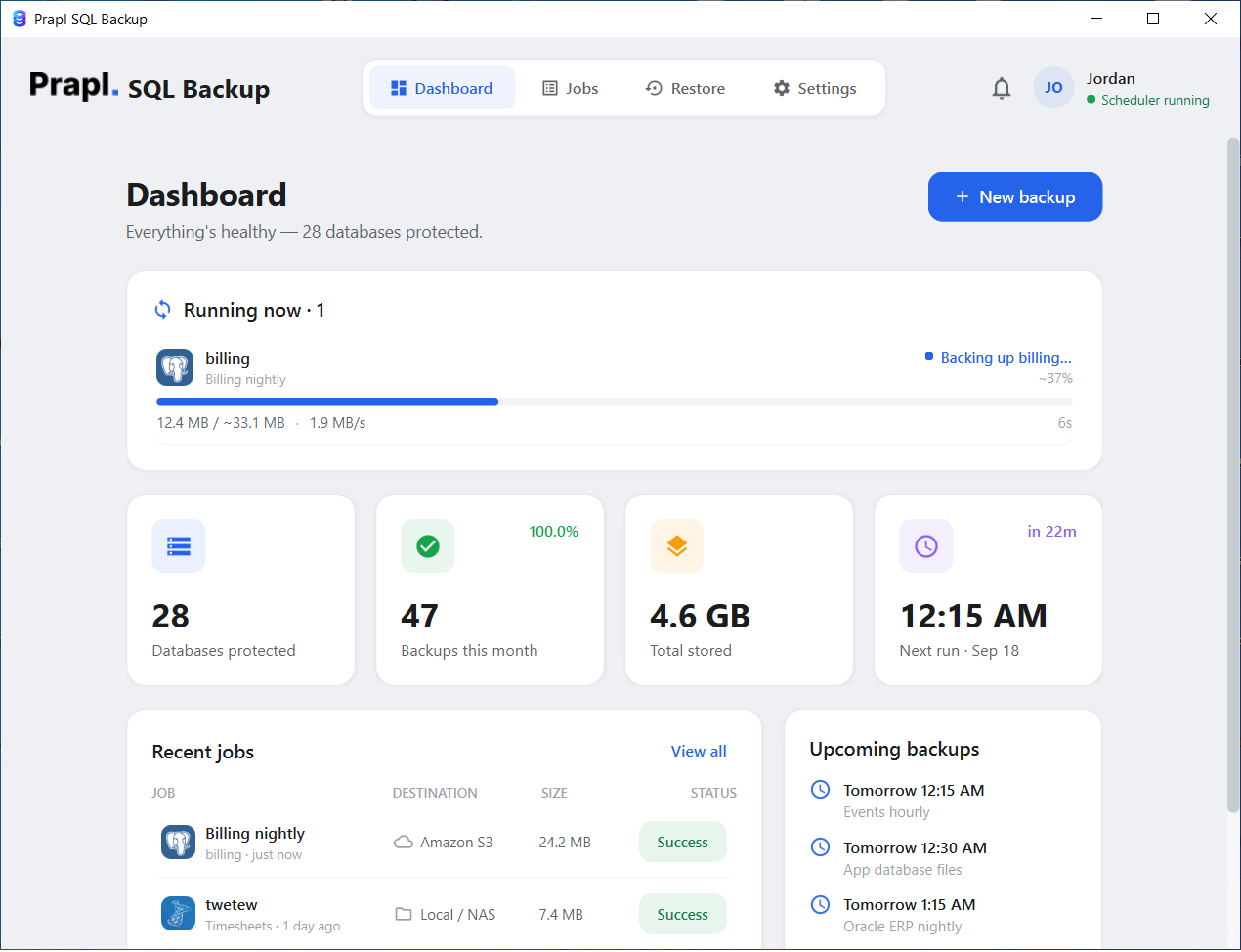
Protect your PostgreSQL database from the risk of unexpected data loss. Our PostgreSQL backup tool create secure backups to ensure quick recovery of your database with its accuracy and integrity intact.
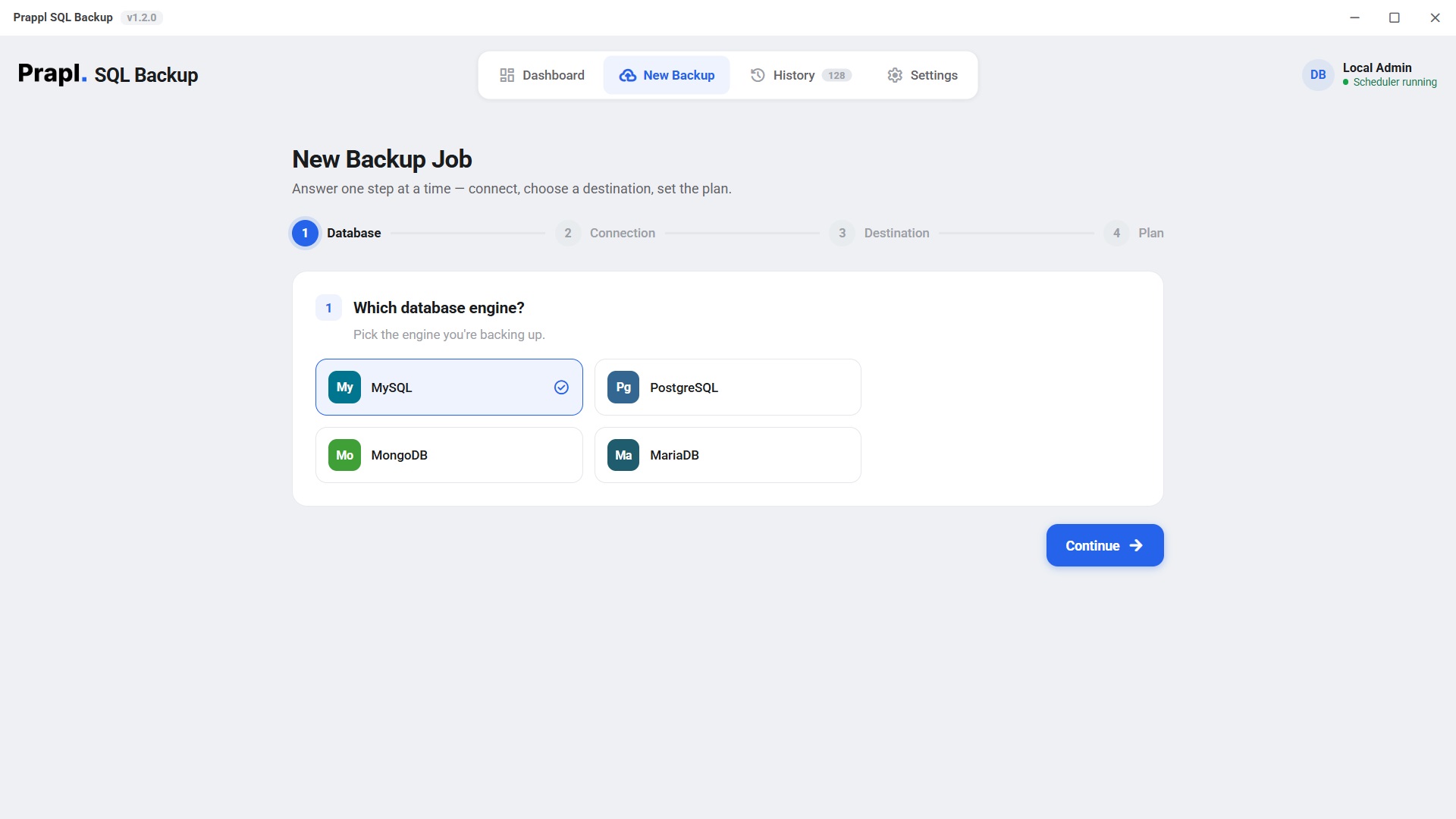
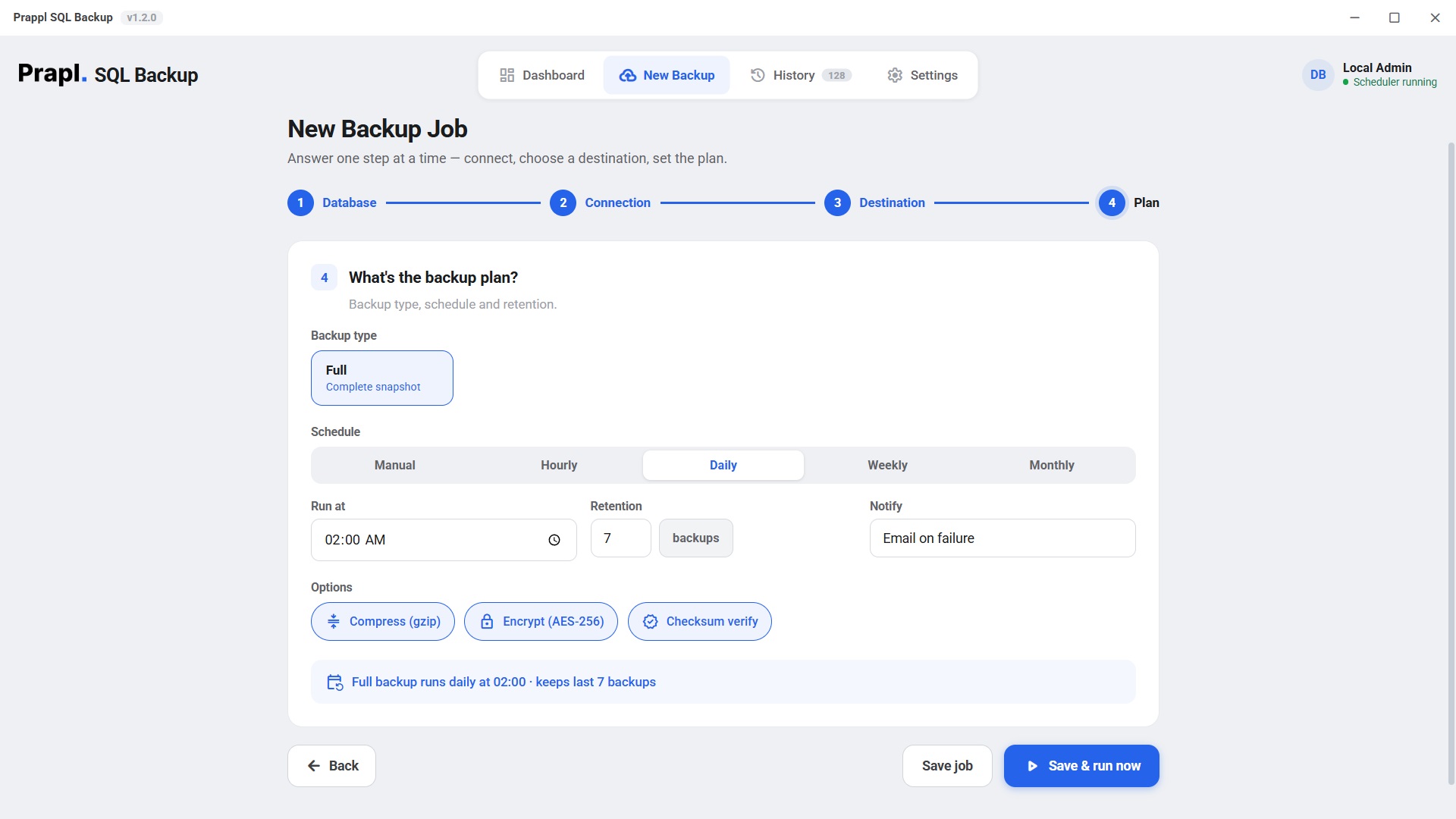
The software simplifies the entire backup process into four easy steps. With PostGreSQL Backup utility, you can choose your PostgreSQL database for backup, connect to your server, creates encrypted backup and store them in your preferred location.
First of all, click on New backup option and then choose your PostgreSQL database.
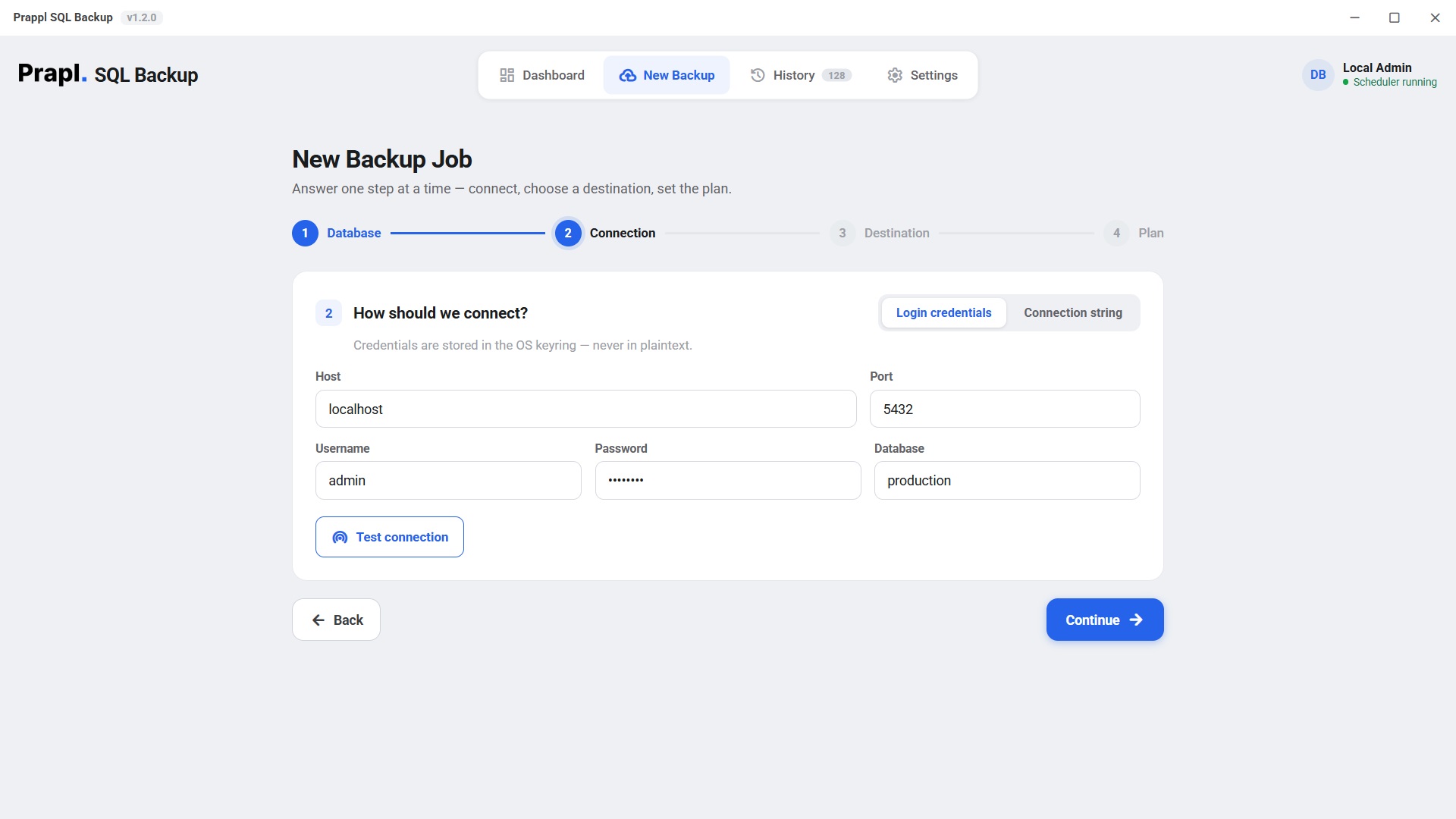
Enter host name, username, password and database name. After that click on Test Connection to verify that the software can successfully connect with your PostgreSQL server.
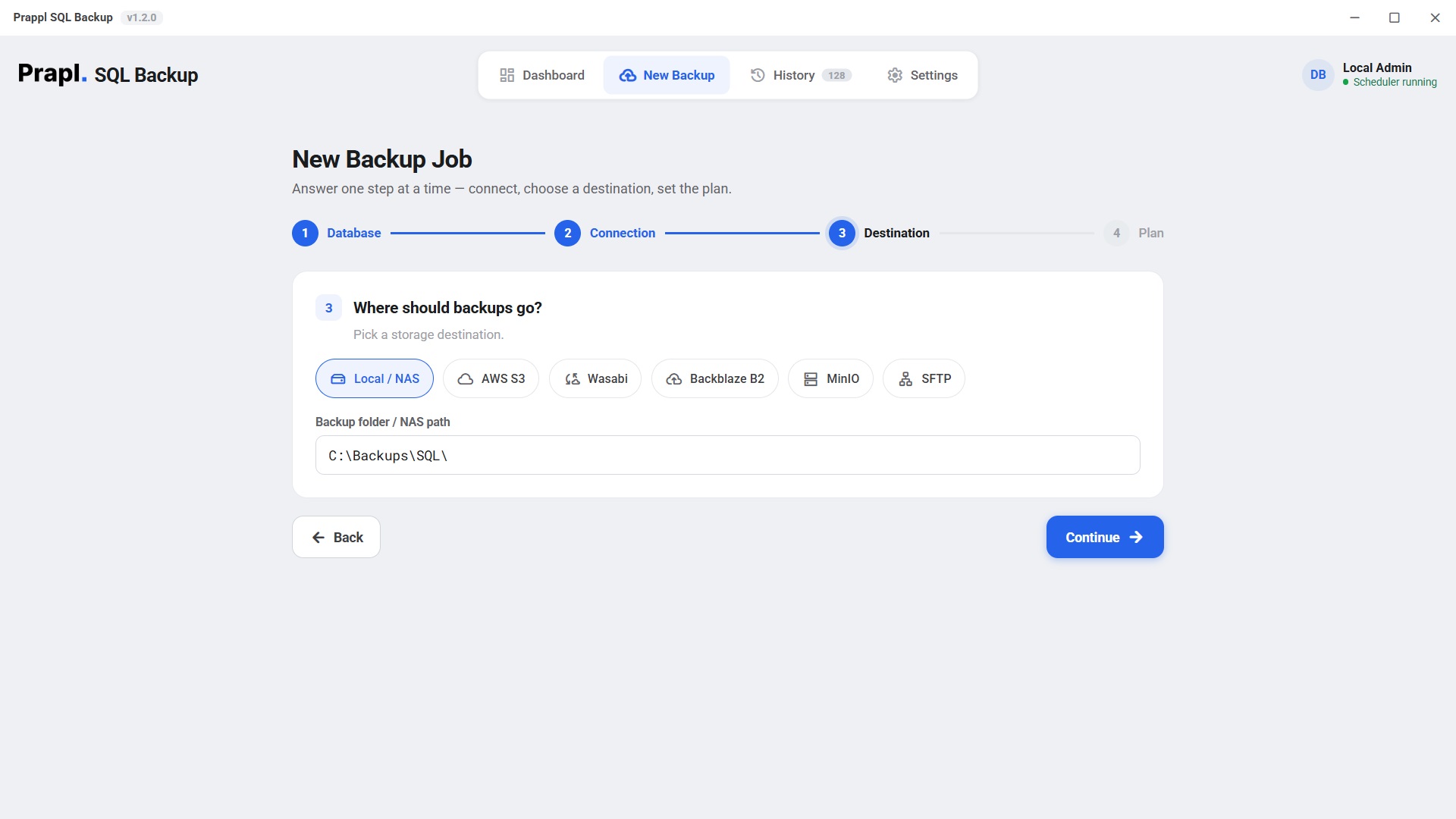
After establishing the connection, select the location such as Local computer/Network Attached Storage/Cloud Storage to store your backup files.
Select your backup type and schedule (daily, weekly or monthly) according to your requirements. After that, click on Save and Run Now button to begin the backup process. The software will create the PostgreSQL database backup according to your selected settings and store it at the desired location.
Accidental Data Deletion like "Drop Table users;" is probably the worst mistake you could have made while working with databases. This will wipe out your precious production data. If there is no recent backup, recovering the lost data becomes difficult. A dedicated PostgreSQL backup software ensures that your database is backed up regularly either automatically or on a schedule basis. You can recover the deleted table and its records from backup file.
New features and improved performance have been added to Postgres Backup Solution. However, if you upgrade your PostgreSQL server, older backup scripts might not always function correctly. Restoring a backup from earlier version to new PostgreSQL environment may result in errors. In these circumstances, the PostgreSQL backup solution simplifies matters and ensures that your backups will remain valuable for future recovery.
When a cyberattack gains access to your server, it might encrypt everything, including your local backups and production databases. This presents a single point of failure for you if you store all your backups on the same system. PostgreSQL database backup tool stores encrypted data in offsite cloud storage while maintaining unchangeable backup copies to avoid this risk.
When high-traffic systems such as e-commerce platforms encounter unexpected database crashes during high-peak times (such as sales events), manual restoration procedures could take hours to complete instead of minutes, causing huge revenue loss for businesses. Automated scheduling built into PostgreSQL backup software ensures that downtimes caused due to crash don't disrupt daily operations long enough.
Data is crucial for Fintech, Healthcare and SaaS companies. These industries are subject to specific rules set by the government or regulatory authorities that must be follow. Simply stating we take backups is not enough. These companies must also demonstrate that backups are performed at specific intervals (daily, weekly, etc.), process completed successfully and proper records of the backup process exist. Structured reporting and verification logs are not offered by manual scripts. This backup tool generates reports on your backup status including verification logs giving companies peace-of-mind knowing they are compliant without having complicated scripts laying around.
While there are several good database-as-a-service solutions on the market—like Amazon Web services RDS or Neon's server-less databases—all have some kind of built-in backup mechanism. But many only offer basic levels of backup with very limited retention time or control. You can create multi-layer backup plans by adding an additional layer of security with a dedicated backup solution. It gives businesses more flexibility, longer retention, and better recovery options than native cloud backup.
Whether managed or self hosted, we connect with you - the hard bits like SSL/ Cluster toplogy included.
Any version between 9-18 running on your own server, virtual machine, or bare metal hardware. Just point SQLBackup at its host and port and let it take care of the rest!
Any PostgreSQL from 9 to 18 — your own server, a VM or bare metal.
SQLBackup will connect via TLS to your Amazon RDS endpoint - You can use the "read replica" endpoint if you want to avoid loading the primary instance too much. The dumped database will be the same as what's on that endpoint.
Aurora speaks the Postgres wire protocol, we are able to run pg_dump just as normal! We'll point SQLBackup at your Aurora cluster (or 'reader'!) endpoint using TLS.
We will take advantage of Neon's direct endpoint (-host), rather than hitting their -pooler host. You don't need to worry about anything else here, since we're passing along sslmode and channel binding.
Paste the pooled host if that is all you have — the app switches to the direct endpoint for you.
Back up your Supabase Postgres via this SSL required connection. Like any other pooled environment, you should target their direct DB connection.
Point us at the mapped host port or if running the SQLBackup agent in the same docker network just point it at the service name.
Use the compose service name when the app and the container share a network.
Never worry about remembering to backup your database again. Forget about creating backup manually everyday. Simply choose a schedule - every hour, daily, weekly or monthly. The tool will automatically backup up your PostgreSQL database at the specified time. This ensure your data is always protected without requiring manual effort.
Your backup is encrypted on your computer before it is stored or transferred. This means that even if someone gains access to your file or cloud storage, they wo not be able to read your data without the correct encryption key. Every backup is encrypted locally using advanced AES-256 encryption and ensure that only you can access it.
Large PostgreSQL databases can consume more storage space. The software automatically compresses your backup files while it is being created, reducing file size without slowing down the backup process. Smaller backups use less storage space and can be uploaded or downloaded more quickly and reduces cloud storage costs.
You can save your PostgreSQL backup wherever it works best for you. Store them on your local computer, a network attached device or popular cloud storage devices. Using this flexibility, you can build a backup strategy that fits your environment. You can even send the same backup to multiple locations at once for extra protection.
Managing old backups manually can be time-consuming and fills your storage. With smart retention policies, you decide how many backups to keep or how long to keep them. The tool automatically removes outdated backups. It helps you to keep your storage organized while ensuring recent backups are always available.
Whether your PostgreSQL database is hosted on your own server or on cloud platform, the tool works without additional configuration. It supports local installations, remote servers and cloud hosted PostgreSQL environments, so you do not have to install or manage different versions yourself. It allows you to use the same backup process everywhere.
The tool continuously monitors backup jobs. You will always know the status of your backups. If a backup fails or encounters an issue, you will be notified immediately through logs or alerts. It helps you to resolve the problem before it puts your data at risk.
Your database login details are stored securely instead of being saved in plain text configuration files. This reduces the risk of exposing sensitive credentials from unauthorized access and adds an extra layer of security to your backup environment.
If you manage multiple database systems, you do not need separate backup solutions for each one. The software can also support other database which make it a convenient all-in-one backup solution for different database environments. The same software supports MySQL, MongoDB, and MariDB.
In this view you can click a stage if you want more details about that part of your workflow.
Our backup process starts by running PostgreSQL's native pg_dump utility in our custom format for streaming directly into the pipeline. There's never a giant temp file hogging RAM just because we dumped everything first.
We compress as we stream using gzip which reduces most backups by 70-80%. We do not need to load up the entire dump before compressing it. That would be really slow.
Every byte that leaves your machine starts life as an encrypted payload of AES-256-GCM. It uses the key generated by scrypt and gives a new one for each 64KB chunk with a unique nonce.
Your encrypted backups get shipped off to wherever you told us, where they're subject to pruning based on how long you want them kept around. We log all this stuff for your enjoyment.
The app runs this for you — there is nothing to type.
Recovering a PostgreSQL database takes four steps in the app: choose the job, choose the point in time, choose what to do with it, review. The tool then downloads the backup, decrypts it, decompresses it and replays it with PostgreSQL’s own pg_restore. Press play to watch every step.
PostgreSQL also has a whole-server restore for self-hosted 17+ physical backups — it keeps your old data folder aside and puts it back automatically if anything fails.
The important thing to keep in mind here is that when you send backups from your computer to cloud/S3/NAS/SFTP etc., they are encrypted at the time of sending. So database → encrypt → Cloud storage. Even if someone hacked into your cloud storage account, he will be unable to crack your backups because all the files are encrypted.
You don't give your password to the software directly. Instead, the software converts your password to an extremely powerful encryption key. This process of conversion is called scrypt — guessing the password becomes very difficult, hackers cannot easily perform a brute-force attack and the backup becomes much more secure.
Every part of your backup file is verified. If you encounter these messages — file is corrupted, someone has altered this file, or download incomplete — the software will show an error message that prevents incorrect or incomplete data from being restored into the database.
Database Password isn't saved to normal text files, but to secure password storage from Windows or Linux.
There's no reason that the software needs to forward your data to its company server when making a backup. The backup goes directly: Your Database → Your Storage. No, your data will never be sent over to our software company's servers. Therefore our company can't see your data, and we don't have the encryption key.
The PostgreSQL backup tool is a desktop application, not a hosted service — it runs on your machine and writes each backup straight to the storage you picked. Nobody charges you per gigabyte, and no copy of your database ever sits on somebody else’s server.
You pay us once for the software — never for gigabytes. Point a job at a folder on your own PC or NAS and the storage costs nothing at all. Prefer the cloud? Use your own Amazon S3, Wasabi, Backblaze B2, MinIO or OneDrive account and pay their rate directly, with no markup in between. Back up 10 GB or 10 TB — the price of the software does not move.
This is a desktop application. It runs on your machine, connects straight to your database and writes the backup straight to the destination you chose. Nothing is uploaded to our servers on the way, so we never hold a copy of your data — and it is encrypted with AES-256 before it leaves, so even the storage provider only ever sees ciphertext.
Database passwords are never written into a configuration file and never sent anywhere. They are kept in the Windows Credential Manager, and the settings file only stores a reference to the entry. If you switch on the optional online monitoring, it reports job status only — name, success or failure, size and duration. Never your data, never your credentials.
The honest trade-offs. SQLBackup is built for scheduled, encrypted, portable logical backups you actually control.
| Capability | PostgreSQL Backup | DIY pg_dump + cron | Managed cloud snapshots |
|---|---|---|---|
| Automatic scheduling | Built-in cron | Manual crontab | Provider default |
| Client-side AES-256 encryption | Always | Plaintext dumps | At rest, provider-held keys |
| Offsite to your own storage | S3 · SFTP · NAS | Scripts you maintain | Locked to provider |
| Portable — restore anywhere | Standard pg_restore | pg_restore | Same provider only |
| Failure alerts & history | Email + log | Fails silently | Basic console |
| You hold the keys | Always | ||
| Software cost | $9/mo, flat | Your time | Storage + egress |
| Storage cost | Your own storage · no per-GB fee | Your own storage | Per-GB, metered |
This software has been developed by engineers who have recovered PostgreSQL databases in real-life situations. These engineers have successfully restored databases from backups in scenarios involving server crashes, database corruption, or data deletion. Therefore, this software was not only created based on theory or documentation but also designed based on practical and real-world experience with backup.
This software has been created by people who successfully recovered databases during real-life emergencies. This means that our workflows are based on experience of using the software in the field, instead of being merely documented.
Battle-tested defaultsThe default settings provided in the software are based on industry best practices — use of official PostgreSQL tools, strong encryption (AES-256), SSL support and support for various PostgreSQL setups. You do not need to manually configure security settings.
Native tools · audited cryptoThis tool does not save the backup in a proprietary file format. Instead, it saves it in PostgreSQL's own standard backup format i.e. .sql or pg_dump. If you stop using this backup software, your backup will still remain fully usable. You can easily recover it using official PostgreSQL tools.
Documented · no lock-inOur company doesn't collect your data. No telemetry and no hidden tracking. Backups are not being sent to our servers. Only you can access your backup.
No phone-home · you keep the keysHave a look to the feeback we had received globally after using Prapl SQL Backup Software
If your company's software runs on a PostgreSQL database and you do not have a dedicated Database Administrator (DBA), then this tool is for you. It automatically performs daily backups, encrypts the backups, and sends an immediate email notification if a backup fails.
If you run a web development or software agency and manage PostgreSQL databases for multiple clients, this program helps maintain separate and secure backups for each client.
Certain industries (such as banking, healthcare, and finance) have strict regulations regarding backups and data security. This tool provides encrypted backups and make it easy to present backup records during audits.
Developers and data analysts often want to perform testing or analysis on a copy of a production database. This utility helps them take a consistent backup of the database, which can be safely used in a different environment.
If you use PostgreSQL on cloud services (such as AWS RDS, Neon, Supabase, etc.), this tool allows you to maintain an independent backup of your database. This ensures you are not entirely dependent on a single cloud provider.
Running PostgreSQL on your own server or computer, the program allows you to save backups to a local drive, NAS, or cloud storage.
AES-256-GCM, key via scrypt, per-file salt, per-chunk nonce · secrets in OS keyringOne flat price covers every engine on the machine. Explore the others:
Download the best PostgreSQL Backup Software and create a mirror or backup copy to local or cloud servers. Trial version is fully functional for 15 Days.