ClickHouse logo ClickHouse 22.x → 25.x · self-hosted & ClickHouse Cloud

ClickHouse Backup Tool

Back up ClickHouse databases on a schedule through the HTTP interface — no backup disk to configure on the server, no extra binaries, and it works the same for self-hosted servers and ClickHouse Cloud.

Tables are exported in ClickHouse’s own Native format so every type round-trips exactly, then compressed and encrypted with AES-256 before being stored on your PC, NAS, cloud bucket or SFTP server.

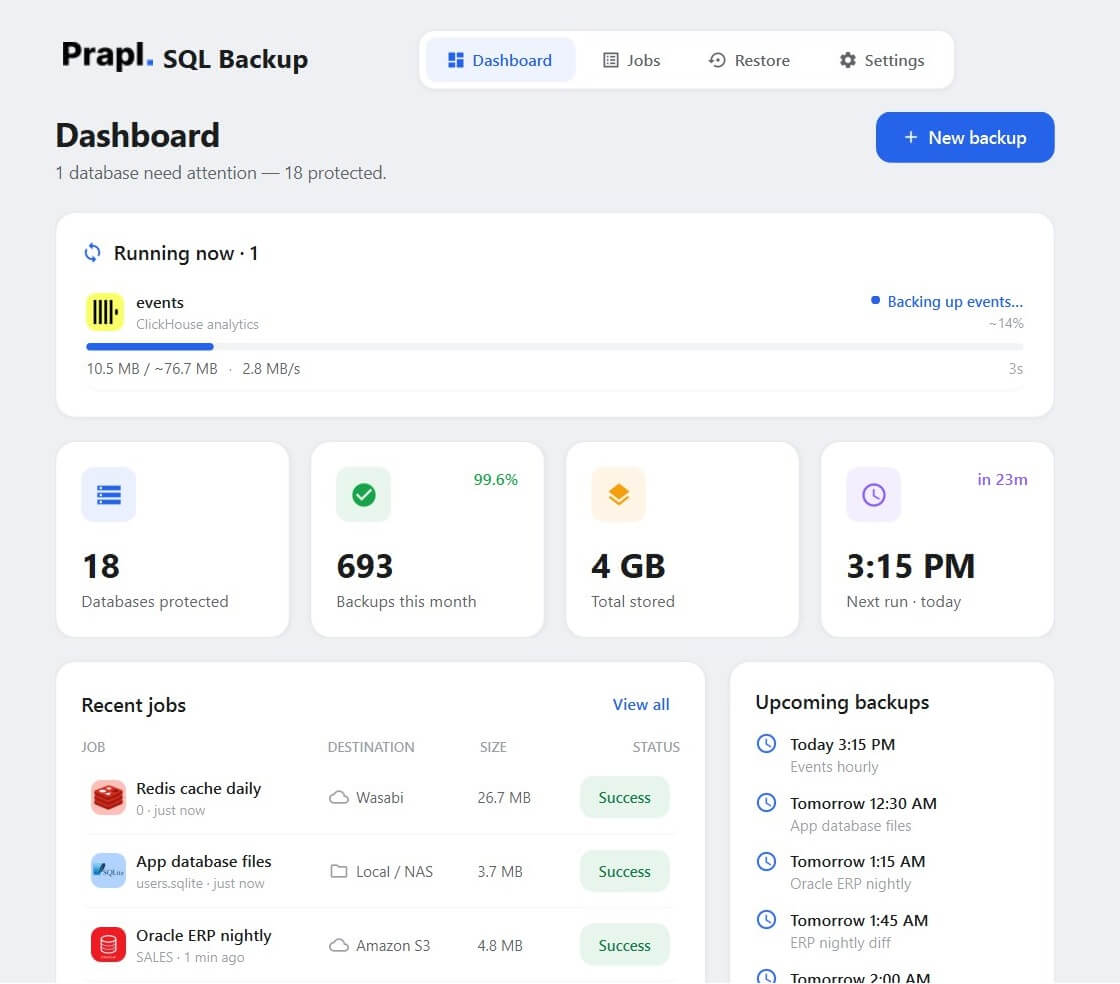
clickhouse backup tool running a scheduled backup of an analytics database
events · backed up 2 min ago
HTTP interface :8123/ FORMAT Native/ SHOW CREATE TABLE/ ClickHouse Cloud/ streaming gzip/ AES-256-GCM/ Amazon S3/ SFTP/
Video tutorial

Watch How to Automate ClickHouse Database Backup

Why It Matters

Why Use a ClickHouse Backup Software

ClickHouse holds the analytics your product decisions run on — events, metrics, logs, billing aggregates — often billions of rows that took months to collect. BACKUP TABLE … TO Disk() needs a backup disk configured by an admin and leaves the file on the server; replication is not a backup. A scheduled, off-server copy in a format ClickHouse itself understands is.

⚠️

DROP TABLE & Bad ALTERs

A DROP on the wrong database, an ALTER TABLE … DELETE with the wrong condition or a botched TTL change removes months of events in seconds. A backup from last night puts the table back, schema and all.

πŸ’½

Node & Disk Failure

Many ClickHouse deployments run on a single node with local NVMe. When the disk or the host dies, the only copy dies with it unless a backup was streamed to a NAS or a cloud bucket.

πŸ›‘οΈ

Ransomware & Exposed Ports

A ClickHouse HTTP port reachable from the internet with a weak default password is found by scanners quickly. Encrypted backups kept off the server are the clean copy you restore from.

πŸ”„

Migrations & Provider Moves

Moving from self-hosted to ClickHouse Cloud, between clouds or between versions? Back up, point the restore at the new server, and tables are recreated with the same DDL and data.

🧰

Upgrades & Rollbacks

Major version upgrades occasionally change behaviour or reject old settings. A backup taken just before the upgrade is the rollback plan for every table.

πŸ“‹

Retention & Reproducible Reports

Financial and usage reports have to be reproducible later. Retention tiers keep daily, weekly, monthly and yearly copies automatically, so the data behind last quarter’s numbers is a restore away.

Key Features

ClickHouse Backup Software - Key Features

Everything you need to back up ClickHouse databases automatically and restore them anywhere.

HTTP Only — Nothing on the Server

The backup runs entirely over ClickHouse’s HTTP interface (port 8123, or 8443 for HTTPS). No clickhouse-backup binary, no backup disk to configure, no shell access to the host — if you can query the server, you can back it up.

Native Format, Exact Types

Rows are exported with SELECT … FORMAT Native, ClickHouse’s own compact binary encoding. Decimal, LowCardinality, Nullable, Array, Map, DateTime64 and enums come back exactly as they were — where CSV or JSON would quietly flatten them.

Schema Included

Each table’s CREATE statement is captured with SHOW CREATE TABLE and stored beside its data, so a restore recreates engines, ORDER BY keys, partitions, codecs and TTLs before loading rows.

ClickHouse Cloud Ready

Set HTTPS to yes, use port 8443 and the default user’s password from the console, and ClickHouse Cloud backs up exactly like a self-hosted server.

System Databases Skipped

system, information_schema and other internal databases are left out automatically — backing them up is meaningless and restoring them would be harmful.

Automatic Scheduled Backup

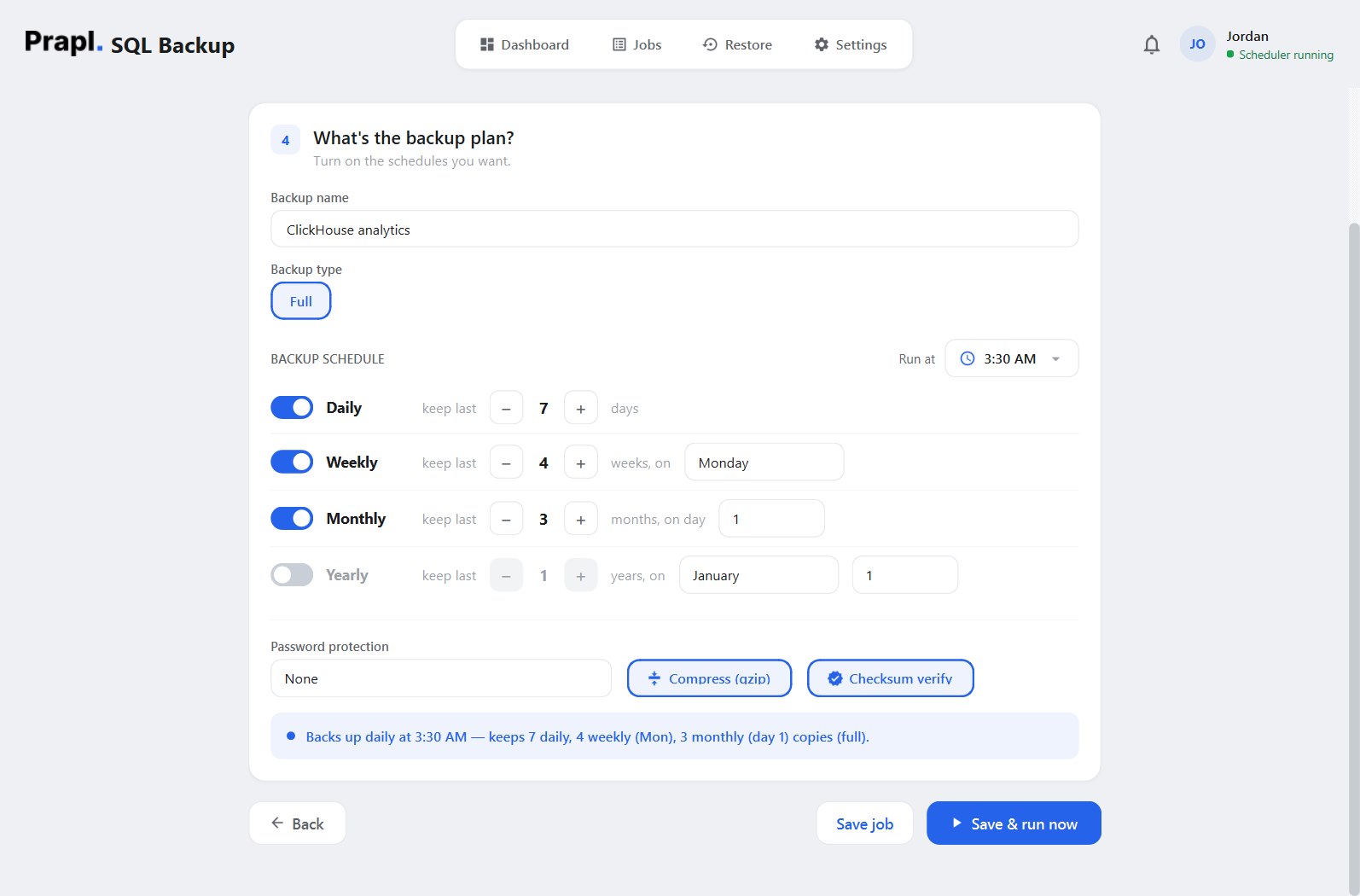
Set a run time and switch on the daily, weekly, monthly or yearly tiers you want. Each tier is also its retention: keep the last 7 daily, 4 weekly and 3 monthly copies and older ones are pruned for you.

Flexible Storage Options

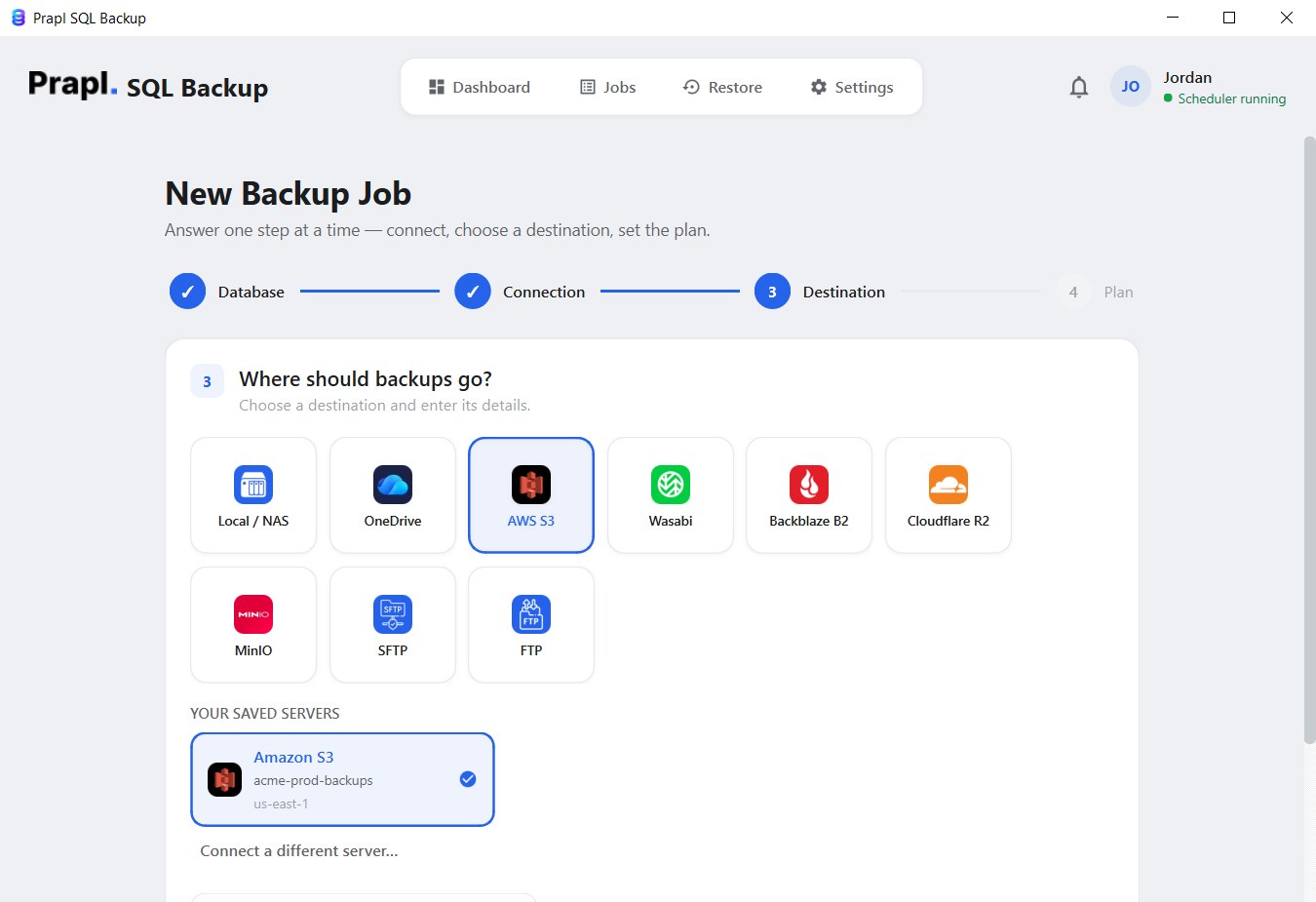
Store ClickHouse backups on your PC, a NAS share, OneDrive, Amazon S3, Wasabi, Backblaze B2, Cloudflare R2, MinIO, SFTP or FTP — and add a secondary destination so every run is copied to two places.

Compression & AES-256 Encryption

Files are gzipped as they stream, then encrypted with AES-256-GCM using a key derived from your password. Analytics data in a shared bucket is unreadable to anyone without it.

15-Day Free Trial

Try every feature of the ClickHouse backup software free for 15 days — no credit card, no hidden charges. If it fits, continue for just $9 per month, billed annually, with a 14-day money-back guarantee.

How It Works

How to Backup ClickHouse Database Automatically?

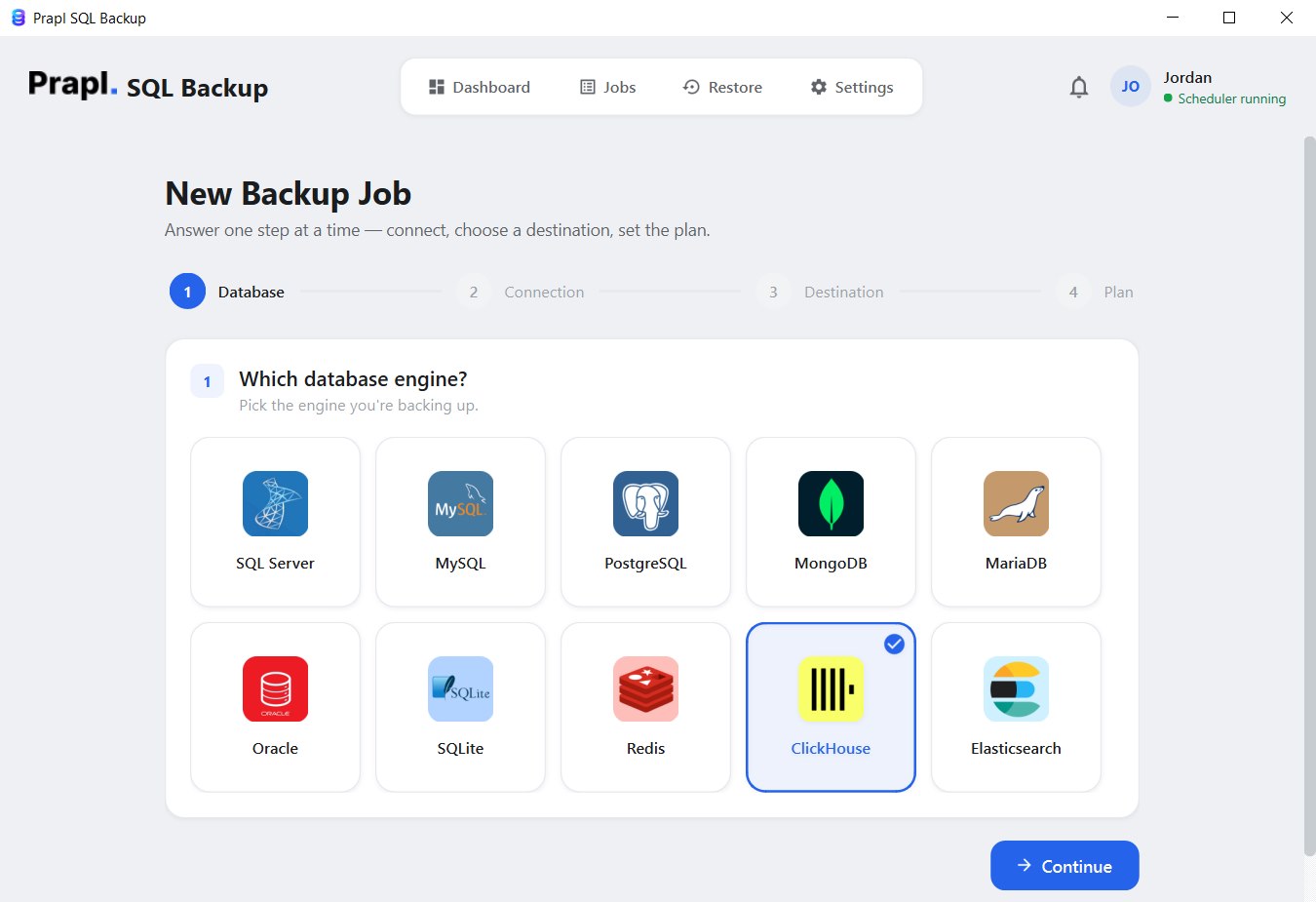
The ClickHouse Backup Tool turns a server-side backup command into a four-step wizard: connect over HTTP, choose where the backup goes, set the plan, and the software handles every run from then on.

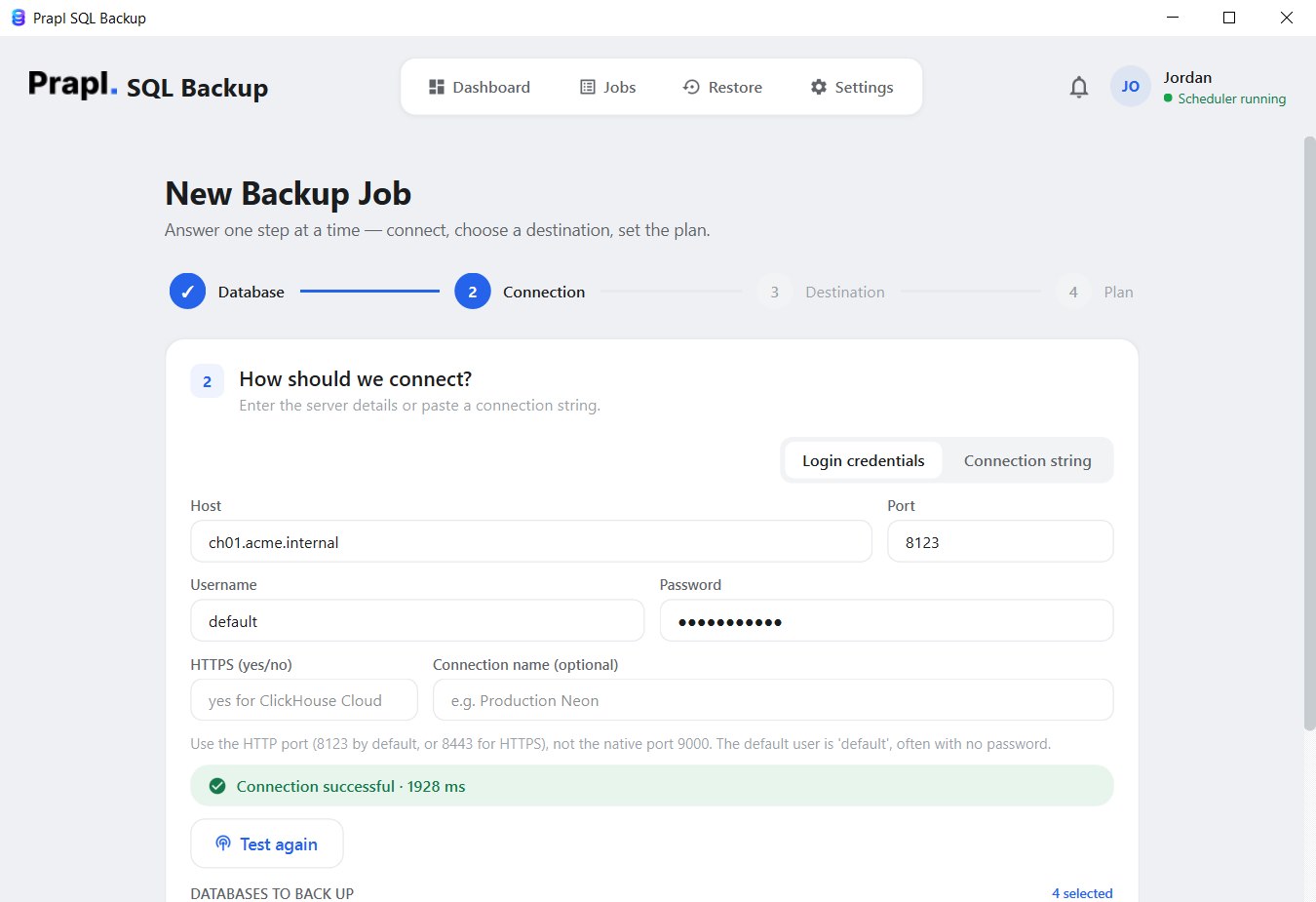
select clickhouse in the backup wizard connect to clickhouse server over http and list databases select the destination to store clickhouse backup set clickhouse backup schedule, retention and encryption

The software exports every table of each selected database, compresses and encrypts the file, and stores it at the chosen location on every scheduled run.

Full step-by-step guide

Works Everywhere ClickHouse Runs

Choose where your ClickHouse server lives

Connect the tool to ClickHouse wherever it is hosted — your own server, a container, a Kubernetes cluster or ClickHouse Cloud. Only the HTTP endpoint and a login are needed:

Self-Hosted ClickHouse ClickHouse Cloud Docker ClickHouse Kubernetes ClickHouse Virtual Machines Remote ClickHouse Server

Self-Hosted ClickHouse

ClickHouse installed on your own server or VPS. Connect to the HTTP interface on port 8123 with the default user (or a dedicated read-only backup user) and back up any database.

Step 2 Connection
Hostch01.acme.internal
Port8123
Usernamedefault
Password••••••••••
HTTPSno
Test & list databases Connected

Use the HTTP port 8123, not the native port 9000 — the one mistake everyone makes.

ClickHouse Cloud

ClickHouse Cloud services expose an HTTPS endpoint on port 8443. Paste the host from the console, use the default user’s password and switch HTTPS on.

Step 2 Connection
Hostabc123xyz.eu-central-1.aws.clickhouse.cloud
Port8443
Usernamedefault
Password••••••••••
HTTPSyes
Test & list databases Connected

No backup disk, no S3 credentials on the server side — the export streams to your PC.

Docker ClickHouse

The clickhouse/clickhouse-server image is backed up over the network — use the compose service name or the port you mapped to the host. Nothing needs to be mounted into the container.

Step 2 Connection
Hostclickhouse
Port8123
Usernamedefault
Password••••••••••
HTTPSno
Test & list databases Connected

Kubernetes ClickHouse

A ClickHouse installation managed by the Altinity operator or a Helm chart is reachable through its service name inside the cluster, or through an ingress or port-forward from your PC.

Step 2 Connection
Hostclickhouse-analytics.default.svc.cluster.local
Port8123
Usernamedefault
Password••••••••••
HTTPSno
Test & list databases Connected

Virtual Machines

ClickHouse on a Linux virtual machine — VMware, Hyper-V, Proxmox or a cloud VM — is reachable by its IP address and backed up like any other server.

Step 2 Connection
Host192.168.1.70
Port8123
Usernamedefault
Password••••••••••
HTTPSno
Test & list databases Connected

Remote ClickHouse Server

A colocated or partner-hosted server is backed up over the internet from your PC. Put the HTTP interface behind TLS (port 8443) and use a read-only user for the backup job.

Step 2 Connection
Hostclickhouse.example.com
Port8443
Usernamebackup_ro
Password••••••••••
HTTPSyes
Test & list databases Connected
The part that matters

A backup you can't restore is just wasted disk

Recovering a ClickHouse database takes four steps in the app: choose the job, choose the point in time, choose what to do with it, review. The tool downloads the file, decrypts it, decompresses it, recreates each table from its stored DDL and streams the rows back with INSERT … FORMAT Native — into the original database or a new one, on any ClickHouse server you can reach over HTTP. Press play to watch every step.

Restoring into a fresh database is the safest rehearsal: create events_test, restore into it and query it side by side with production before you touch anything live.

Restore: events from Amazon S3
Locate backupfind the key in the destination
Downloadpull the encrypted object · 52 MB
Decrypt & verifyAES-256-GCM integrity check
Decompressrestore the original export · 310 MB
INSERT … FORMAT Nativerecreate tables, stream rows into events
Your data, your storage

Your data. Your choice.
Your storage.

The ClickHouse backup tool is a desktop application, not a hosted service — it runs on your machine and writes each backup straight to the storage you picked. Nobody charges you per gigabyte, and no copy of your ClickHouse data ever sits on somebody else’s server.

Choose any destination — or several at once
This PCany folder
External driveUSB or disk
NASnetwork share
OneDriveyour account
Amazon S3your own bucket
S3-compatibleWasabi · B2 · R2 · MinIO
FTPyour own server
SFTPyour own server
No per-GB fee from us Encrypted before it leaves Send to several at once
How It Compares

ClickHouse Backup Tool vs BACKUP TABLE & Other Tools

CapabilityPrapl SQL Backup ToolOther Tools
Backup Automation Automatically ScheduledRequire manual setup
Deployment Support Self-hosted, Docker, Kubernetes, VMs & ClickHouse Cloud — HTTP onlyLimited
Storage Destination Local/NAS, OneDrive, S3, Wasabi, Backblaze, R2, MinIO, SFTP & FTPLimited storage options
Data security AES-256 before the file leaves your PCGood
Backup Compression YesSupported but limited
Backup Monitoring Dashboard, email & cloud alerts No
Setup Process Simple wizard, four stepsComplex
You hold the keys Always No
Storage cost Your own storage · no per-GB feeOften rented per GB
Price start from $9/monthstart from $39/month
Why Trust This ClickHouse Backup Tool with Your Critical Data

Built to Keep Your Analytics Recoverable

Designed for Real Backup Challenges

ClickHouse sits under applications where downtime and data loss have real consequences. This backup tool exists to make regular backups effortless, remove the manual steps people forget, and make sure a restorable copy of your data is always within reach when something goes wrong.

01. Experience

Transparent Backup Process

You should always know how your backups are made and protected. The ClickHouse backup workflow is simple, documented on this page step by step, and built on ClickHouse’s own, publicly documented interfaces rather than on anything proprietary or hidden.

02. Authoritativeness

Powered by Trusted Technologies

Every backup is made with interfaces ClickHouse documents and supports: the HTTP interface for transport, SHOW CREATE TABLE for schema, and the Native format for rows in both directions. On top of that the tool adds streaming compression and AES-256-GCM encryption before the file reaches its destination.

03. Expertise

Your Backup & Your Encryption Key

Your ClickHouse backup belongs to you, not to the software. Files are encrypted before they are stored and only your key can unlock them. The tool keeps no password and no hidden access to your backups — they remain under your control, wherever you decide to keep them.

04. Trustworthiness

Sources & further reading

SQLBackup builds directly on ClickHouse’s own, documented interfaces. Verify our approach against the official docs:

Client Feedback

What Clients Are Saying After Using the ClickHouse Backup Tool

Technical specs

System Requirement & Basic Information

Storage Required
500 MB Minimum (1 GB Recommended)
RAM
1 GB Minimum (2 GB Recommended)
Versions
ClickHouse 22.x → 25.x · self-hosted, Docker, Kubernetes, ClickHouse Cloud · HTTP 8123 / HTTPS 8443 · system databases skipped
Backup format
Container file (.chdump) holding each table’s SHOW CREATE TABLE DDL followed by its rows in Native format
Backup types
Full (per database)
Compression
Streaming gzip — constant memory, no temp bloat · or password-protected ZIP
Encryption
AES-256-GCM, key via scrypt, per-file salt, per-chunk nonce · secrets in the Windows Credential Manager
Destinations
Local / NAS, OneDrive, Amazon S3, S3-compatible (Wasabi, Backblaze B2, Cloudflare R2, MinIO), SFTP, FTP · optional secondary copy
Scheduling & retention
Manual / daily / weekly / monthly / yearly tiers · keep-last-N per tier · checksum verification
Platforms
Windows 10/11 · desktop app, runs from the system tray
Questions & Answers

Frequently Asked Questions

Follow the steps below to store a ClickHouse backup on your computer:
  1. Run Prapl SQL Backup Tool on your PC.
  2. Click on New Backup and select ClickHouse.
  3. Enter the host, HTTP port (8123 or 8443), username and password, set HTTPS if needed, click Test & list databases and tick the databases to back up.
  4. Choose the Local/NAS option and enter the folder to save the backup in.
  5. Set the plan and click Save & run now.

The HTTP port: 8123, or 8443 when the server uses HTTPS (ClickHouse Cloud always does). Port 9000 is the native protocol used by clickhouse-client and the connection test will fail on it.

Yes. Use the HTTPS endpoint from the ClickHouse Cloud console on port 8443, the default user’s password, and set HTTPS to yes. The export streams to your PC, so no backup disk or cloud-side credentials are needed.

No. The tool uses only the HTTP interface. Nothing is installed on the server, no backup disk is configured, and no file is ever written on the server’s side.

Yes. Rows are exported and restored in ClickHouse’s Native format, which carries the exact column types — Decimal, LowCardinality, Nullable, Array, Map, DateTime64, enums — where CSV or JSON exports would lose precision or wrap types.

No. system, information_schema and other internal databases are skipped automatically. Backing them up is meaningless and restoring them would be harmful.

No. When you choose AES-256 protection the backup is encrypted before it is stored, and it can only be opened with the encryption password. Without it the file is unreadable ciphertext — on your PC, on a NAS or in a cloud bucket.

Backup time depends on the size of the data, the speed of the server and of the destination, and whether compression and encryption are enabled. Small databases finish in seconds or minutes; large ones take longer but stream in the background without freezing your PC, and the Dashboard shows live progress and speed.
One tool, every database

Also backs up your other databases

One flat price covers every engine on the machine. Explore the others:

Automate ClickHouse Database Backup

Create a backup of your ClickHouse data and save it to local or cloud storage. Download the ClickHouse Backup Tool and use every feature free for 15 days — no credit card required. If it fits, subscribe for just $9/month with a 14-day money-back guarantee.

15-day free trial 14-day money-back No auto-renewal