MariaDB logo MariaDB 10.6-12.3

MariaDB Backup Tool

Secure your MariaDB database from cyber threats, server failures and unintentional deletions. MariaDB Backup Software automatically creates encrypted backups and saves them to local storage, NAS devices and cloud services for maximum data availability.

99.9%
Backup Reliability
5 Minutes
To Your First Backup
AES-256
Encryption
mariadb backup tool backup mariadb database mariadb backup software backup mariadb database windows
analytics · backed up 2 min ago
mariadb_dump/ Incremental Backup/ Streaming gzip/ Amazon S3/ SFTP/ AES-256-GCM/
10.612.3
MariaDB Versions
6
Storage Destination
AES-256
Encryption
Automatic
Scheduled Backup
Why It Matters

Why Use MariaDB Backup Tool

Important corporate data, including transaction history, application data, financial data, and customer details are stored in MariaDB databases. If this data is lost due to human error, ransomware, server malfunctions, hardware failure and unintentional deletion, then business activities may be interrupted. Creating backup ensures that data is always available when need it.

⚠️

Human Error

Mistakes happen even to experienced database administrator. A wrong query, accidental deletion of a table and incorrect update can remove important records within seconds. If you have a backup copy then you can recover the lost data instead of rebuilding it manually.

💽

Hardware Failure

Hard drives, SSDs, storage devices and virtual machines can fail without warning which makes your MariaDB database inaccessible. Recovering lost data is impossible without backup. The MariaDB backup solution automatically creates mirror copies of your database using the scheduling feature. You can restore your data from backup file and minimize downtime after hardware failures.

🛡️

Ransomware Attack

Database servers are the target of cybercriminals who encrypt files and demand payment to unlock them. Backup copies kept in several places can help you restore your data without depending on hackers if your live data is hacked.

☁️

Regional or Cloud Outages

Although hosting your MariaDB database on the cloud increases availability but outages, service interruptions, and unintentional data loss are still possible with cloud services. You can access your database even in the event that your cloud provider is momentarily unavailable if you maintain independent backups.

🔓

Unprotected Backup Files

Saving database dumps as plain .sql files without encryption means anyone gains access to the file can read sensitive business information. Encrypting backups with AES-256 encryption keeps your database protected from unauthorized access

🕘

No Backup History

Keeping only one backup is not always enough. If the database becomes corrupted and new backup is subsequently created then that new backup will also contain the same corrupted or incomplete data. However, if older backups have been preserved then you can restore it.

How It Works

How to Backup MariaDB Database Automatically?

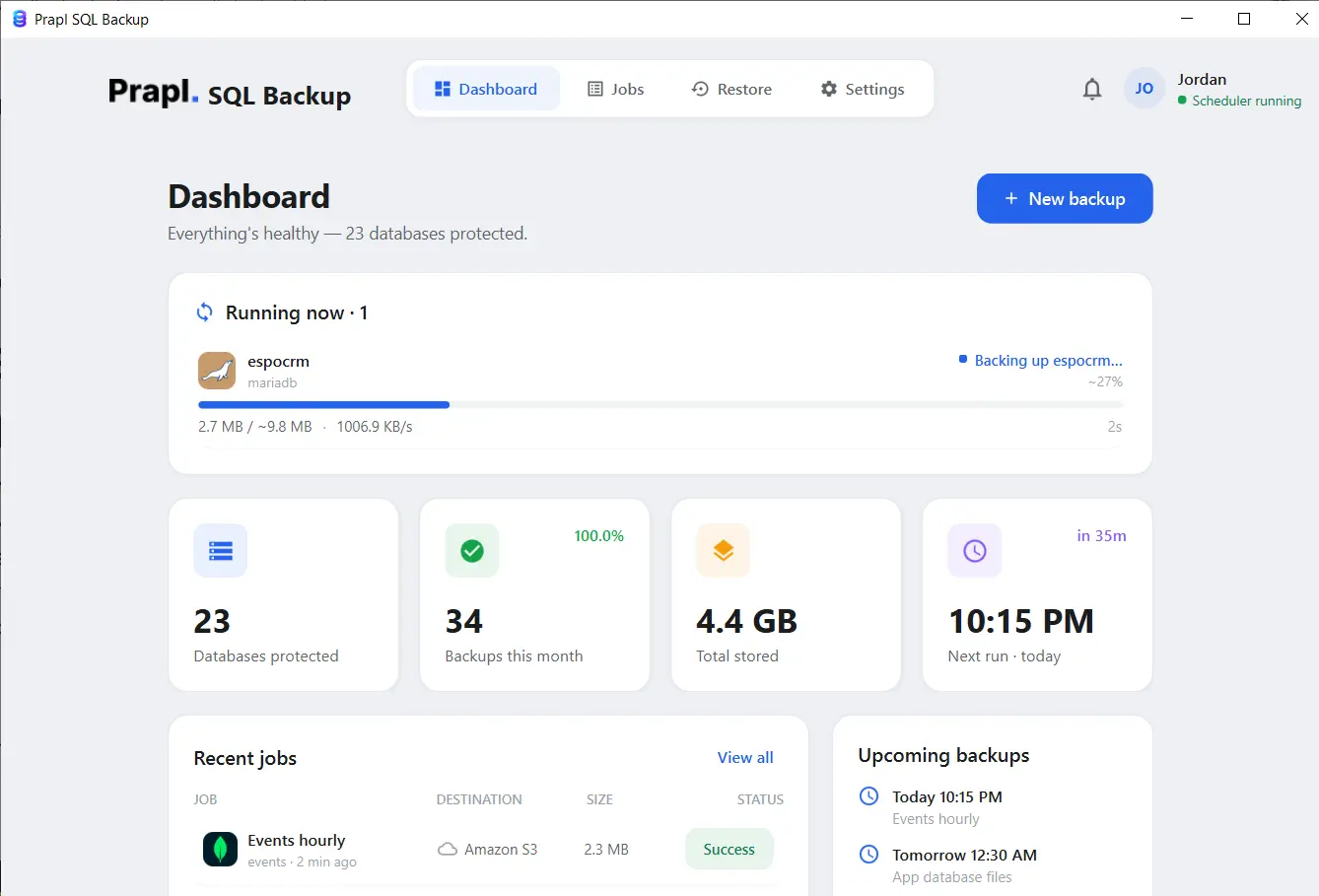
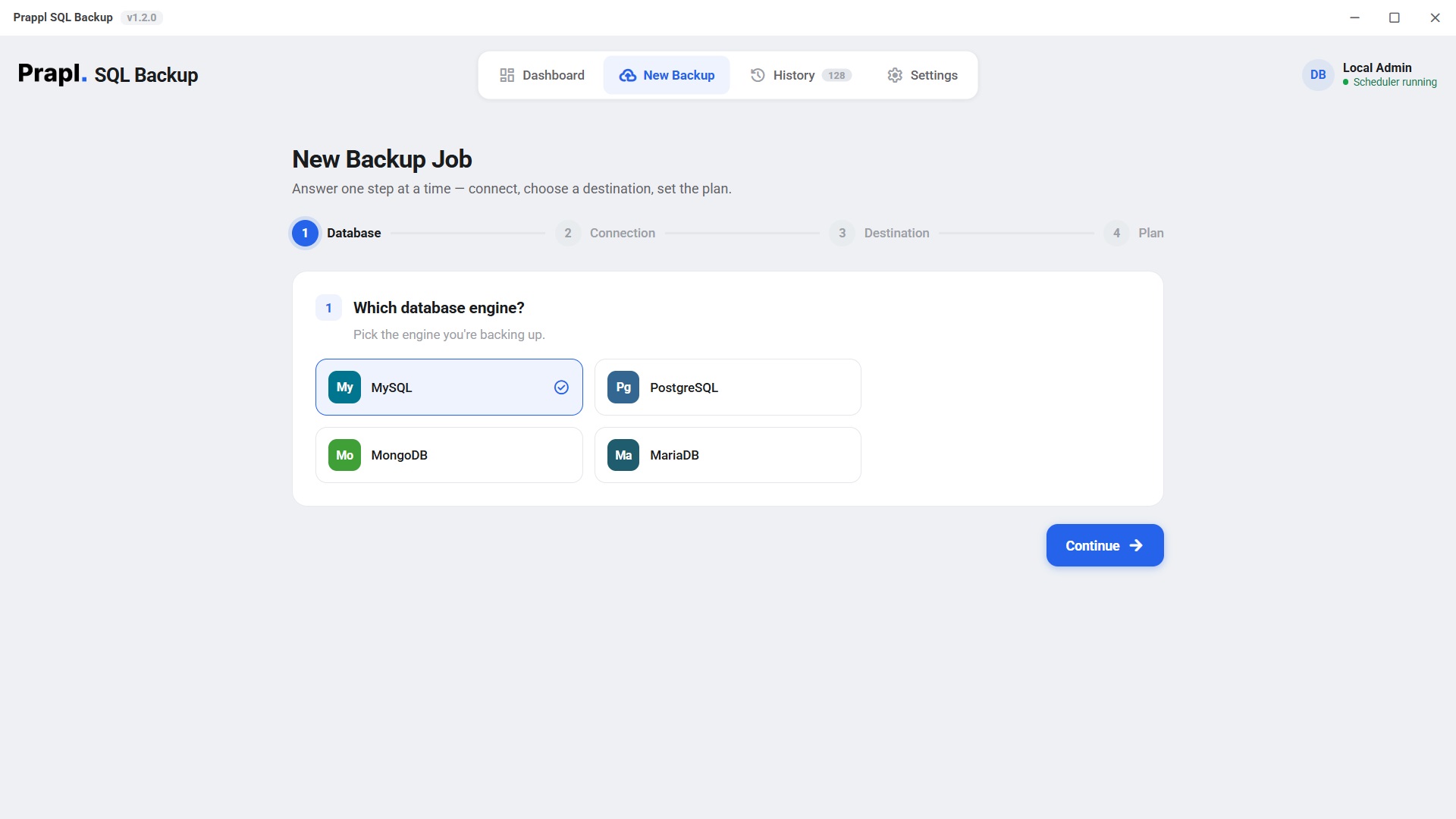
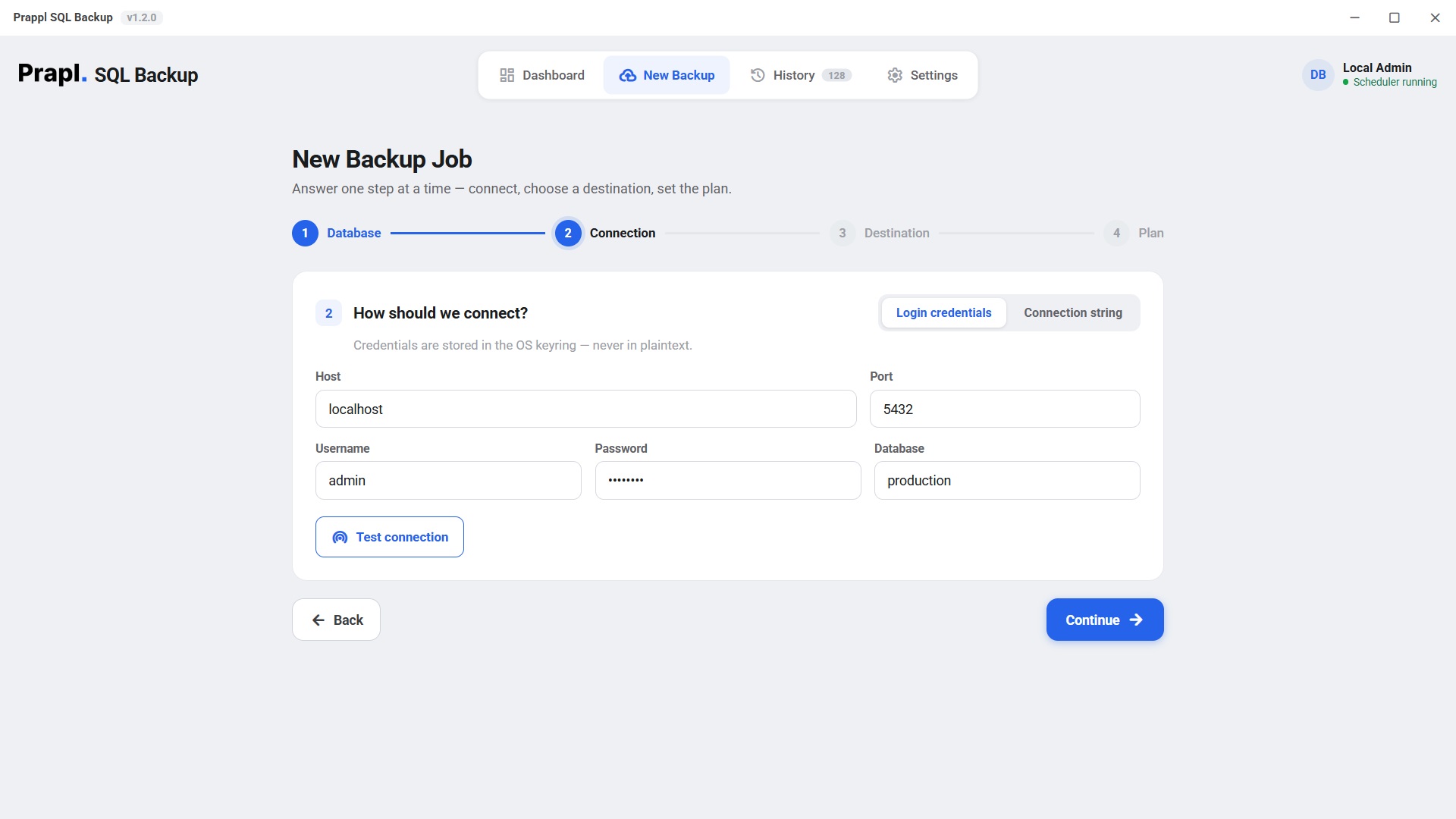
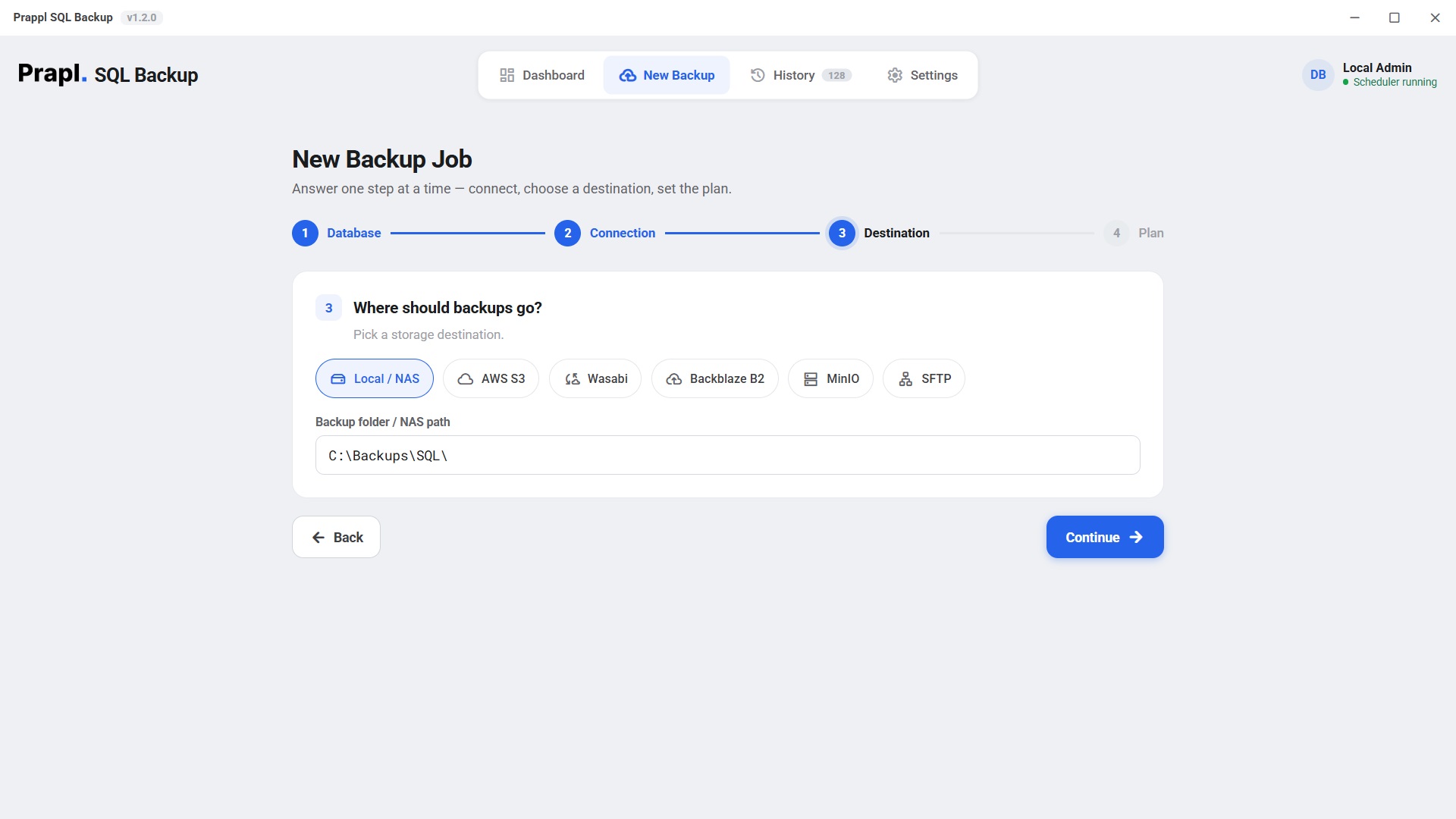
The MariaDB Backup Tool simplifies database protection by allowing you to create automated backup without using command line utilities. Just connect to your MariaDB server, choose storage location and set the backup schedule, the software will handle the rest process.

run Mariadb backup service sign in select target to save mariadbb backup schedule and run mariadb backup process

The software will automatically create MariaDB backup based on your selected schedule and save it at the chosen location.

Full step-by-step guide

Works Wherever MariaDB Runs

Backup MariaDB Database No Matter Where It's Hosted

Your MariaDB server is running on your own infrastructure, in the cloud and inside containers, it connects securely and creates reliable backups. It supports SSL/TLS connections and works with both standalone servers and replicated environments. So you can protect your database without changing existing setup.

Self-Hosted MariaDB Amazon RDS for MariaDB Azure Database for MariaDB Docker MariaDB Cloud SQL for MariaDB Kubernetes MariaDB Virtual Machines Replica Server

Self-Hosted MariaDB

Protect MariaDB databases running on your own physical server, virtual machine, VPS and dedicated hosting. Simply provide the server credentials, the MariaDB backup software securely connects to create encrypted backups without interrupting your database operations.

Step 2 Connection
Hostdb.internal
Port3306
Usernamebackup_user
Password••••••••••
Databaseanalytics
Test & list databases Connected

Amazon RDS for MariaDB

Create backups directly from your Amazon RDS for MariaDB instance using its database endpoint. The backup solution establishes secure SSL/TLS connection and allows you to backup up your production database or read replica, helping reduce workload on the primary instance.

Step 2 Connection
Hostmydb.abc123.us-east-1.rds.amazonaws.com
Port3306
Usernamebackup_user
Password••••••••••
Databaseanalytics
Use SSL/TLSRequired
Test & list databases Connected

Azure Database for MariaDB

Backup databases hosted on Microsoft Azure with secure connection. It works with Azure managed MariaDB instances and allow scheduled backup to local storage or cloud destinations without requiring complex scripts.

Step 2 Connection
Hostmyserver.mariadb.database.azure.com
Port3306
Usernamebackup_user@myserver
Password••••••••••
Databaseanalytics
Use SSL/TLSRequired
Test & list databases Connected

Docker MariaDB

If MariaDB is running inside a Docker container, it can connect using the container exposed database port. Schedule automatic backups without stopping the container or affecting running applications.

Step 2 Connection
Hostmariadb
Port3306
Usernamebackup_user
Password••••••••••
Databaseanalytics
Test & list databases Connected

Use the compose service name, or the port you mapped to the host.

Cloud SQL for MariaDB

Secure your Cloud SQL for MariaDB databases by connecting directly to your cloud instance. Automated backup scheduling, compression and encryption help your database while minimizing storage usage.

Step 2 Connection
Host34.72.10.15
Port3306
Usernamebackup_user
Password••••••••••
Databaseanalytics
Use SSL/TLSRequired
Test & list databases Connected

Kubernetes MariaDB

Protect MariaDB deployment running in Kubernetes clusters. Connect using the service endpoint and automate backups regardless of where the database pod is scheduled within the cluster.

Step 2 Connection
Hostmariadb.default.svc.cluster.local
Port3306
Usernamebackup_user
Password••••••••••
Databaseanalytics
Test & list databases Connected

Virtual machines

If your MariaDB server is hosted on VMware, Hyper-V, VirtualBox, Proxmox, KVM and another virtualization platform, it connects just like it would to a physical server and provide the same automated backup experience.

Step 2 Connection
Host192.168.1.50
Port3306
Usernamebackup_user
Password••••••••••
Databaseanalytics
Test & list databases Connected

Replica Servers

To create backups without adding to the stress on the main database, connect to a MariaDB server. When database performance is the top concern in production settings, this strategy is perfect.

Step 2 Connection
Hostreplica.internal
Port3306
Usernamebackup_user
Password••••••••••
Databaseanalytics
Test & list databases Connected

Point at a replica to keep backup load off the primary.

Key Features

MariaDB Backup Software - Top Features

Automated Backup Scheduling

You do not need to manually perform backups every time. Simply decide the schedule once such as hourly, daily, weekly and monthly. The software then automatically creates backup of the MariaDB database at the scheduled time. This guarantees that the most recent backup is always accessible and removes the possibility of forgetting to backup your data.

Encryption Before Storage

Whenever the process of creating backup files takes place, it encrypts the backup files. The process of encryption makes the backup file unreadable unless a password or encryption key is entered by the user. No matter where the backup file is stored, either on cloud, NAS or remote server, the data is protected from any unauthorized access.

Flexible Backup Type

There are two types of backup files in MariaDB backup tool and you get to choose which one you want based on your preferences. Full Backup is a backup of the whole database while Incremental Backup only backs up the newly added information since the previous backup.

Real Time Compression

Inbuilt compression capability helps compress the file size during the backup process itself. Since the process of compression takes place along with the process of making a backup, no further compression is required. Reduced size of backup files saves storage space and time for uploading the files.

Multiple Storage Destinations

SQL Backup tool provides you with the choice to save the backups to multiple destinations other than one. The destinations you can save to are Local Drives, NAS, Amazon S3, Wasabi, MinIO or SFTP server. If something goes wrong at the first destination point, you have your backup file at

Backup Retention Policy

It is not necessary to keep every backup indefinitely. A backup retention policy determines how long older backup versions are stored. For instance, just keep the last seven backups or those made in the last ninety days. Older ones get automatically deleted without taking up valuable storage space.

Protected Credentials Management

Connecting to MariaDB Server needs username and password and other login details. It will store these details in ciphertext format instead of storing as a plain-text file. And do not have to ask again and again for the password if you want to run scheduled backup.

Backup History & Activity Logs

The MariaDB backup solution keeps track of every backup you take. You can see when each one happened, if they were successful or not, how long they took and where your backups are stored. If there is an issue with backup, you will be able to easily look through these logs to find out what went wrong and troubleshoot accordingly.

Local and Remote MariaDB Support

This means that with this backup solution you can take backups of Maria DB databases hosted not only on your computer (local) but also hosted on another computers across a network/internet. Whether it is residing on your local computer/VPS/cloud/server/remote office etc., everything can be handled using one application.

Inside A Backup

The Journey from MariaDB Database to Secure Backup

The backup process is divided into four simple stages that captures, compresses, encrypts and store your database without manual intervention.

1 · Dump
mariadb_dump
2 · Optimize
Streaming Compression
3 · Protect
AES-256 Encryption
4 · Store
Cloud or Local Destination

Dump with mariadbdump

The backup process starts by running MariaDB backup tool. It connects to your database and creates mirror copy of your data. This captures your tables, records and database structure without modifying the original data.

# what the app runs — MariaDB’s own tool mariadb-dump -h db.internal -u backup_user \ --single-transaction --routines --triggers --events \ --result-file analytics.sql analytics

Optimize

As the backup is created, the data is compressed to reduce file size. Smaller backup files require less storage space and can be transferred more quickly.

# streamed in chunks — never loaded into RAM analytics.sql analytics.sql.gz 2.41 GB 612 MB (75% smaller)

Encrypt

The backup is encrypted with AES-256 before being stored. This guarantees that the backup data can only be accessed by those who have the right credentials.

key = scrypt(password, salt) # AES-256-GCM · 64 KB chunks · unique nonce each

Store

The selected location receives the encrypted backup automatically. It is prepared for any time to restore data when you needed.

upload s3://bucket/analytics/... prune: keep-last-N per destination · write log

The app runs this for you — there is nothing to type.

The part that matters

A backup you can't restore is just wasted disk

Recovering a MariaDB database takes four steps in the app: choose the job, choose the point in time, choose what to do with it, review. The tool then downloads the backup, decrypts it, decompresses it and feeds the dump straight back through the mariadb client. Press play to watch every step.

Restores are chain-aware: pick any incremental and the tool pulls its base full backup and every change file in between, in the right order — you never assemble a chain by hand.

Restore: analytics from Amazon S3
Locate backupfind the key in the destination
Downloadpull the encrypted object · 612 MB
Decrypt & verifyAES-256-GCM integrity check
Decompressrestore the original dump · 2.41 GB
mariadb clientcreate the target, then replay into analytics_restored
sqlbackup · encrypt · analytics
Plaintextanalytics_full_20260627.dump.gz
scrypt(password, salt) → 256-bit key · fresh nonce
Ciphertext
FormatMAGIC(9) · SALT(16) · [ LEN · NONCE(12) · CT+TAG ] × N
256-bitAES key
96-bitnonce / chunk
64 KBchunk size
Security

See How MariaDB Backup Solution Secure Your Database

Your MariaDB database may contain crucial information such as business records, customer information and other critical data. Backup is secured at every stage during creation, so your data remains protected whether it is stored on local drive or cloud storage. If someone gain access to the backup location but this data remains unreadable without the correct encryption key.

Strong Key Generation with scrypt

Instead of using your password directly for encryption, it derives a unique encryption key using the scrypt key derivation function. This makes password guessing and brute force attacks difficult.

Integrity Protection for Every Backup Block

Backups are encrypted and authenticated in small data blocks rather than as a single file. each block is independently verified. It helps to detect any corruption or modification in the backup file.

Safe Database Credentials

Instead of storing MariaDB connection credentials in plain text, your operating system uses protected credentials storage. This aids in preventing unauthorized people from accessing private login information.

Direct to Destination Backup

Your MariaDB backup is directly save to the storage destination. The backup process does not rely on intermediary servers. So you remain in full control of your data during the process.

Your data, your storage

Your data. Your choice.
Your storage.

The MariaDB backup tool is a desktop application, not a hosted service — it runs on your machine and writes each backup straight to the storage you picked. Nobody charges you per gigabyte, and no copy of your database ever sits on somebody else’s server.

Choose any destination — or several at once
This PCany folder
External driveUSB or disk
NASnetwork share
OneDriveyour account
Amazon S3your own bucket
S3-compatibleWasabi · B2 · MinIO
FTPyour own server
SFTPyour own server
No per-GB fee from us Encrypted before it leaves Send to several at once

No storage bill from us

You pay us once for the software — never for gigabytes. Point a job at a folder on your own PC or NAS and the storage costs nothing at all. Prefer the cloud? Use your own Amazon S3, Wasabi, Backblaze B2, MinIO or OneDrive account and pay their rate directly, with no markup in between. Back up 10 GB or 10 TB — the price of the software does not move.

Your database never passes through us

This is a desktop application. It runs on your machine, connects straight to your database and writes the backup straight to the destination you chose. Nothing is uploaded to our servers on the way, so we never hold a copy of your data — and it is encrypted with AES-256 before it leaves, so even the storage provider only ever sees ciphertext.

Your passwords stay on your machine

Database passwords are never written into a configuration file and never sent anywhere. They are kept in the Windows Credential Manager, and the settings file only stores a reference to the entry. If you switch on the optional online monitoring, it reports job status only — name, success or failure, size and duration. Never your data, never your credentials.

How It Compares

MariaDB Backup Tool vs Other Tools

FeaturePrapl SQL Backup ToolOther Backup Tools
Schedule Backup Built-in schedulerLimited
Encryption AES-256 EncryptionNot Always Enabled
Compression Automatic during Backup Not
Storage Location Local, NAS, SFTP, Cloud, etc.Limited Integrations
backup History Centralized BackupLimited Reporting
Backup Retention Automatic cleanup based on PolicyBasic Retention
Works with Local & Remote MariaDB YesDepends on Configuration
Storage cost Your own storage · no per-GB feeOften rented per GB
Why Trust This MariaDB Backup Tool with Your Critical Data

Built to Keep Your Databases Recoverable

Designed for Real Backup Challenges

MariaDB databases power applications where downtime and data loss can have serious consequences. This backup tool is designed to make regular backups easier, minimize human labor and guarantee that the mirror copy of your database is always accessible in case of unforeseen circumstances.

01. Experience

Transparent Backup Process

You should constantly be aware of how your backups are made and safeguarded. The backup procedure is simple, well-documented and based on widely used technology that makes it easy to understand.

02. Authoritativeness

Powered by Trusted Technologies

Every backup is made with tools that the database industry trusts. It uses the native MariaDB backup utility for consistent database exports, compress data to optimize storage and encrypts with AES-256 before it reaches its destination.

03. Expertise

Your Backup & your Encryption key

Your MariaDB database backup belongs to you not the software. Backup files are encrypted before they are stored and only your encryption key can unlock them. The MariaDB backup software does not keep password or hidden access to your backups. It gives guarantee that your backup files remain under your control.

04. Trustworthiness

Sources & further reading

SQLBackup builds directly on MariaDB's own, documented tools. Verify our approach against the official docs:

User Reviews

Feedbacks of MariaDB Backup Utility

One Backup Solution for Every MariaDB Setup

Backup MariaDB Database Environment

🏢

Small Businesses

All small enterprises operate with a website, CRM, ERP or e-commerce platform based on MariaDB. Hence, ensuring the availability of these databases through regular backups protects the most critical elements such as transactional, client record and application configuration data from loss.

🧑‍💻

Developer Teams

During software development, the database undergoes continuous changes, such as creating new tables, modifying existing tables, adding test data and deploying new application updates. With all this going around, there is always chance that some developer accidentally deletes crucial data or causes other problems with their SQL queries. Regular MariaDB backup ensures that developers have a rollback point in case they break anything with their modifications.

🚀

SaaS Businesses

SaaS (Software as a Service) companies store all their application's user data in a MariaDB database. If the server crashes, data gets deleted or a technical issue arises, the data can be restored using backup file. Therefore, SaaS companies need a backup solution that can automatically performs backups daily or according to a schedule, keeps backup files secure by encrypting them and save backups to various storage locations.

🗄️

Database Administrators

A Database Administrator (DBA) is the person responsible for managing and securing the database. Their responsibilities include taking regular database backups, verifying that backup completed successfully, storing backup files and recovering data using backups when needed. If a company has multiple MariaDB servers, manually backing up each server can be difficult. This is where the MariaDB backup tool helps the DBA to manage backups for all servers from single location.

Technical specs

System Requirement & Basic Information

Storage Required
500 MB Minimum (1 GB Recommended)
RAM
1 GB Minimum (2 GB Recommended)
Versions
PostgreSQL 9 → 18 · ships up-to-date client tools · version-mismatch detection
Compression
Streaming gzip — constant memory, no temp bloat
Encryption
AES-256-GCM, key via scrypt, per-file salt, per-chunk nonce · secrets in OS keyring
Destinations
Local / NAS, Amazon S3, S3-compatible (Wasabi, Backblaze B2, MinIO), SFTP
Scheduling & retention
Manual / hourly / daily / weekly / monthly · keep-last-N per destination
Platforms
Windows 10/11 · desktop app and headless CLI/agent
Questions & Answers

Frequently Asked Questions

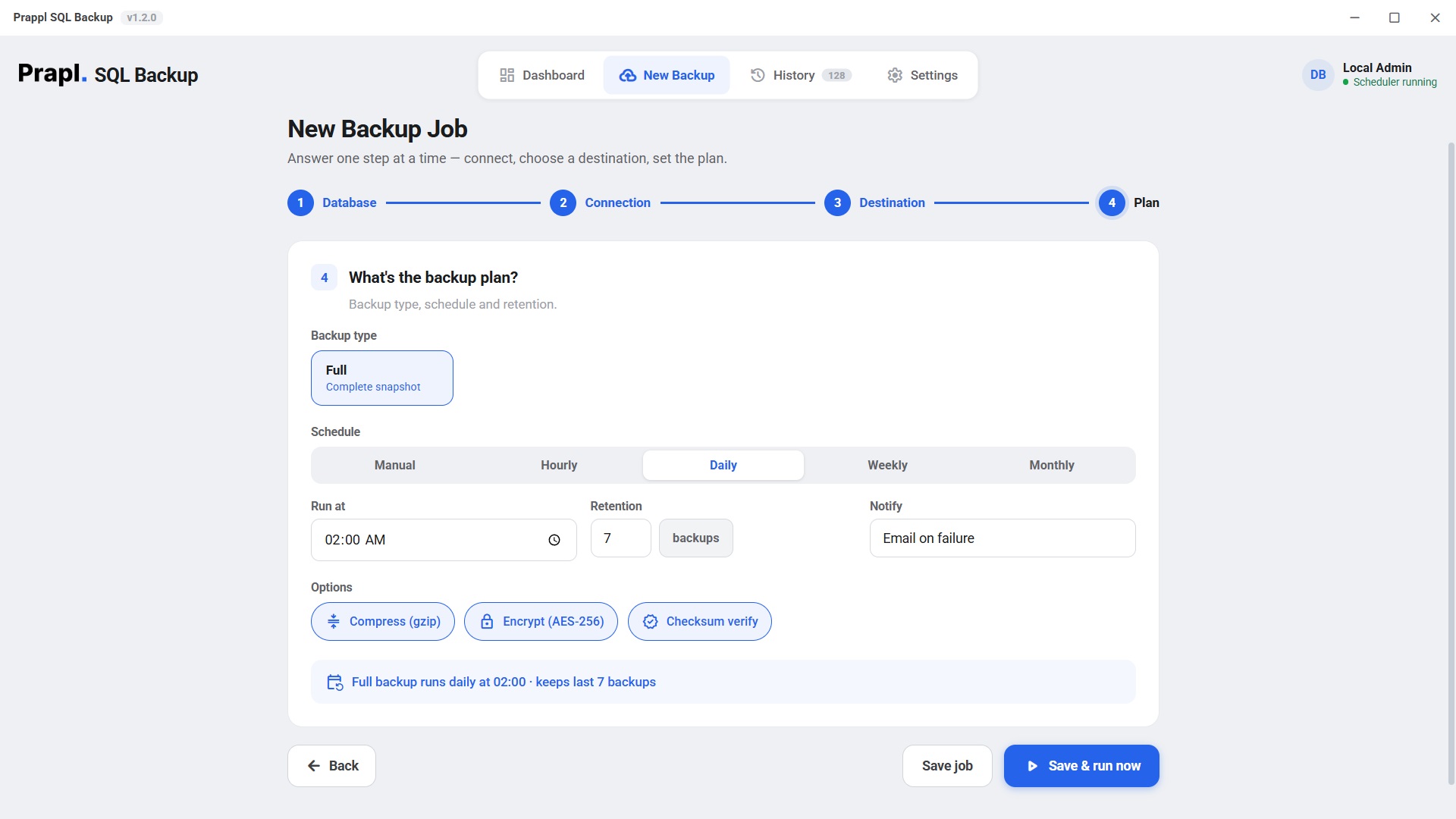
Follow the below given steps to backup MariaDB database:
  1. Run the Prapl SQL Backup Tool on your PC.
  2. Click New Backup and choose MariaDB.
  3. Enter MariaDB database login details and verify the connection.
  4. Select location to store backup.
  5. Set the backup type and schedule.
  6. Click on Save and Run Now button to begin the backup process.

Its very easy, the tool comes with 15 days free trial version that allows to check all its features without any cost.

Yes, it supports incremental backup functionality that save only newly data records after the initial backup process.

If the backup stops due to a network or system issue, it will notify you with email alert. The MariaDB backup tool resumes from the last successful point instead of restarting from the beginning.

You can save the MariaDB backup to local drive, AWS S3, Wasabi, SFTP, or NAS path.

No. You can backup as much MariaDB data as you need. Larger databases may take more time to complete but there are no maximum backup size limit.

Yes, we provide technical support to assist users with installation, configuration and backup related issues.

No, the MariaDB Backup Wizard performs secure and accurate backup process while maintaining login credentials protection throughout the operation.
One tool, every database

Also backs up your other databases

One flat price covers every engine on the machine. Explore the others:

Incremental MariaDB Backup Solution - Try Now

You can use the software completely free of charge for the first 15 days. No credit or debit card is required for the free trial. If you like the software after 15 days, you can subscribe at a rate of $9 per month. You also get a 14-day money-back guarantee after purchase.

15-day free trial 14-day money-back No auto-renewal