Oracle 12.1 → 23ai · On-prem, OCI & Autonomous
Back up Oracle Database schemas automatically to local drives, NAS, Amazon S3, S3-compatible cloud or SFTP servers — with nothing to install on the database host and no Oracle Instant Client on your PC.
Choose a readable SQL export or Oracle’s own Data Pump format, schedule it, and every copy is compressed and protected with AES-256 encryption before it leaves your machine.
Oracle powers ERP, finance, HR and customer systems — the data a business cannot afford to lose. Yet many Oracle backups still depend on a DBA remembering to run expdp, on scripts nobody maintains, or on RMAN jobs only a specialist can restore. A scheduled, encrypted schema backup you can restore from a desktop app closes that gap.
A DROP TABLE on the wrong schema, an UPDATE without a WHERE clause or a script run against production instead of test removes records in seconds. With a schema backup from last night you restore the data instead of reconstructing it by hand.
Disks, SSDs, virtual machines and whole hosts fail without warning, and an Oracle instance on a dead server is inaccessible until it is rebuilt. A copy stored on another machine, a NAS or a cloud bucket lets you bring the schema back elsewhere and keep working.
Attackers who reach a database server encrypt or delete what they find and ask for payment. Backups that were encrypted with your key and stored outside the server give you a clean copy to restore from — without negotiating with anyone.
Moving from 19c to 23ai, applying a patch set or migrating to Oracle Cloud can go wrong halfway. A backup taken just before the change is the rollback plan: if the upgrade fails, the previous state of every schema is one restore away.
Financial, HR and customer records often have to be kept and reproducible for years. Retention tiers keep daily, weekly, monthly and yearly copies of each schema automatically, so an auditor’s request is answered from storage, not from memory.
When only one DBA knows how the export scripts work, every holiday is a risk. A backup job configured once in a wizard, visible on a dashboard and restorable in four clicks means anyone on the team can recover a schema.
Everything you need to back up Oracle Database schemas automatically and keep them recoverable.
Most Oracle tools make you install Instant Client, sqlplus or expdp first. This tool speaks Oracle’s native protocol directly, so nothing is installed on your PC or on the database host — enter host, port, service name and credentials, and it connects.
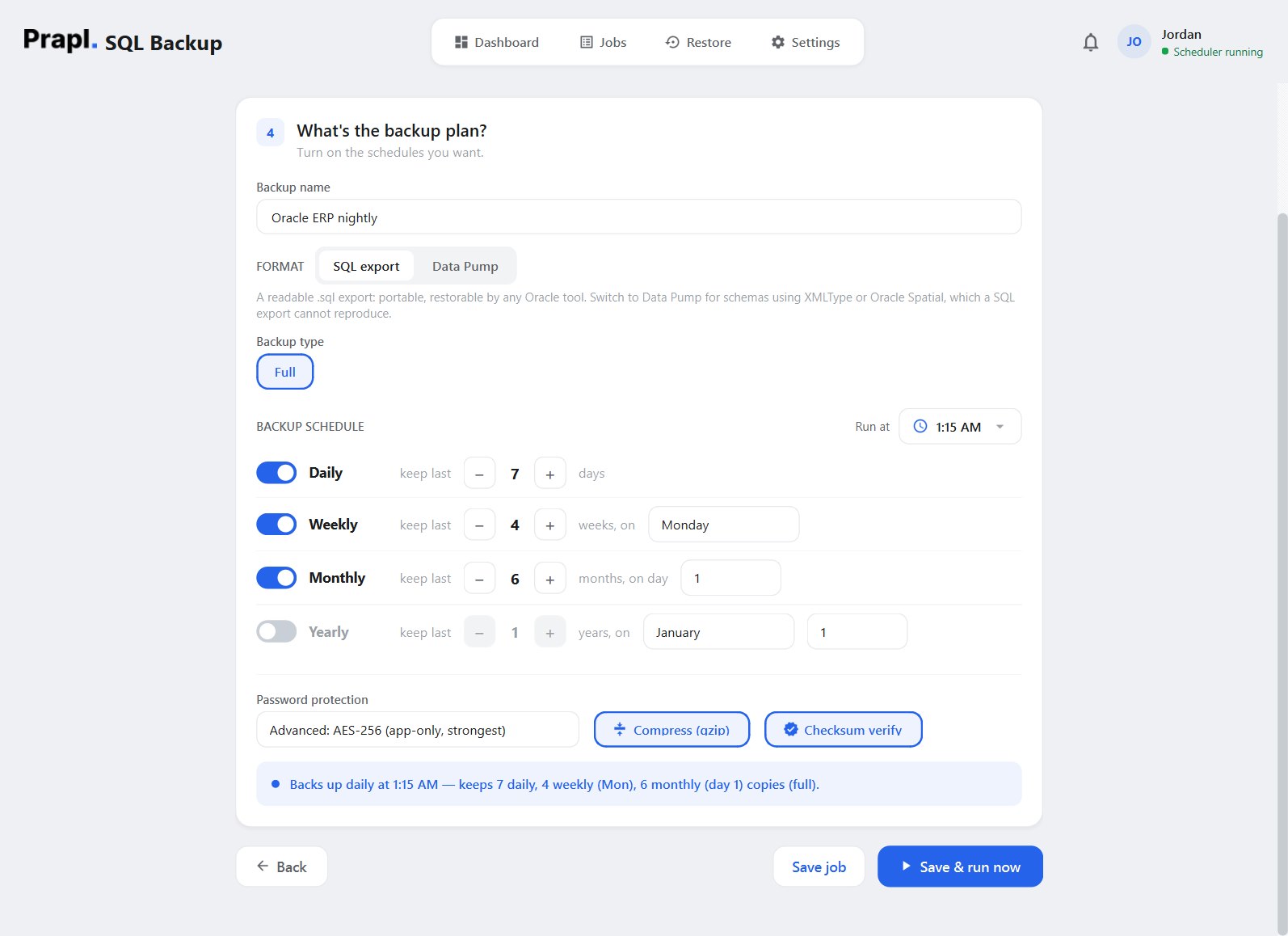
Pick the format per job. A SQL export is a readable, portable .sql file any Oracle tool can load. Data Pump is Oracle’s own binary format — faster on large schemas and the right choice for XMLType, Spatial and other types a text export cannot reproduce. Both work against remote and cloud servers.
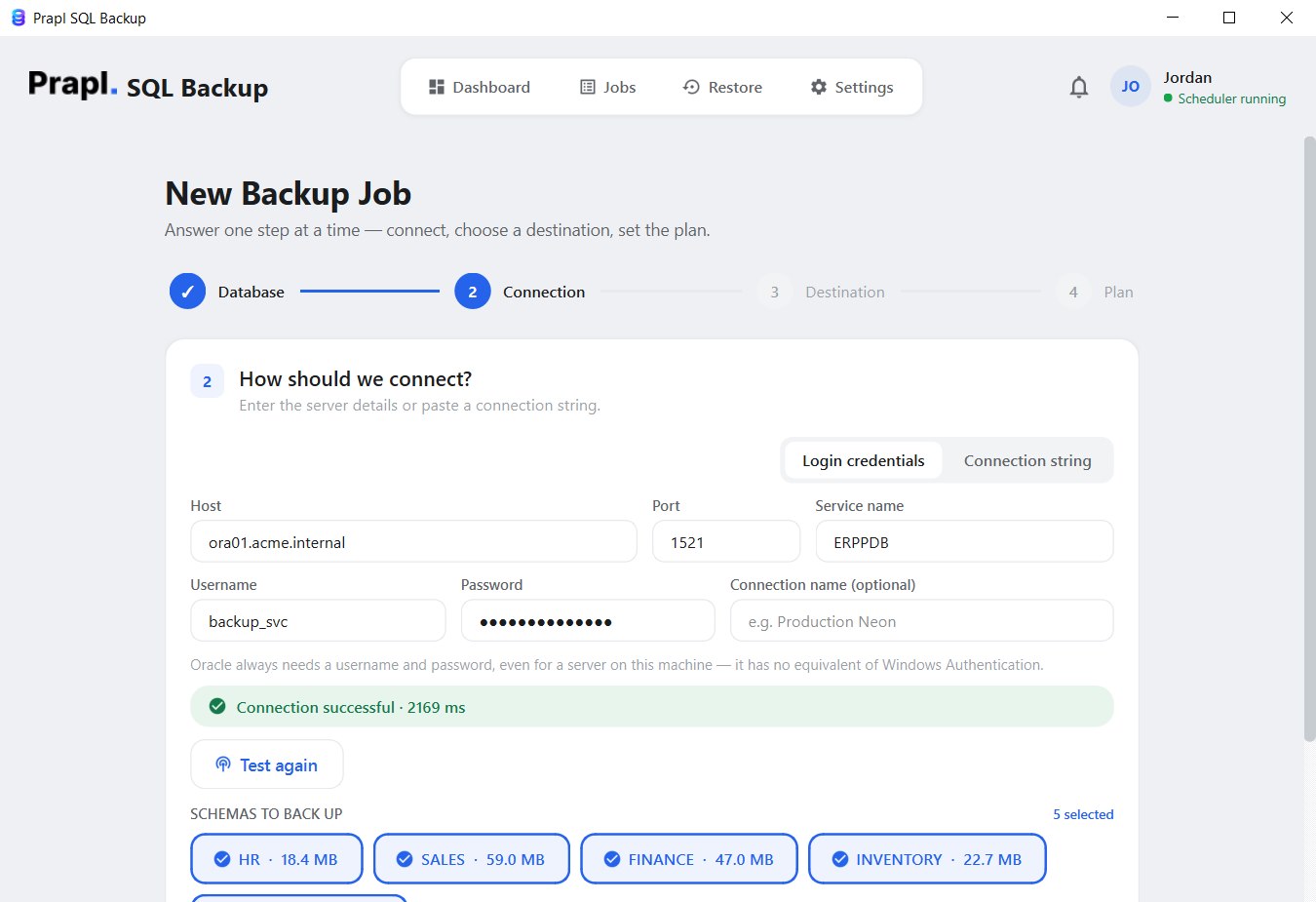
Oracle organises data in schemas inside a pluggable database, so the wizard lists the schemas after a successful connection test and lets you tick exactly the ones to protect — HR and SALES tonight, FINANCE in a separate job with its own schedule.
Set a run time and switch on the daily, weekly, monthly or yearly tiers you want. Each tier is also its retention: keep the last 7 daily and 4 weekly copies, and the tool prunes older files for you. Once saved, the job runs on its own from the system tray.
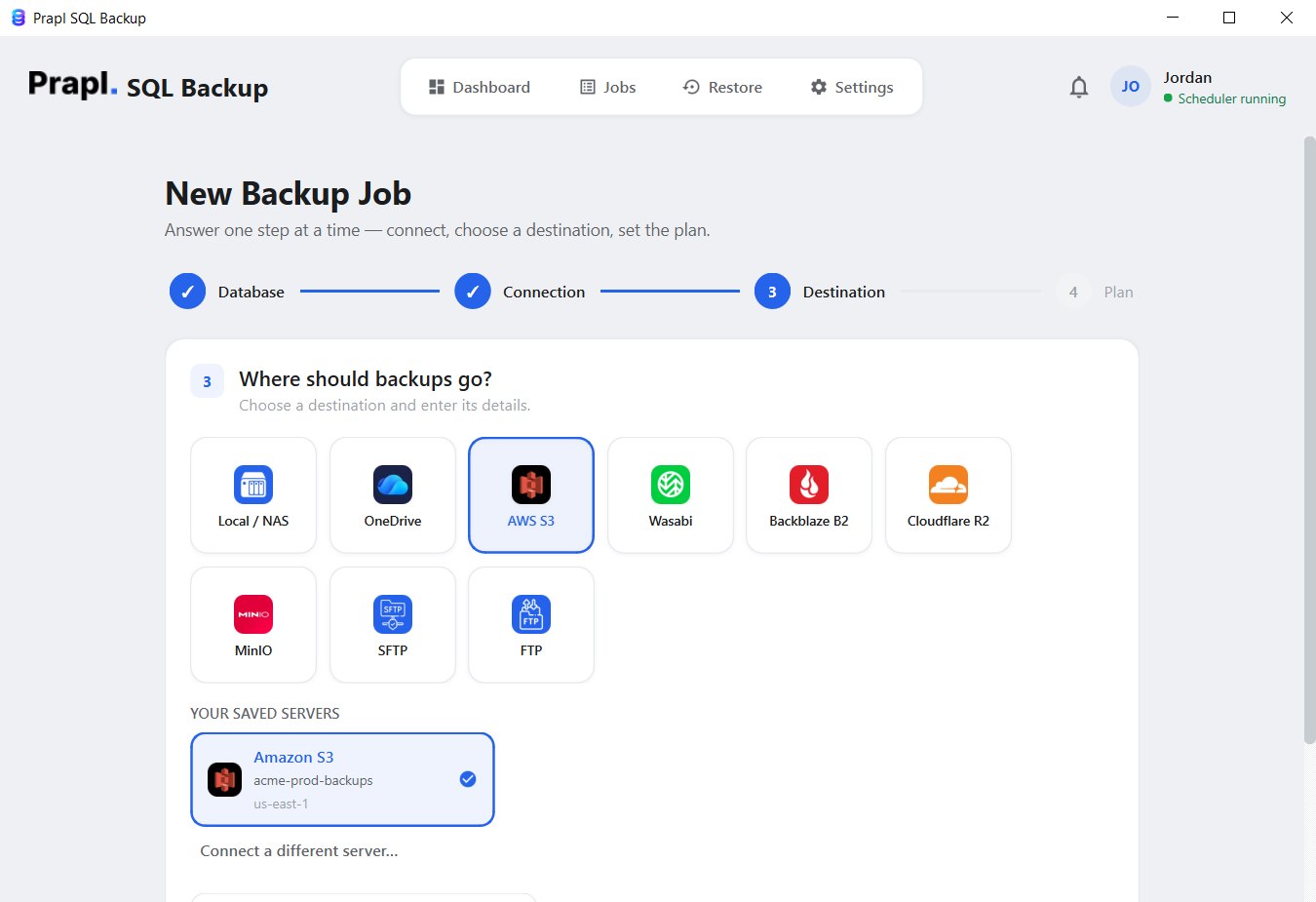
Store Oracle backups on your PC, an external drive, a NAS share, OneDrive, Amazon S3, Wasabi, Backblaze B2, Cloudflare R2, MinIO, SFTP or FTP — and add a secondary destination so every run is copied to two places at once.
Schema exports compress extremely well. Files are gzipped as they stream, typically shrinking 70–80%, which saves storage, speeds up uploads and makes it cheap to keep more history.
After compression the file is encrypted with AES-256-GCM using a key derived from your password. Whoever gets hold of the file — on a lost USB drive or in a shared bucket — cannot read a single row without it.
Oracle always needs a username and password, and they are never written to a plain-text file. Credentials go into the Windows Credential Manager; the job only stores a reference, and the optional cloud monitoring only ever sees job status.
Try every feature of the Oracle backup software free for 15 days — no credit card, no hidden charges. If it fits your workflow, continue for just $9 per month, billed annually, with a 14-day money-back guarantee.
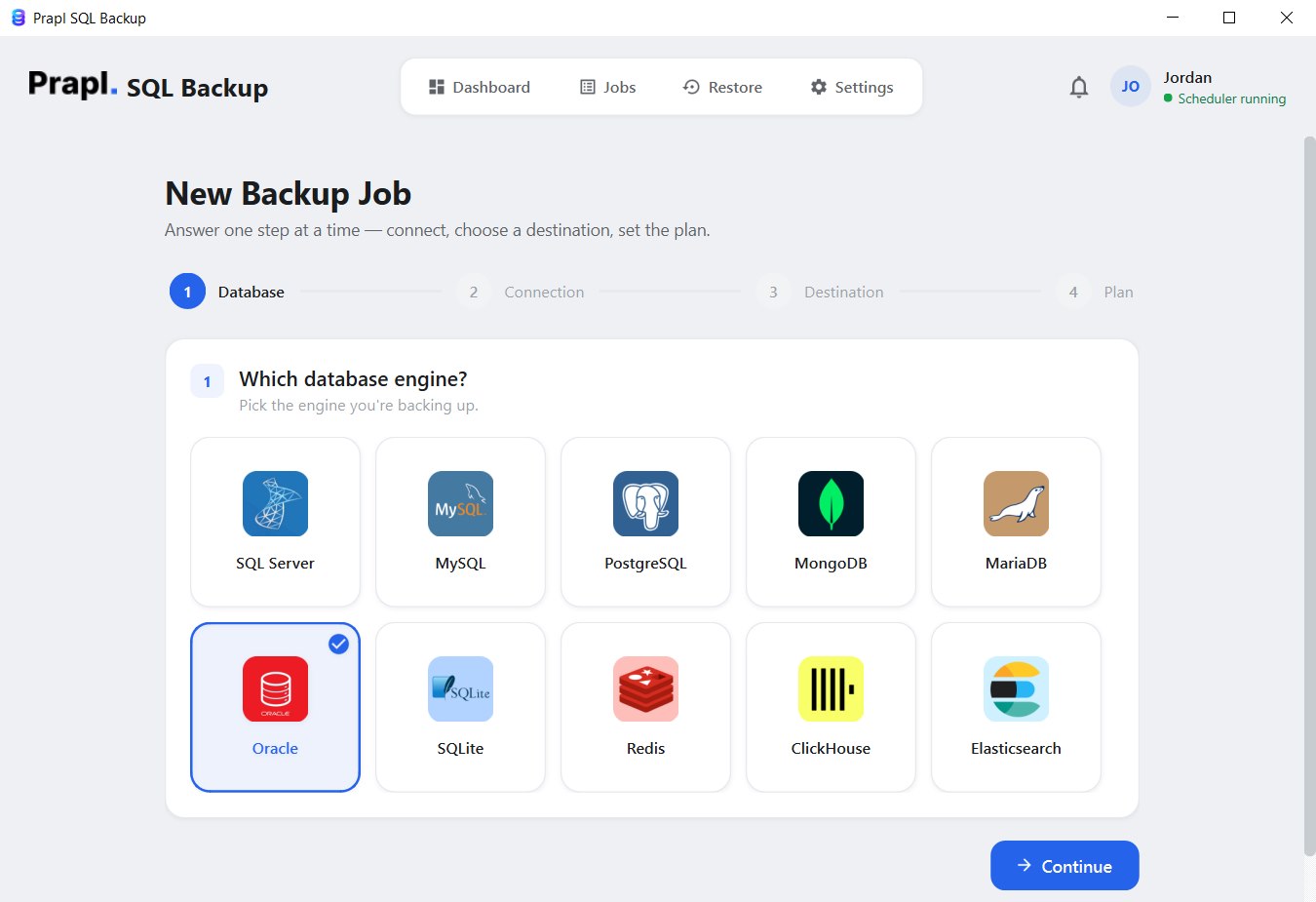
The Oracle Backup Tool turns a schema export into a four-step wizard: connect to the pluggable database, choose where the backup goes, set the plan, and the software handles every run from then on.
The software exports each selected schema, compresses and encrypts it, and stores it at the chosen location on every scheduled run.
Connect the tool to an Oracle pluggable database wherever it is hosted — on-premises, in Oracle Cloud, in a container or on a developer PC. Only a host, a port, a service name and a login are needed:
Oracle Database 12.1, 19c, 21c or 23ai running on your own server or VPS. Connect to the pluggable database by its service name and back up any schema in it.
Base Database or Exadata services on OCI expose a service name just like an on-premises server. Open port 1521 to your PC (or connect through your VPN) and back up schemas the same way.
Use the full service name shown in the OCI console for the pluggable database.
Autonomous Database connections are encrypted end to end. Point the tool at the TLS endpoint and service name from the console and it exports schemas with no wallet software to install.
Data Pump exports run inside the Autonomous instance and stream back over the same connection.
Running Oracle Database Free (or XE) locally for development? Its pluggable database is called FREEPDB1 — connect to localhost and back up your schemas before every experiment.
Oracle always needs a username and password, even on this PC — there is no Windows Authentication.
Oracle Free or XE inside a Docker container works the same way — use the port you mapped to the host and the container’s pluggable database service name.
Backups are taken over the network, so nothing needs to be mounted into the container.
Oracle on a Windows or Linux virtual machine — VMware, Hyper-V, VirtualBox or Proxmox — is reachable by its IP address and backed up like any other server.
A colocated or partner-hosted Oracle server is backed up over the network from your PC. Grant a read-only backup user SELECT ANY TABLE and SELECT_CATALOG_ROLE, and keep the export off the production host.
Every backup follows the same simple, secure workflow. From connecting to the pluggable database to storing the encrypted file, each step is designed to keep your schemas safe and restorable.
The tool connects to the pluggable database over Oracle’s native protocol and exports one schema at a time. Oracle itself generates production-grade DDL through DBMS_METADATA.GET_DDL — tables, indexes, sequences, views, triggers — and every row is written as INSERT statements, with large LOBs handled in PL/SQL blocks. Choose Data Pump instead and the export runs server-side through DBMS_DATAPUMP, then the .dmp file streams back to your PC over the same connection, so it works with remote and cloud databases too.
Before saving, the export is compressed in a stream, typically by 70–80%. It is never loaded into memory as a whole, so a multi-gigabyte schema is handled with the same small footprint as a tiny one.
After compression the backup is encrypted with AES-256-GCM, using a key derived from your password with scrypt. Every 64 KB chunk gets its own nonce and authentication tag, so tampering is detected and the file is unreadable without the key.
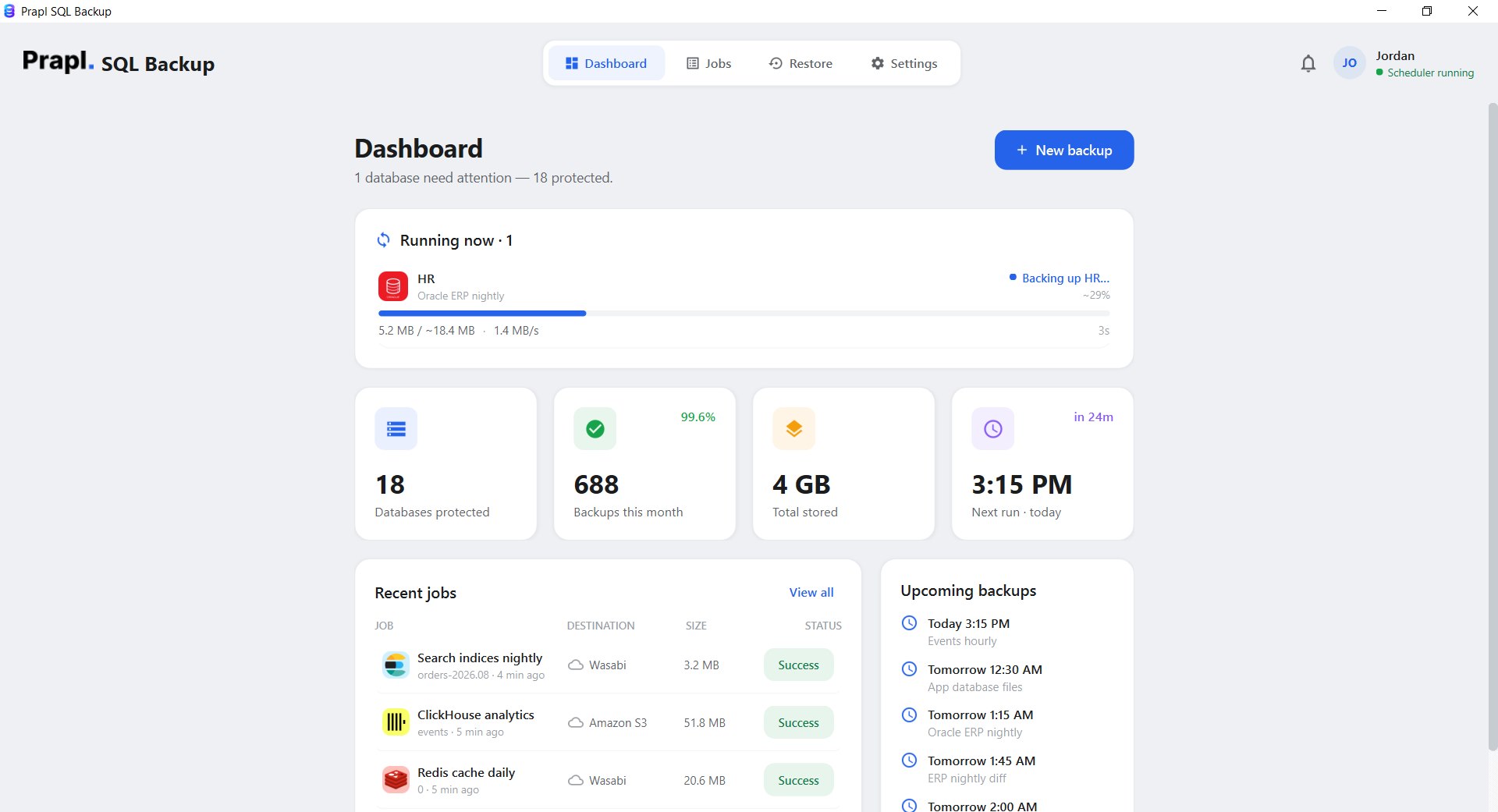
The encrypted file is uploaded to your chosen destination (and to the secondary one, if set), verified by checksum, and logged. Retention tiers delete outdated copies automatically so storage never fills up with files nobody needs.
The app runs this for you — there is nothing to type.
Recovering an Oracle schema takes four steps in the app: choose the job, choose the point in time, choose what to do with it, review. The tool downloads the file, decrypts it, decompresses it and replays the SQL export into the target schema — or hands a Data Pump file to DBMS_DATAPUMP with TABLE_EXISTS_ACTION=REPLACE. Press play to watch every step.
Restoring into a different schema? Data Pump restores support REMAP_SCHEMA, so a copy of SALES can land in SALES_TEST for a safe rehearsal without touching production.
Your Oracle backups contain the data your business runs on, so protecting them through the whole backup journey matters. Here, every file is compressed, checksummed and encrypted on your PC before it leaves, and stays protected while it is transferred and stored.
Your Oracle credentials and connection details are kept in the Windows Credential Manager, never in a plain-text configuration file. The settings file only stores a reference to the entry, which keeps passwords out of reach of anyone browsing the disk.
When a Oracle backup is created and sent to a storage location (local, NAS, cloud, SFTP), things can still go wrong on the way:
Checksum verification compares the stored file against the one that was written. If it is corrupted, incomplete or altered, the job is flagged as failed instead of quietly succeeding — so the Oracle backup you rely on is one that will actually restore.
The Oracle backup never passes through any of our servers. Everything happens between your machine and the storage location you chose, and the file is encrypted before it leaves. You keep full control over where your backups live and who can open them.
The Oracle backup tool is a desktop application, not a hosted service — it runs on your machine and writes each backup straight to the storage you picked. Nobody charges you per gigabyte, and no copy of your Oracle data ever sits on somebody else’s server.
You pay us once for the software — never for gigabytes. Point a job at a folder on your own PC or NAS and the storage costs nothing at all. Prefer the cloud? Use your own Amazon S3, Wasabi, Backblaze B2, Cloudflare R2, MinIO or OneDrive account and pay their rate directly, with no markup in between. Back up 10 GB or 10 TB — the price of the software does not move.
This is a desktop application. It runs on your machine, connects straight to your Oracle server and writes the backup straight to the destination you chose. Nothing is uploaded to our servers on the way, so we never hold a copy of your data — and it is encrypted with AES-256 before it leaves, so even the storage provider only ever sees ciphertext.
Database passwords are never written into a configuration file and never sent anywhere. They are kept in the Windows Credential Manager, and the settings file only stores a reference to the entry. If you switch on the optional online monitoring, it reports job status only — name, success or failure, size and duration. Never your data, never your credentials.
| Capability | Prapl SQL Backup Tool | Other Tools |
|---|---|---|
| Backup Automation | Automatically Scheduled | Require manual setup |
| Deployment Support | On-premises, OCI, Autonomous, Docker & remote — no client install | Limited |
| Storage Destination | Local/NAS, OneDrive, S3, Wasabi, Backblaze, R2, MinIO, SFTP & FTP | Limited storage options |
| Data security | AES-256 before the file leaves your PC | Good |
| Backup Compression | Yes | Supported but limited |
| Backup Monitoring | Dashboard, email & cloud alerts | No |
| Setup Process | Simple wizard, four steps | Complex |
| You hold the keys | Always | No |
| Storage cost | Your own storage · no per-GB fee | Often rented per GB |
Oracle sits under applications where downtime and data loss have real consequences. This backup tool exists to make regular backups effortless, remove the manual steps people forget, and make sure a restorable copy of your data is always within reach when something goes wrong.
01. ExperienceYou should always know how your backups are made and protected. The Oracle backup workflow is simple, documented on this page step by step, and built on Oracle’s own, publicly documented interfaces rather than on anything proprietary or hidden.
02. AuthoritativenessEvery backup is made with interfaces Oracle documents and supports: DDL comes from DBMS_METADATA, Data Pump exports run through DBMS_DATAPUMP, and the connection uses Oracle’s native protocol. On top of that the tool adds streaming compression and AES-256-GCM encryption before the file reaches its destination.
03. ExpertiseYour Oracle backup belongs to you, not to the software. Files are encrypted before they are stored and only your key can unlock them. The tool keeps no password and no hidden access to your backups — they remain under your control, wherever you decide to keep them.
04. TrustworthinessSQLBackup builds directly on Oracle’s own, documented packages. Verify our approach against the official docs:
DBMS_METADATA — the package that generates the DDL in every SQL export.DBMS_DATAPUMP API it uses.FREEPDB1) used in our examples and screenshots.General ledger, payroll and order data in Oracle schemas gets a nightly, encrypted copy with a retention history that answers audit questions without a DBA on call.
Whether your product runs on one Oracle instance or many customer PDBs, keep every schema’s backups organised, encrypted and visible from a single dashboard.
Backups are encrypted with your key before they leave the PC, credentials stay in the Windows Credential Manager, and nothing is uploaded to a third-party service.
Take a Data Pump backup of production and restore it into SALES_TEST with REMAP_SCHEMA to get a realistic environment for QA, migrations and performance testing — without touching live data.
Replace hand-written expdp and cron scripts with scheduled jobs, checksum verification, retention tiers and alerts, for on-premises, VM, Docker and cloud instances alike.
Create one job per client schema with its own schedule and destination. Backups for different clients stay separated, encrypted and monitored in one place.
.sql) — readable and portable · Data Pump (.dmp) via DBMS_DATAPUMP, streamed from DATA_PUMP_DIRAES-256-GCM, key via scrypt, per-file salt, per-chunk nonce · secrets in the Windows Credential ManagerOne flat price covers every engine on the machine. Explore the others:
Create a backup of your Oracle data and save it to local or cloud storage. Download the Oracle Backup Tool and use every feature free for 15 days — no credit card required. If it fits, subscribe for just $9/month with a 14-day money-back guarantee.