MongoDB logo MongoDB 4.x-7.x

MongoDB Backup Tool

Securely backup MongoDB database to local drives, NAS devices, cloud storage or SFTP servers. The MongoDB backup software protects every elements of your database.

Schedule automatic backup, encrypt your backup files with AES-256 encryption and compress data to reduce storage usage.

mongodb backup software mongodb backup tool backup mongodb database automatically incremental mongodb backup
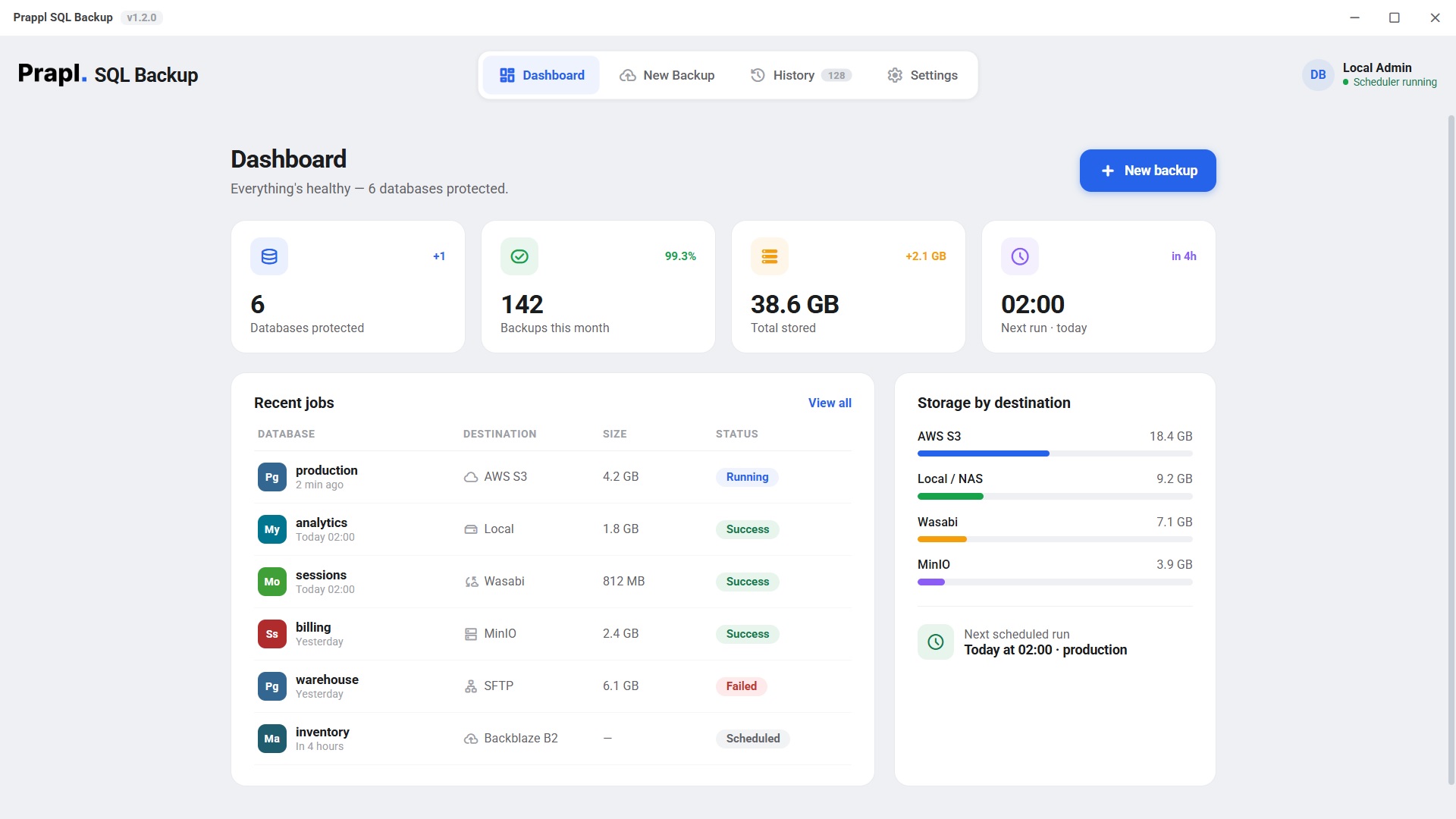
analytics ยท backed up 2 min ago
mongodump/ BSON archive/ --oplog/ streaming gzip/ AES-256-GCM/ Amazon S3/ SFTP/ mongorestore/

Everything You Need for Reliable MongoDB Backup

4.x-7.x
MongoDB Versions
Storage
Local, NAS, Cloud & SFTP
AES-256
Encryption Security
Automated
Scheduled Backup
Top Use Cases

Top Use Cases for MongoDB Backup Tool

MongoDB database store business-critical information such as customer records, application data, analytics, product catalogs and transaction history. Losing this information can interrupt business operations, delay projects and lead to financial losses. Regular backups provide the way to recover data whenever unexpected problems occur.

๐Ÿ—‘๏ธ

Protect Against Accidental Data Deletion

One of the most common cause of data loss is human error. A developer, database administrator or employee may accidentally delete a collection, remove important documents or execute incorrect query. Without a backup, recovering the loss information is impossible. A regular backup ensures that your data remains safe. You can restore your deleted data from the backup copy.

๐Ÿ’ฝ

Recover Data from Hardware or Server Failure

Servers, hard drives, SSD and other storage devices can fail without any warning. Power outages or system crashes may also make your MongoDB database unavailable. A backup stored on another server, external drive or cloud storage allows you to restore your database and continue your work with minimal downtime.

๐Ÿ›ก๏ธ

Stay Protected from Cyberattacks

Cybersecurity threats continue to target valuable database. Hackers may encrypt, delete & damage your database and ask for payment to restore them. If you already have backup copies, you do not have to depend on attackers. You can restore original database without relying on compromised systems and continue your business operations.

๐Ÿ”„

Simplify Database Migration

Many organizations move their MongoDB databases to new server, cloud platform and another machine. There is chance that some data may be missed or corrupted during migration. Having a backup ensures that your original database remains safe. If anything goes wrong while transferring, you can easily restore data from backup file.

๐Ÿงฐ

Create Safety Net Before Software Updates

Updating MongoDB, changing server settings or migrating to newer version can lead to unexpected issues. An upgrade may fail due to compatibility problems, interrupted installations and incorrect settings. Creating backup before making major changes provides security. If any issue occur then you can restore the previous version of your database without rebuilding everything.

๐Ÿ“‹

Meet Business and Compliance Requirements

Many businesses are required to keep customer records, financial information and transaction history for several years to meet legal or industry regulations. Backup MongoDB database help organizations store historical data and make it available whenever audits or compliance checks are required.

Key Features

MongoDB Backup Software - Key Features

Best solution to backup MongoDB database automatically and safeguard critical data from loss.

Safe Storage of Credentials

Protects your MongoDB login credentials since they are important. Instead of saving usernames and passwords in plain text files, it stores them securely using your operating system built-in credentials manager. This prevents unauthorized users from viewing your database credentials and provides extra layer of security.

Flexible Storage Options

You are free to store your MongoDB backup wherever it is most convenient. It supports saving backup MongoDB database to pc, network attached storage devices, AWS S3, Wasabi, FTP/SFTP servers and cloud storage services. This flexibility allows you to build backup strategy that matches your business needs.

Backup Compression

Large database backups consume large storage space. The MongoDB backup tool automatically compresses backup files before saving them. This helps reduce storage usage, speeds up file transfers and make it easier to manage multiple backups without filling up your storage quickly.

Automatic Scheduled Backup

You forget about making manual backups everyday. Here, you have a built-in schedule option to automate mongodb backup. Simply choose the preferred time and frequency i.e. daily, weekly or monthly. Once you set the schedule, it will create MongoDB database backup automatically. This ensures your database is always protected without any manual effort.

Simple and Easy to Use Interface

The MongoDB backup utility is designed with simple user graphical interface which makes it easy for anyone to use it. Whether you are beginner, database administrator or IT professional, you can create backup without learning complex commands. Simply connect your MongoDB database, choose the backup location, set the schedule and start the backup process in just a few clicks.

One Backup Solution for Multiple Databases

Using many backup applications for each database is quite expensive and time consuming task. With this single backup solution, you can backup MongoDB database as well as other popular databases like MySQL, PostgreSQL, MariaDB and more. This makes database management easy without installing multiple backup tools.

Strong AES-256 Encryption

After the creation of the backup, MongoDB backup solution will use the standard AES-256 encryption algorithm to encrypt the files, then store them safely on the designated location. Thus, all your important data is kept safe even when stored securely. If someone gets the backup file but they cannot read its contents without right encryption key.

Email Notifications

MongoDB backup wizard keeps you informed about every backup operation. As soon as the backup has been successfully completed, you get an automatic email with notifications about what's going on. It helps admins check up on their backups instead of having to physically check out the software themselves. Also, if anything goes wrong with your backup process at all, this email alert lets everyone know immediately so that there can be prompt responses.

15-Day Free Trial

Try all features of the MongoDB backup software totally free of cost within 15 days. No credit card is required and there are no hidden charges during the trial period. If you are satisfied with its working procedure then you can continue using the program for just $9 per month.

How It Works

How to Backup MongoDB Database?

MongoDB Backup software allows you to save database directly from your server. It is easy to use for all users whether you are professional, personal or non-technical user.

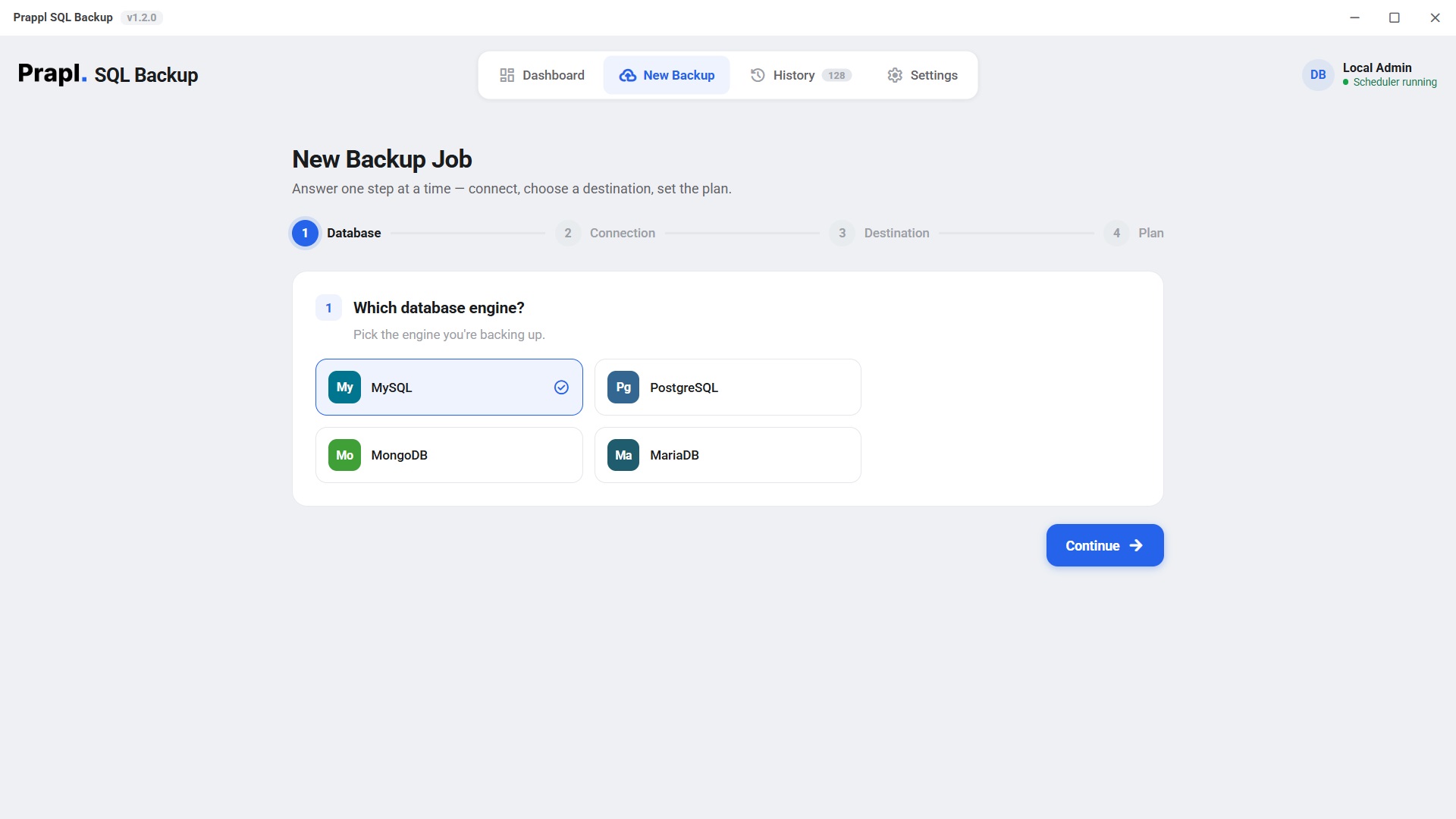
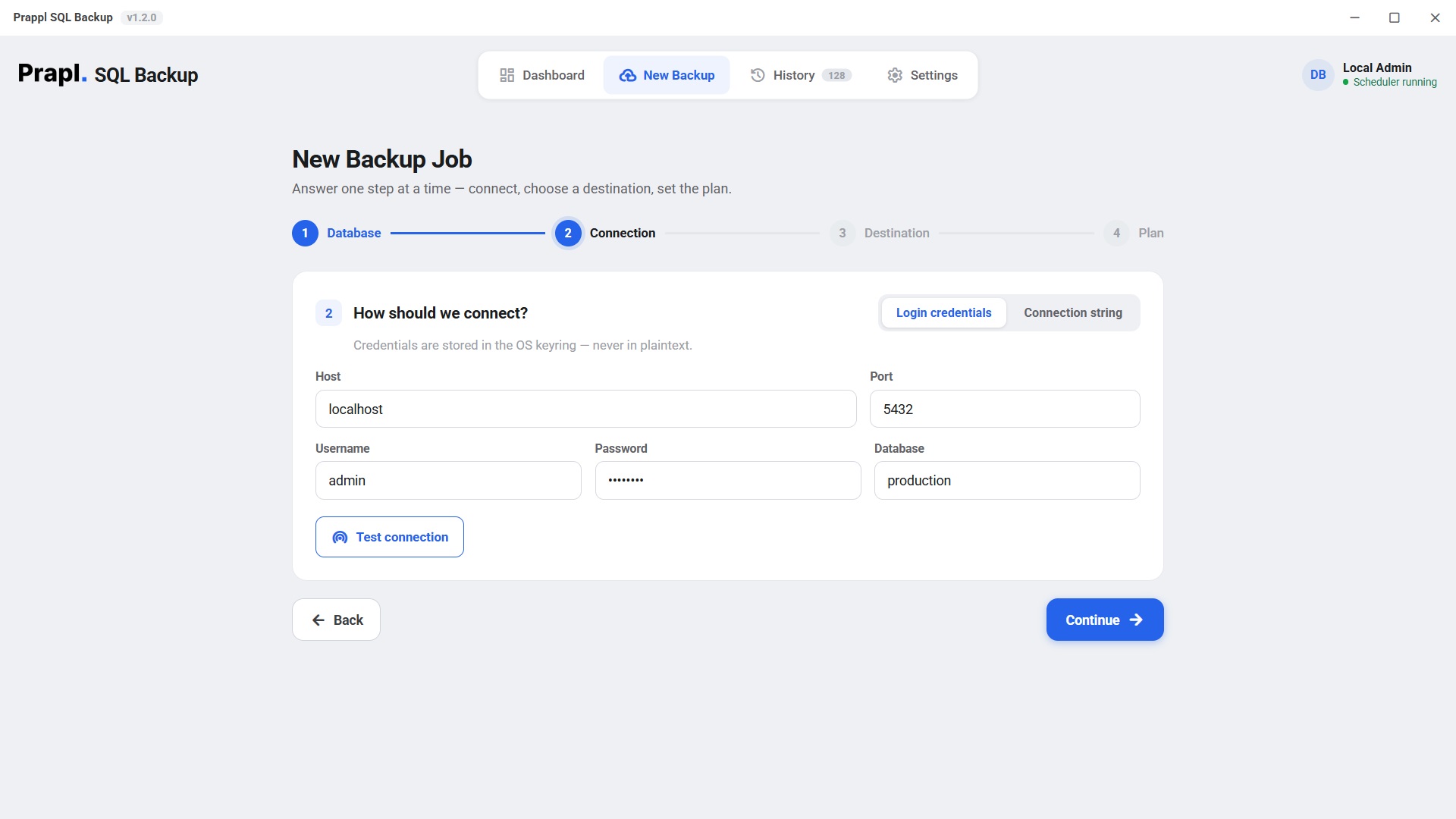
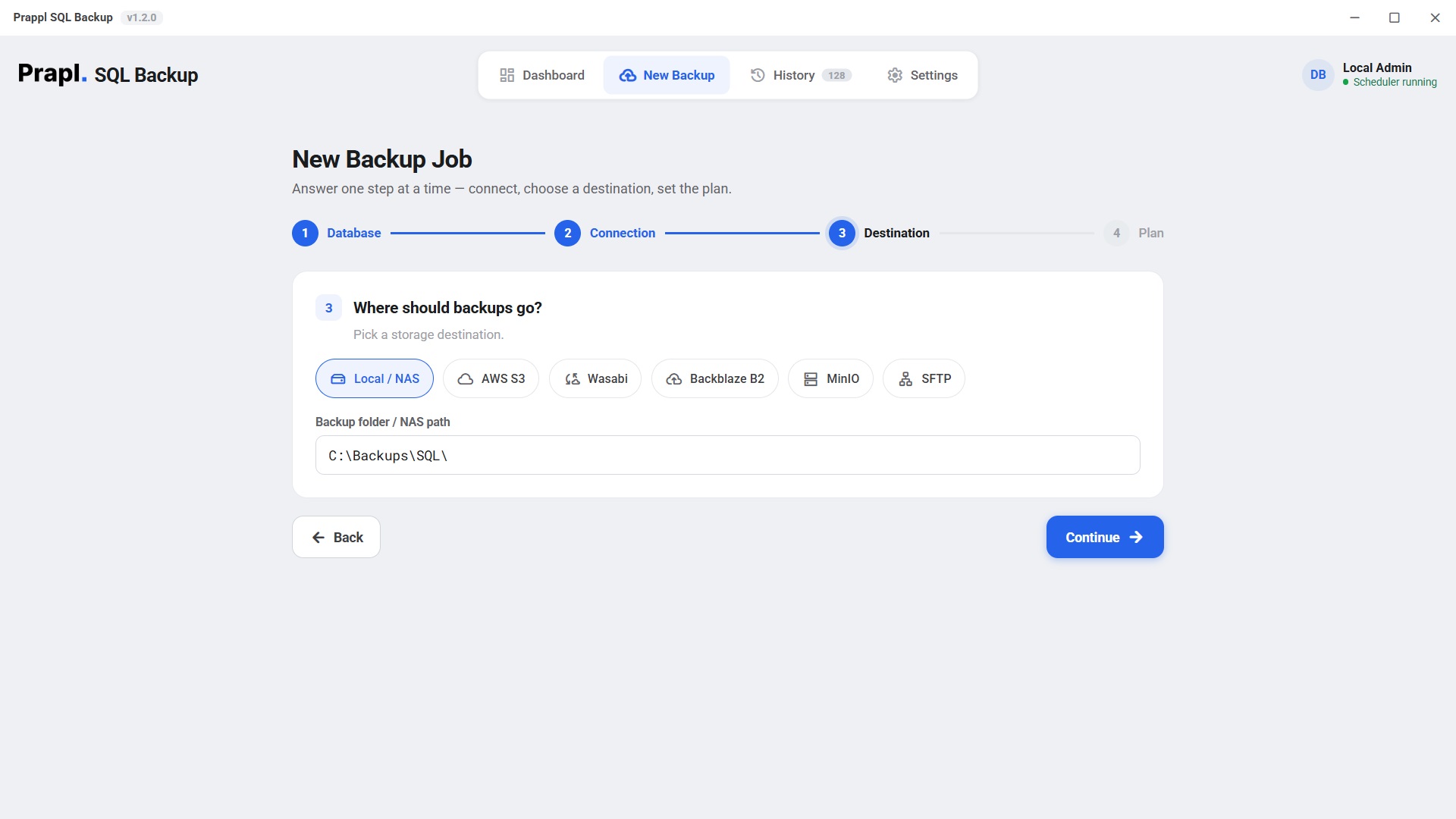
select mongodb database for backup connect mongodb sql database select the location where to save mongodb backup schedule and run mongodb database backup

The software will create MongoDB database backup and store it at your selected location.

Full step-by-step guide

Works Everywhere MongoDB Runs

Choose where your MongoDB database lives

Connecting our tool with your MongoDB database hosted either on your server or on your cloud platform could be effortless for you. We support all required kinds of secure connection methods like SSL/TLS, different ways of authentications & many more types of deployments such as:

Self Hosted MongoDB MongoDB Atlas Docker MongoDB Kubernetes MongoDB Virtual Machines Remote MongoDB Server Replica Set

Self-Hosted MongoDB

You have MongoDB instance running on your local server (VPS, Virtual Machine or Dedicated Server). Connect and run backup operations on that database.

Step 2 Connection
Hostdb.internal
Port27017
UsernamebackupUser
Password••••••••••
Databaseanalytics
Test & list databases Connected

MongoDB Atlas

If you are using MongoDB Atlas, just connect to your Atlas cluster securely to create backups by providing some connection details.

Step 2 Connection
Connection stringmongodb+srv://cluster0.ab1cd.mongodb.net
Password••••••••••
Databaseanalytics
Use SSL/TLSRequired
Test & list databases Connected

Paste the connection string from Atlas — host, port and options come with it.

Docker MongoDB

If you are using MongoDB inside of Docker container this allows you to easily backup your database which is running inside that container.

Step 2 Connection
Hostmongo
Port27017
UsernamebackupUser
Password••••••••••
Databaseanalytics
Test & list databases Connected

Use the compose service name, or the port you mapped to the host.

Kubernetes MongoDB

When MongoDB has been deployed into Kubernetes cluster, then you could use this MongoDB Backup Software to connect to this Deployment and generate backups.

Step 2 Connection
Hostmongodb.default.svc.cluster.local
Port27017
UsernamebackupUser
Password••••••••••
Databaseanalytics
Test & list databases Connected

Virtual Machines

You can also backup databases which are running on windows /linux virtual machine using our mongodb backup tool.

Step 2 Connection
Host192.168.1.50
Port27017
UsernamebackupUser
Password••••••••••
Databaseanalytics
Test & list databases Connected

Remote MongoDB Server

If you are hosting MongoDB on some remote server /cloud machine, then you have to connect to that from your system over network to do backup.

Step 2 Connection
Hostmongo.example.com
Port27017
UsernamebackupUser
Password••••••••••
Databaseanalytics
Test & list databases Connected

Replica Set

You can take your backup from secondary node so that you don’t have too much load on primary servers.

Step 2 Connection
Connection stringmongodb://node1,node2,node3/?replicaSet=rs0
Password••••••••••
Databaseanalytics
Read fromSecondary
Test & list databases Connected

Reading from a secondary keeps the backup off your primary node.

Inside MongoDB Backup Utility

MongoDB Database Backup Workflow

Every backup follows simple and secure workflow. From connecting to MongoDB database to storing the encrypted backup file, each step is designed to keep data safe.

1 ยท Dump
mongodump
2 ยท Compress
70-80% smaller
3 ยท Encrypt
AES-256
4 ยท Store
retention & logs

Dump with mongodump

Connect with MongoDB database and create complete backup of your database. It exports your collections, documents, indexes and metadata without modifying your original database. It ensures backup is created in MongoDB compatible format that can easily restored.

# what the app runs — MongoDB’s own tool mongodump --host db.internal --port 27017 \ --db analytics --archive=analytics.archive

Compress Backup

Before saving, the backup file is automatically compressed by approximately 70-80%. This reduces the file size, saves storage space and makes transferring faster.

# streamed in chunks — never loaded into RAM analytics.archive analytics.archive.gz 2.41 GB 612 MB (75% smaller)

AES-256 Encryption

After compression, the backup is encrypted using the AES-256 encryption standard. This ensures that your backup remains safe from unauthorized access before it is stored on destination.

key = scrypt(password, salt) # AES-256-GCM ยท 64 KB chunks ยท unique nonce each

Store and Retention

Once the MongoDB backup is encrypted, it is sent to preferred storage location. Backup retention rules automatically clean up outdated backups and detailed logs keep you informed of every backup operation.

upload s3://bucket/analytics/... prune: keep-last-N per destination ยท write log

The app runs this for you — there is nothing to type.

The part that matters

A backup you can't restore is just wasted disk

Recovering a MongoDB database takes four steps in the app: choose the job, choose the point in time, choose what to do with it, review. The tool then downloads the archive, decrypts it, decompresses it and replays it with mongorestore. MongoDB restores go back into the database name they were taken from. Press play to watch every step.

Oplog-based incremental restores replay into the original database, so keep the target name as it was — the tool restores the base full and every oplog slice in order for you.

Restore: analytics from Amazon S3
Locate backupfind the key in the destination
Downloadpull the encrypted object · 612 MB
Decrypt & verifyAES-256-GCM integrity check
Decompressrestore the original dump · 2.41 GB
mongorestorereplay the archive into analytics
sqlbackup ยท encrypt ยท analytics
Plaintextanalytics_full_20260627.dump.gz
scrypt(password, salt) โ†’ 256-bit key ยท fresh nonce
Ciphertextโ€ฆ
FormatMAGIC(9) ยท SALT(16) ยท [ LEN ยท NONCE(12) ยท CT+TAG ] ร— N
256-bitAES key
96-bitnonce / chunk
64 KBchunk size
Security

Watch How MongoDB Backup Tool Protects Your Database Backups

Your MongoDB backups contain sensitive business information, so protecting them during the entire backup journey is important. Here, your data is secured before leaving your system and remains protected while transferred to storage location.

Secure Credential Storage

Your database credentials & sensitive connection details are safeguarded with your OSโ€™s secure credential storage mechanism. Instead of keeping passwords in plain text configuration files, it uses secure storage provided by Windows OS to reduce the risk of unauthorized access.

Backup Integrity Verification

When a MongoDB backup is created and sent to a storage device (local, NAS, cloud, SFTP), the following problems can sometimes occur:

  • Some part of the backup file may have been damaged.
  • The file may not have been completely stored due to internet issue.
  • Someone may have made changes to the backup file without permission.

Backup Integrity Verification checks the backup file to verify it is completely accurate. It detects if the file is corrupted, uploaded incompletely or has been modified. This ensures that the MongoDB backup can be successfully restored without any problems if needed.

Direct Backup Flow โ€” No Third-Party Servers

Backup process of MongoDB does not go via any of our servers, which makes your data totally private. So, we can say that everything happens within your environment and your desired storage location. You have full control about placing your backups.

Your data, your storage

Your data. Your choice.
Your storage.

The MongoDB backup tool is a desktop application, not a hosted service — it runs on your machine and writes each backup straight to the storage you picked. Nobody charges you per gigabyte, and no copy of your database ever sits on somebody else’s server.

Choose any destination — or several at once
This PCany folder
External driveUSB or disk
NASnetwork share
OneDriveyour account
Amazon S3your own bucket
S3-compatibleWasabi · B2 · MinIO
FTPyour own server
SFTPyour own server
No per-GB fee from us Encrypted before it leaves Send to several at once

No storage bill from us

You pay us once for the software — never for gigabytes. Point a job at a folder on your own PC or NAS and the storage costs nothing at all. Prefer the cloud? Use your own Amazon S3, Wasabi, Backblaze B2, MinIO or OneDrive account and pay their rate directly, with no markup in between. Back up 10 GB or 10 TB — the price of the software does not move.

Your database never passes through us

This is a desktop application. It runs on your machine, connects straight to your database and writes the backup straight to the destination you chose. Nothing is uploaded to our servers on the way, so we never hold a copy of your data — and it is encrypted with AES-256 before it leaves, so even the storage provider only ever sees ciphertext.

Your passwords stay on your machine

Database passwords are never written into a configuration file and never sent anywhere. They are kept in the Windows Credential Manager, and the settings file only stores a reference to the entry. If you switch on the optional online monitoring, it reports job status only — name, success or failure, size and duration. Never your data, never your credentials.

How It Compares

MongoDB Backup Tool vs Other Tools

CapabilityPrapl SQL Backup ToolOther Tools
Backup Automation Automatically ScheduleRequire Manual setup
Deployment Support Supports Every MongoDB DeploymentLimited
Storage Destination Local/NAS, Wasabi, Backblaze, MinIO and SFTPLimited Storage Option
Data security ExcellentGood
Backup Compression YesSupport but limited
Backup Monitoring Yes No
Setup Process Simple ConfigurationComplex
You hold the keys Always No
Storage cost Your own storage · no per-GB feeOften rented per GB
Client Feedback

What Clients are Saying After Using the MongoDB Backup Tool

Who It's For

Designed for Every MongoDB Environment

๐Ÿš€

Application Teams

With applications that depend upon MongoDB, the MongoDB backup wizard will protect your data through automated backup, encryption, compression, and other flexibility. You no longer have to manage things like backups as you work to build great features for your application.

๐Ÿข

Software Companies

Whether you are managing a single MongoDB database or many across different projects, we keep your backups organized, secure, and simple to monitor from a single location.

๐Ÿ›ก๏ธ

Security-Focused Organizations

Keep your most-sensitive MongoDB data safe with built-in AES-256 encryption to ensure that all backups are protected as they head to your storage. This helps you stay on top of security best practices for your organization.

๐Ÿงช

Development & Testing Teams

Developers should not work directly on the live MongoDB database when they need to test new features, address bugs and examine the application. They create Mongo database backup and restore it to Development, QA or Staging environment to conduct testing safely. In the event of an error, this ensures that the production database is safe and that actual user data is unaffected. Additionally, teams can have complete control over their data and restore it anytime needed by keeping backups separately on Amazon S3, SFTP, NAS or local storage.

๐Ÿ–ฅ๏ธ

Infrastructure & Server Administrators

Regardless if you run MongoDB on VPS/Virtual Machine/Dedicated Server/Local Infrastructure this backup solution will do automatic backups & encrypts them for security and store where ever you want.

๐Ÿค

Managed Service Providers (MSPs)

Create backup jobs that are dedicated to managing your customer's MongoDB databases. Apply custom schedules to meet your needs. Safely keep your clients' backups stored separately from one another.

Technical specs

System Requirement & Basic Information

Storage Required
500 MB Minimum (1 GB Recommended)
RAM
1 GB Minimum (2 GB Recommended)
Versions
MongoDB 4.4 โ†’ 8.0 ยท ships up-to-date database tools ยท version-aware dumps
Compression
Streaming gzip โ€” constant memory, no temp bloat
Encryption
AES-256-GCM, key via scrypt, per-file salt, per-chunk nonce ยท secrets in OS keyring
Destinations
Local / NAS, Amazon S3, S3-compatible (Wasabi, Backblaze B2, MinIO), SFTP
Scheduling & retention
Manual / hourly / daily / weekly / monthly ยท keep-last-N per destination
Platforms
Windows 10/11 ยท desktop app and headless CLI/agent
Questions & Answers

Frequently Asked Questions

Follow the below given steps to store MongoDB backup locally:
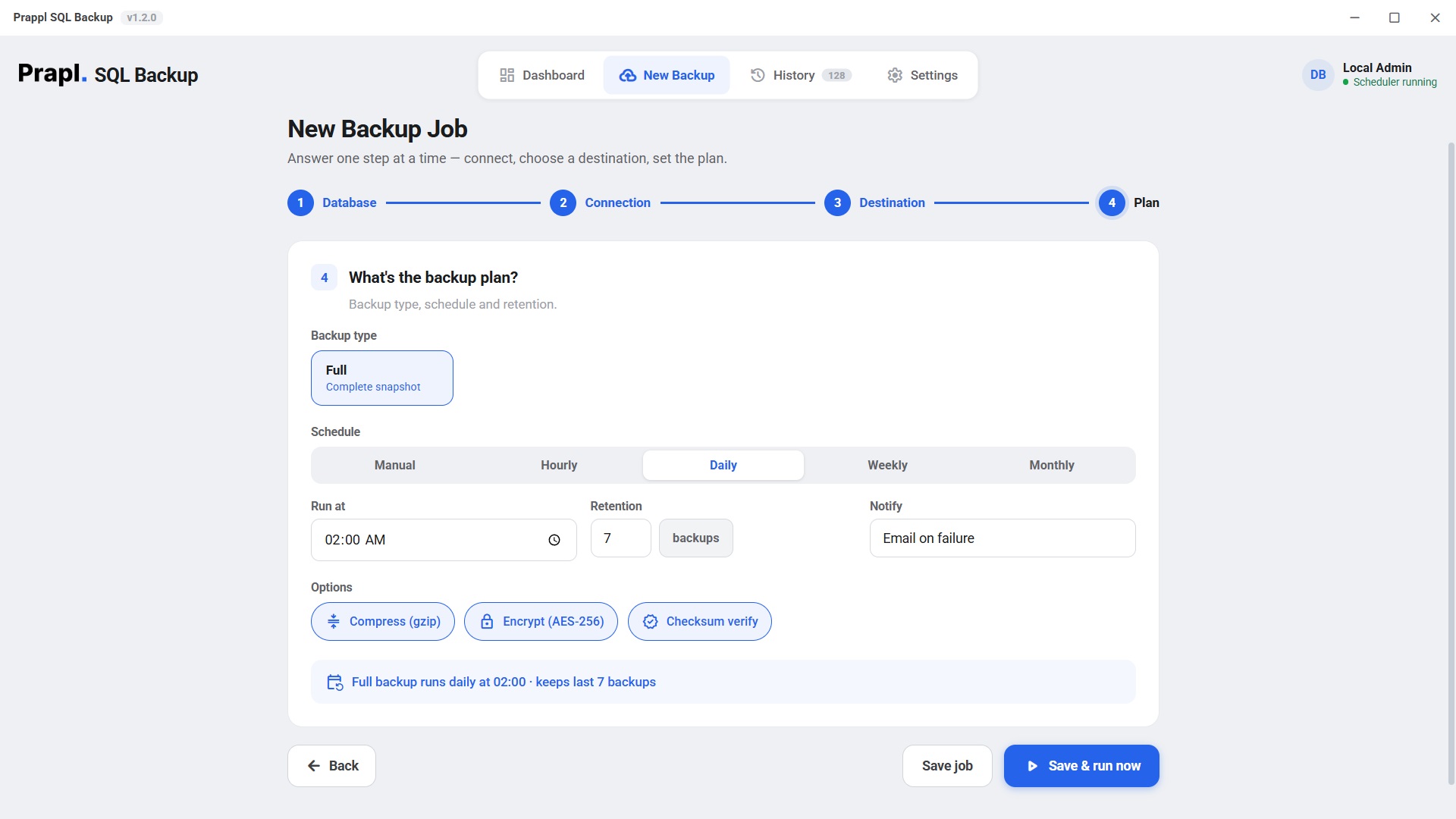
  1. Run Prapl SQL Backup Tool in your PC.
  2. Click on New Backup and select MongoDB database.
  3. Provide your MongoDB login credentials to establish the connection.
  4. Choose Local/NAS option and provide the path to save backup on your system.
  5. Set the plan and run backup.

Backup protect your database against accidental deletion, hardware failures, software corruption, cyber attacks and other unexpected issues. It ensures your data can be recovered whenever needed.

Yes. To create backup MongoDB database automatically on every day choose daily option in Schedule.

No. Your backup is encrypted, users must have the correct password or encryption key to open it.

The MongoDB backup tool offers Compress option. Enable this option to reduce backup size.

MongoDB backup tool display the status of every backup job. You can check whether the backup completed successfully, failed and is still running.

Yes. It is designed to work with self-hosted MongoDB deployments. After connecting yo your server, you can create manual or scheduled backup.

Backup time depends on the database size, storage speed, network performance and whether compression or encryption is enabled. Smaller databases any complete within minutes while larger databases take time.
One tool, every database

Also backs up your other databases

One flat price covers every engine on the machine. Explore the others:

Automate MongoDB Database Backup

Create backup of your MongoDB database and save it to local or cloud storage. Download the best MongoDB Backup Software and enjoy all its features for 15 days. No debit or credit card is required. If you are satisfied then subscribe for just $9/month with a 14-day money back guarantee.

15-day free trial 14-day money-back No auto-renewal