 Abeer Arora
For any business, data plays a crucial role; it’s like their lifeblood. And protecting that data from any loss becomes more important. Imagine opening your database one morning and finding that important records are missing. A server failure, accidental deletion, corrupted files, or even a simple human error can turn a normal workday into a data recovery problem.
Sounds terrific, right?
That is where database backups come in. Wondering what is a database backup? A backup gives you another copy of your data you can use to restore information when the original database is no longer available or cannot be trusted.
Let’s learn more about it and the importance of database management.
What Is a Database Backup for a Business?
In simple words, a database backup is a copy of the information stored in a database that can be used to restore that data if the original database is lost, damaged, corrupted, or accidentally changed.
A database backup might include tables, records, schemas, database objects, or configuration-related information, depending on the backup method.
How Does a Database Backup Work? Steps to Follow
Now, you know about database backup. But does every backup method include the same things? No. It varies depending on the backup method.
Database backup works as:
- To create a backup, first select the live database
- Then, look for the backup process
- After this, make a backup copy of the relevant database and choose the storage destination
- And finally, select recovery when required at the time of the data loss.
When a backup job runs, the backup system reads the relevant database data and creates a separate backup copy. That copy can then be stored locally, on another server, on network storage, or in a supported cloud/remote destination.
However, the exact process depends on the database system and backup method you’re using.
Why Is Database Backup Important to Create?
For any organization, irrespective of size, data is the biggest asset. And backing up that database is far more important to keep themselves safe from any uncertainty. Because losing your data simply means losing your clients, their trust, and not to mention the competition with your competitors.
The reasons to keep the backup:
- Hardware failure: A server, storage drive, or other hardware component can fail.
- Accidental deletion: Someone can delete a record, table, or database unintentionally.
- Human error: Incorrect updates or configuration changes can damage or overwrite data.
- Database corruption: Software issues, storage problems, or unexpected interruptions can cause corruption.
- Security incidents: A security incident can affect the availability or integrity of database data. An independently stored backup can provide a recovery option when the live database has been compromised.
- Business continuity: If an important database becomes unavailable, operations may be disrupted. A reliable backup can reduce the time and data loss involved in recovery.
Without a usable backup, recovering deleted or corrupted data may depend on whatever remains available on the original system. After all, the cost of a backup is much easier to plan for than the cost of losing data you cannot recreate.
So, the choice is all yours.
What Are the Different Types of Database Backups?
Now that you have the idea about database backup and why it is important to keep one. The next question must be the types of DB backups, or how you should create a backup.
So, there are mainly three types of backups. Full, incremental, and differential backups for the database.
- Full Backup: It copies the complete selected database or data set.
- Incremental backup: This backup usually keeps the changes since the most recent backup.
- Differential backup: On the other hand, a differential backup captures the changes since the most recent full backup.
Want to understand the differences in more detail for the types? Read our guide to full vs Incremental vs Differential Backups.
Also, if you are managing multiple databases, manually creating individual backups can quickly become repetitive. Therefore, you can automated backup for multiple databases and schedule recurring backups.
How Often Should You Back Up Your Business Database?
The frequency of the backup varies from organization to organization. However, some of the factors are:
- How often data changes
- How much data can be lost
- Database size
- Available storage
- System performance
- Recovery requirements
How to Create a Reliable Database Backup Strategy?
For a reliable backup strategy, make sure to identify the critical database first. Not every DB necessarily needs the same backup frequency. Then, decide the backup type you’re looking for.
You can, though, run manual backups by following a strategy. But it is suggested to avoid relying entirely on someone remembering to create backups.
Therefore, opt for the Windows-based SQL backup tool to automate the entire backup without writing scripts. This software can be used to automate database backup tasks, schedule recurring jobs, and manage backup destinations.

Also, it won’t be a smart choice if you keep your backups in the same system as the live database. Therefore, make sure to keep them separately.
Keep the retention rules clear. In short, decide how long backups should remain available.
Steps to Keep Your DB Backup Automatically
Once you understand what a DB backup is and its importance, the next step is making sure they run consistently. Follow this step-by-step guide to use automated the backup:
Download and install SQL backup software on your Windows PC. Launch it and select the database types.
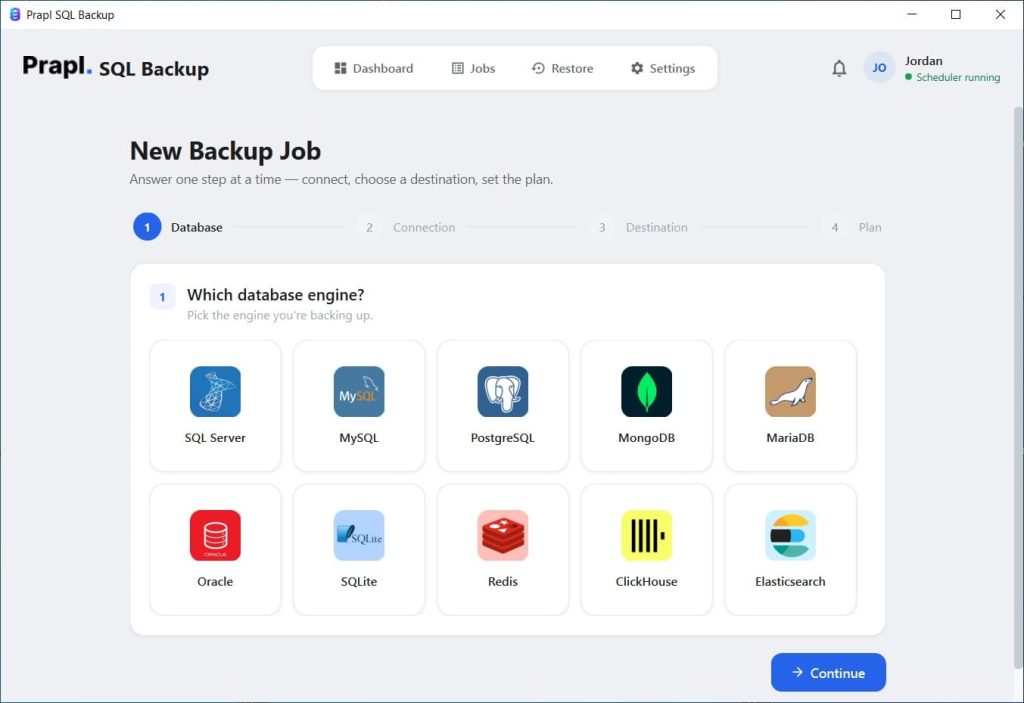
Then, enter your credentials to connect to the database server you want to back up.

Select the backup method that fits your requirements and the target location to store it.
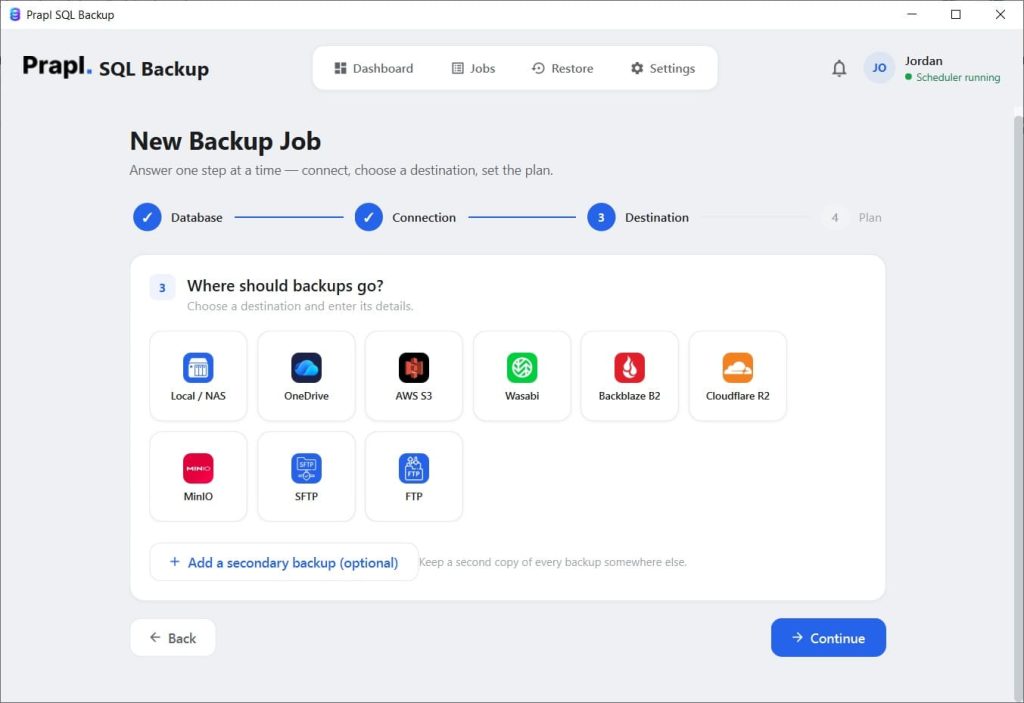
Schedule the backup depending on how frequently your database changes.
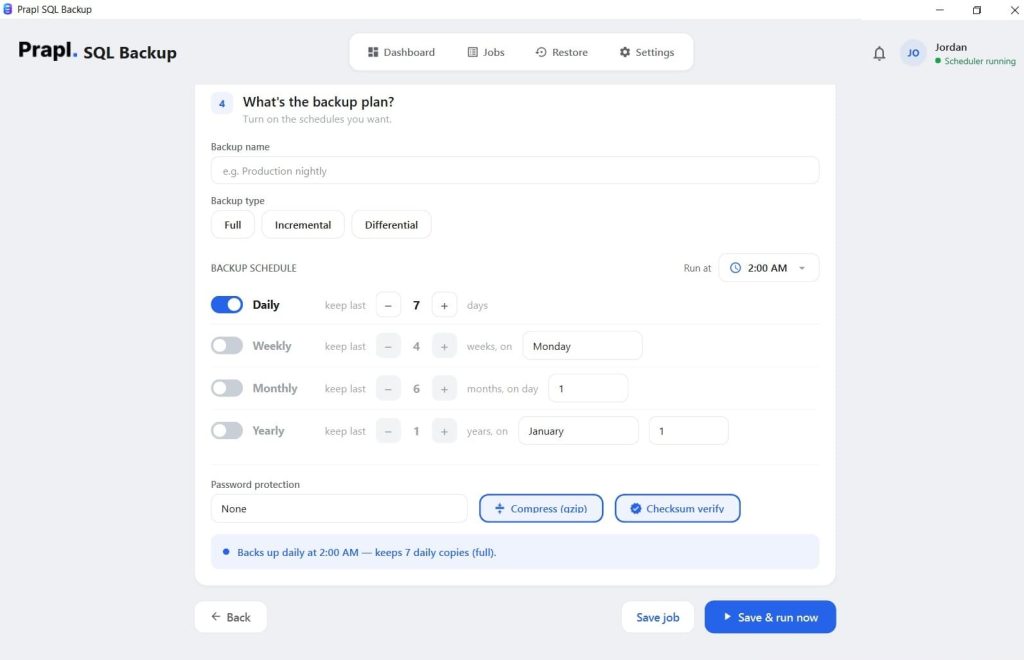
Finally, just click the Start and Run options. It will instantly start the backup, and then you can check if the backup is done successfully or not.
Conclusion
Using security techniques and technologies to try to stop any data attack or disruption is crucial. However, it is equally crucial to maintain a database backup and recovery system. Being able to promptly and simply recover databases in the event of an unwanted data breach is both operationally and fiscally prudent.
Therefore, a reliable Windows-based desktop backup software simplifies your backup and recovery processes.
Ultimately, the best backup is one that is created regularly, stored safely, and available when you actually need to recover your data. To prevent any data loss and reduce downtime, a secure backup is beneficial.