 Abeer Arora
Imagine you backed up the data but forgot to check it once done, and now the backup is lost. A backup may fail without anyone noticing. It may be stored on the same server as the original database. Or you may discover during an emergency that nobody has actually tested whether the backup can be restored. These are just some common database backup mistakes organizations make.
We all know that for any business, data is a valuable asset. But having a database backup doesn’t necessarily mean your data is protected.
IT mistake at work (backup failure) — what usually happens after this?
byu/Terrible_Good_6856 insysadmin
Mistakes do happen. Someone can’t do everything right every time. The good news is that most of the mistakes can be avoided with a properly planned and regularly monitored backup strategy. A reliable backup strategy involves knowing why database backups are important, how frequently they should be created, where they should be stored, making automated database backups, and whether they can actually be restored when needed.
Top 10 Common Database Backup Mistakes Companies Make
- Relying Only on Manual Backups: Relying only on someone to perform manual backups is one of the most basic database backup mistakes. Occasional manual backups aren’t necessarily a problem when you only need them from time to time. The problem arises when a business requires backups daily or multiple times a day and relies on someone to remember to perform them regularly. People become preoccupied. Missed tasks, not intentionally, of course. When an emergency requires a backup, the person responsible for creating it may not be available. A missing backup can create a gap between the current database and the most recent recovery point.
- Choosing the Wrong Backup Frequency: Not every database needs to be backed up in the same manner. Depending on their database size, storage capacity, backup frequency, and recovery needs, businesses can select between full, incremental, and differential backups. A differential, incremental, or full backup. Every strategy has benefits and drawbacks of its own.
- Not Scheduling Backups: Another common mistake is choosing a backup frequency merely because it appears reasonable. For example, a business may only perform one backup every 24 hours, despite the fact that its database is continuously updating throughout the day. So, when something goes wrong, instead of asking how often we can create a backup, consider how much recent data we can afford to lose.
- Storing Backups on the Same Server: While having a backup is helpful, where you store it is equally important. Assume that the production database and its sole backup are kept on the same server. You can lose access to both the live database and the backup if that server has a significant hardware malfunction, storage issue, or security event. For this reason, companies should consider doing more than just making a backup file.
- Never Testing Backup Restoration: Okay, so you start the backup, and then get busy with some other thing. But forgetting to test the backup after completion is the mistake that most companies usually make. You may discover a problem only when you urgently need the data. For instance, you might have an incomplete backup, a corrupted backup file, incorrect permissions, missing credentials, and more.
- Not Monitoring Backup Jobs: Automation might lead to a false sense of security, but it also lessens manual labor. Without verifying the outcomes, a business may set up a backup routine and think everything is operating as it should. However, some factors can cause automated jobs to fail, like not enough storage, issues with connections, failures in authentication, modified database login information, and network problems. A failed job might go unreported if no one reviews the backup history.
- Keeping Too Few Backup Copies: Having just one backup copy is another mistake a business can make. This could appear adequate at first. After all, if something compromises the original database, you still have a backup to recover your data. However, what happens if the same incident damages, erases, overwrites, or affects that backup? All of a sudden, there might be no more useful recovery points.
- Ignoring Backup Security: Data in a backup may be just as sensitive as data in your production database. Sensitive data, including financial information, corporate documents, and customer details, remains just as important when you store it in a backup file. Yet businesses occasionally put a lot of effort into protecting their production environment while paying far less care to their backup copy and make mistakes.
- Not Having a Retention Policy: Another question comes up when you create backups regularly: How long should you keep them? Let’s be honest, storage needs can increase rapidly if you store all backups indefinitely. However, if you delete backups too forcefully, you may not have an older recovery point when you need one. Let’s say a database issue goes unnoticed for two weeks. An older, clean version might not be accessible if your organization only retains the last three days’ worth of backups.
- Assuming Replication Is a Backup: Although replication and backups might both be crucial to database availability, they are not the same. In general, replication maintains data synchronization across systems. In the event that one system is offline, this can help preserve availability. In contrast, a backup gives you an independent copy that you can use to restore your data. Wondering why this distinction is important? Imagine someone accidentally deletes crucial records from the production database. If the system immediately replicates that change, the replicated database may also contain the deleted records.
How to Avoid Common Database Backup Mistakes to Protect the Data?
- Automate recurring backups: So, if you need regular backups, automate the process to reduce the chances of missing a backup.
- Set a backup frequency based on your recovery requirements: Secondly, make sure to use this to determine an appropriate backup frequency.
- Keep backups separate from production: Moreover, store your backups on separate hardware or in a different location instead of relying on the same system for both.
- Maintain multiple recovery points: Having more than one usable backup can provide additional options during recovery.
- Monitor backup jobs: Also, check whether scheduled backups are actually completing or if they stopped in between.
- Set retention rules: Additionally, businesses should decide how long different backup copies should remain available.
- Protect backup data: It is better to apply appropriate security controls to backup files and storage destinations than regretting later.
- Test restoration: Don’t wait for an emergency to discover that your recovery process doesn’t work.
These points can turn a collection of backup files into a more reliable database backup strategy.
How Automation Can Make Database Backups More Reliable?
There is no fluff: automation works best when it comes to keeping the data safe. Many backup mistakes happen because the entire process depends mainly on manual work.
On the other hand, automation can reduce this dependency by allowing backup jobs to run according to a predefined schedule.
For businesses that want to manage scheduled database backups from a Windows desktop without writing their own scripts, Prapl SQL Backup Tool provides a way to configure automated backup tasks.

Features of the Tool:
- Scheduled backups
- Multiple databases
- Full/incremental/differential options where supported
- Backup to PC
- Remote/cloud destinations
- Retention
- Backup history
Backup Your Database Using a Tool in 4 Simple Steps
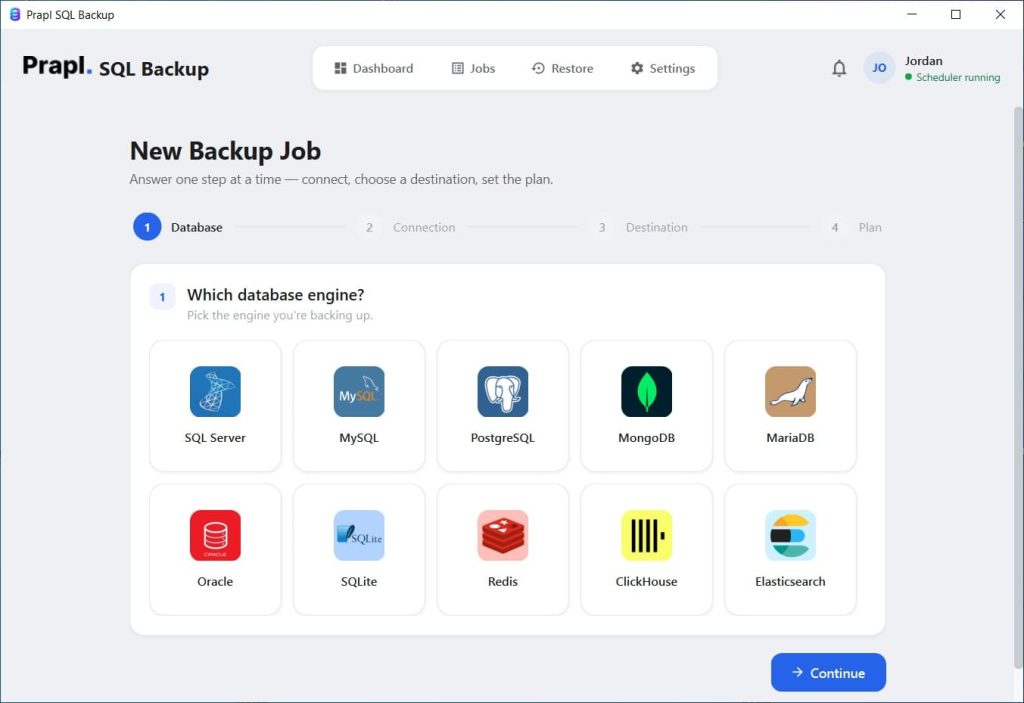
Download the SQL database backup tool, launch it, and select the type
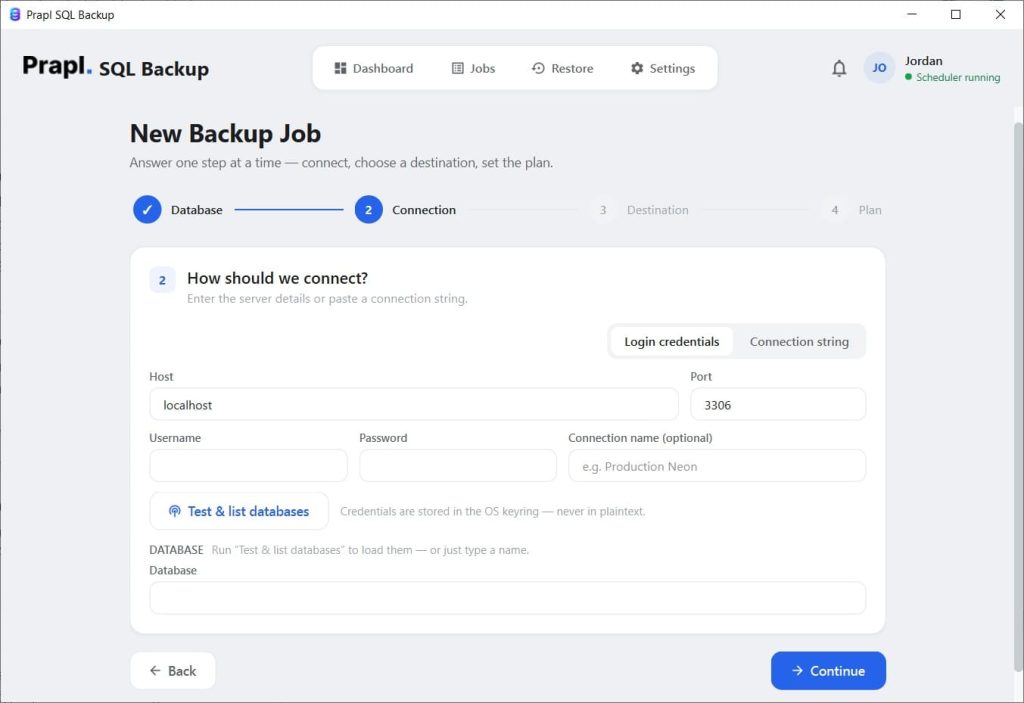
Then, enter the credentials as required
After this, choose the backup method from the given options and pick the storage location

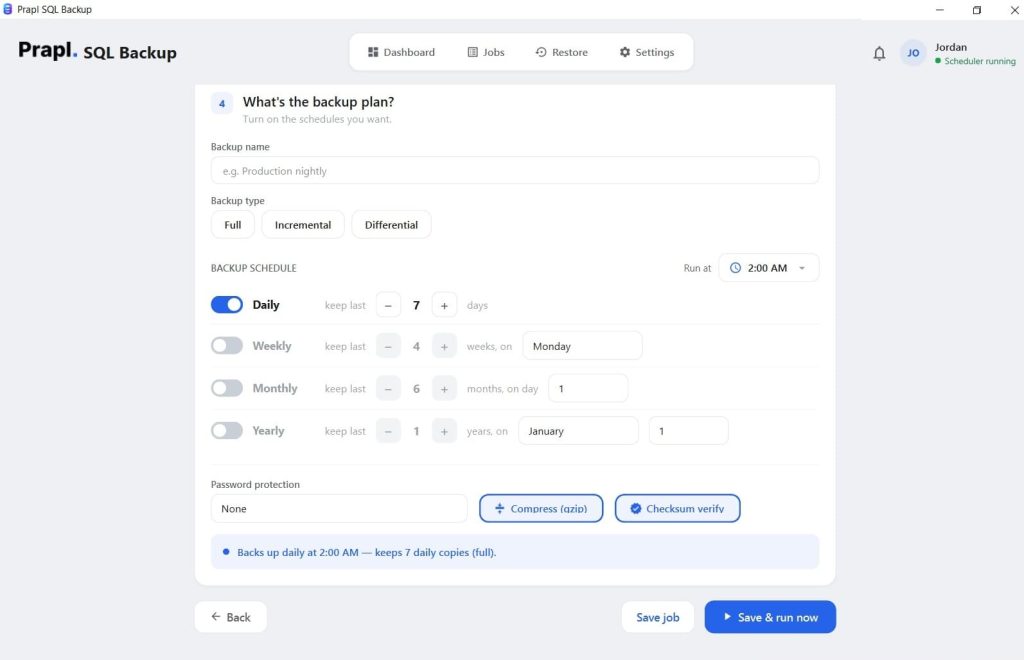
Schedule the backup, hit the Start and Run button. It will immediately start the database backup, you will get a notification when it is done.
Conclusion
An effective database backup strategy involves much more than simply creating a copy of your data.
Companies can put their data at risk when they make common database backup mistakes, such as storing backups on the same server, relying only on manual backups, choosing the wrong backup frequency, or skipping restore tests.
The best approach is to build a backup process around your actual recovery needs. Automate regular backups when necessary, store copies separately, set a practical retention policy, protect your backup data, and regularly test your backups to make sure you can restore them when you need them.