 Abeer Arora
After deciding what to back up, you must be wondering where you should keep your database backup. Keeping backups on your own infrastructure gives you more direct control and quick access. On the other hand, cloud storage gives you an off-site copy that doesn’t depend entirely on your local PC. So, for businesses that want both types of protection, choosing a database backup platforms that supports on-premises and cloud storage can give more flexibility.
Backup platform options for a 900TB mixed on-prem environment
byu/ExplanationFlashy501 inBackup
But not every backup platform offers the same storage options, and simply supporting “cloud backup” doesn’t tell you how the platform actually handles your data.
Therefore, before choosing a solution, you should look at supported destinations, automation, security, restoration, retention, and overall control.
What Do On-Premise and Cloud Backup Mean?
On-premise backup: Businesses choose database backup platforms that support on-premise backup. In simple words, a company stores backup data within infrastructure it controls. For Examples:
- PC
- local server
- NAS/network storage
- internal storage infrastructure
Benefits:
- Direct control
- Potentially faster local recovery
- No dependency on cloud connectivity for local access
Limitations:
- Hardware can fail
- Physical incidents can affect local copies
- Storage capacity needs to be managed
Cloud backup: Here, backup copies go to cloud infrastructure operated by a provider.
Benefits:
- Off-site storage
- Scalability
- Less dependence on local hardware
Considerations:
- Ongoing storage costs
- Internet dependency
- Provider security
- Data access
- Compliance requirements
Why Use Both On-Premise and Cloud Storage?
Both backup storage has its own benefits and some disadvantages. Therefore, businesses can opt for a hybrid approach. In short, a business might keep a local copy for faster access and maintain another copy in cloud storage for additional protection if the local environment becomes unavailable. Or simply automate the process without any database backup mistakes.
So, in case of any malware attacks or ransomware attacks, your business data will still be protected.
If you are keeping one backup copy locally and another copy on the cloud storage. In situations like the failure of the production server, local backup may provide you with quicker recovery.
But if the local environment suffers a serious incident, then cloud backup provides another recovery location.
Hence, it would be a smart choice to go for a hybrid option.
What Should You Look for in a Database Backup Platform?
Before considering any database backup platform, it is worth asking the following questions:
- Multiple Storage Locations: Does the software send backups to both local and cloud destinations?
- Automated Scheduling: Can the business schedule recurring backups with the given platform?
- Multiple database support: Can the platform manage automated backups for multiple databases?
- Backup types: Also, make sure the database backup platform supports full, Incremental, and Differential backups.
- Retention: Additionally, look for if you can decide how long backup copies remain available on that platform.
- Backup monitoring: The completion of the backup notifications are as important as other factors. Hence, you should check if you can see whether scheduled jobs succeeded.
- Restore capabilities: Remember this is the most important question to consider. Backup is not worthwhile if you can restore the data whenever needed. Therefore, you must know how easily you can restore a database from local or cloud storage.
- Security: Make sure to discuss authentication, access control, encryption where appropriate, secure credentials, and cloud provider security.
- Ease of use: The software should be easy to use. It is quite important for small businesses without dedicated IT teams.
Database Backup Platforms That Support On-Premise and Cloud Storage
1. Prapl SQL Backup Tool: This application provides management for scheduling and tracking backup operations in addition to encryption for data in transit and at rest. For businesses looking for a Windows desktop solution, this program provides an option for managing automated database backups with local and remote/cloud storage capabilities. Some businesses prefer a backup architecture that minimizes reliance on intermediary infrastructure and keeps the backup process under their direct control. As a result, this tool is ideal for these kinds of organizations to relieve their burdens.

2. Acronis Cyber Protect: To protect companies from contemporary cyberthreats, Acronis Cyber Protect is an integrated solution that combines powerful cybersecurity, data protection, and endpoint management. It streamlines IT processes, improves system efficiency, and guarantees complete protection across physical, virtual, and cloud environments by combining backup and anti-malware capabilities into a single platform.
3. HPE Zerto Software: Organizations can manage backup, recovery, and data mobility across hybrid and multicloud environments with HPE Zerto Software, a data protection and disaster recovery solution. Moreover, this tool helps businesses maintain operational resilience and comply with regulations by reducing downtime and data loss.
4. Synology Active Business Backup: Synology Active Backup for Business is a program that centralizes and controls backups to a Synology NAS device from Macs, PCs, servers, and virtual machines. Active Backup for Business is a unified backup solution that lets users create and keep track of all backup and restore operations from a single console.
5. Microsoft Azure Backup: This Microsoft cloud-based program offers backup and recovery options for data kept in the cloud or on-site. Automated backups, recovery points, and long-term retention policies for files, folders, virtual machines, apps, and workloads are all made possible by the software.
6. DELL PowerProtect Data Manager: By enabling automated data backup, recovery, and replication, the Dell program helps businesses protect vital information and maintain business continuity. For businesses handling massive amounts of data, the software is intended to simplify and expedite data security procedures, lower complexity, and boost operational effectiveness.
Best Automated Solution for an On-Premise and Cloud Backup Option
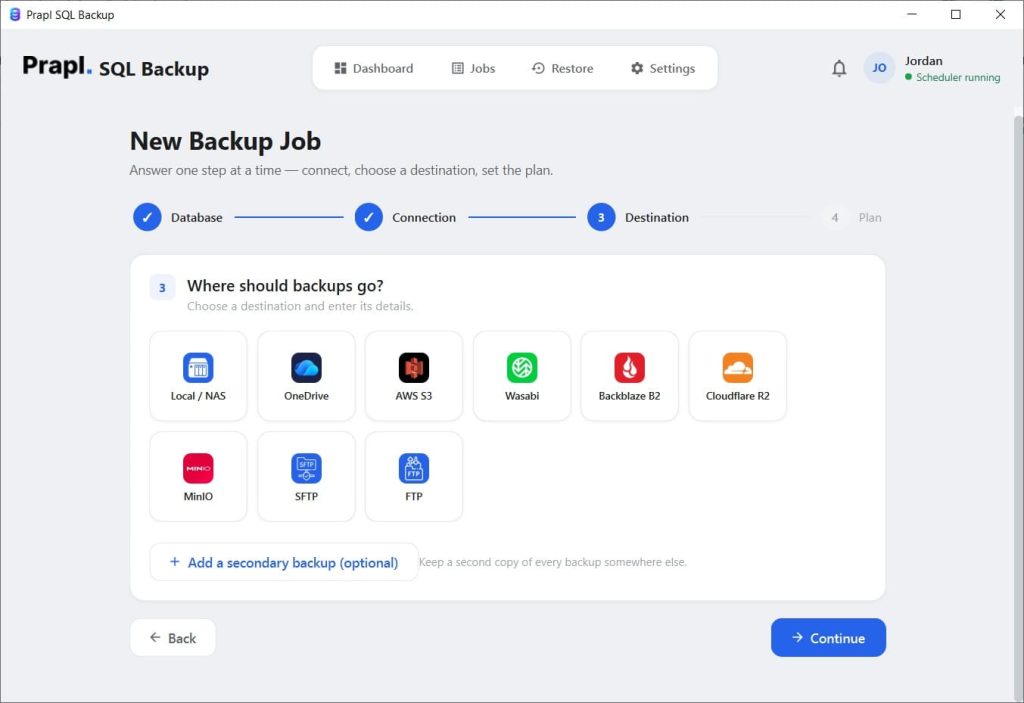
Using Prapl SQL Backup Tool, a Windows-based application, you can now opt for any option to save your backup copy. Choose on premise storage location if you need quick local access, or you already maintain local storage. Or go for cloud storage destinations if you need an off-site copy, you need scalable storage, or you want remote access.
Quick Steps to Use this Tool
Download, install, and launch this SQL backup software, then choose the database type.
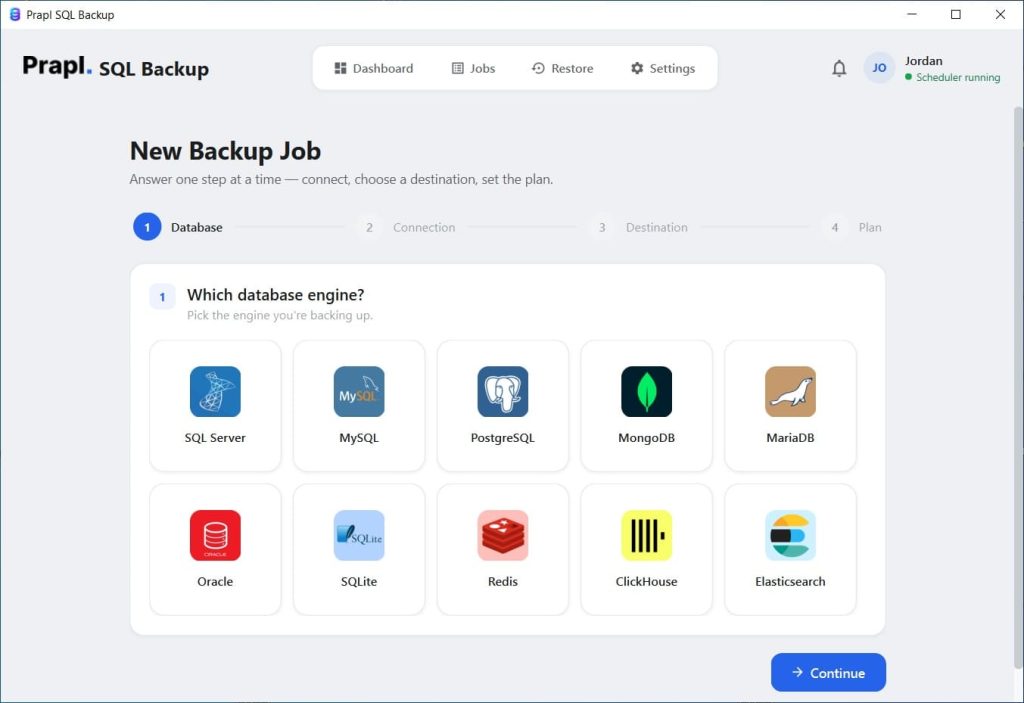
Secondly, add your credentials, and then click on Test Connections.

Just after this, select the destination path to save your backup copy.
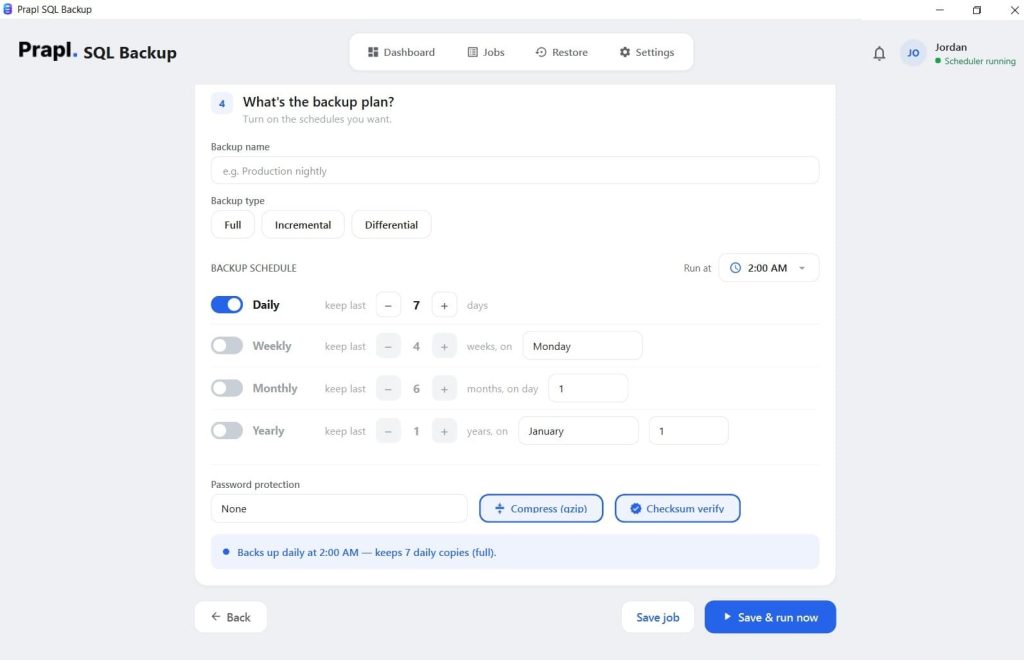
Lastly, set the backup, encryption, retention, and RUN the backup. This tool will automatically initiate the backup process; you will be notified when the process is done.
Conclusion
Selecting a database backup platforms involves more than just choosing between cloud and on-premises storage. Businesses should think about how frequently they back up their databases, where they want to keep recovery copies, how they handle security and retention, and how simple it is to restore their data when something goes wrong.
Thus, a reasonable balance between quick local access and an extra off-site recovery copy can be achieved for many businesses by utilizing both on-premise and cloud storage. The ideal platform should minimize the need for tedious human labor while making this setup simple to maintain.
However, it is better to look for benefits and risks before choosing any option. Ultimately, the best database backup platform is the one that fits your infrastructure, recovery requirements, and day-to-day workflow.