 Abeer Arora
Quick Answer: TimescaleDB runs on top of PostgreSQL, so backing it up is essentially the same as choosing how you want to backup PostgreSQL database. You have two practical methods to backup TimescaleDB database:
- Logical backup (pg_dump/pg_restore): Exports your database into portable dump file. It is simple and works well for small databases but it is fully manual and starts to struggle as your data grows.
- Professional software for automated backup: A specialised backup program that plans backups, controls retention and sends copies to local or cloud S3/FTP/SFTP without any storage limits. No matter how large your database is. No scripting required.

We will describe both approaches in this article along with detailed instructions. What each one does, exactly how to run it and when to choose it. In order to choose the best strategy for your system and protect your time series data.
Table of Contents
- What is TimescaleDB?
- Why You Should Back Up TimescaleDB Database?
- Prerequisites Before Backing Up Your TimescaleDB Database
- How to Backup TimescaleDB Database Manually and Automatically?
- Method 1. Logical Backup with pg_dump
- Method 2. Automated TimescaleDB Backup with Prapl Software
- Advantages of Using TimescaleDB Backup Software
- Comparison Table: Manual vs Automated Backup Solution
- Concluding Words
- Frequently Asked Questions
What is TimescaleDB?
An open-source time-series database called TimescaleDB was developed as a PostgreSQL extension. Instead of replacing PostgreSQL, it enhances it. Adding special table type called hypertable that automatically partitions time-series data into smaller chunks based on time.
TimescaleDB can ingest and query enormous amounts of time-stamped data due to its design. While still providing you with complete SQL, joins, indexes and the entire PostgreSQL ecosystem, IoT sensor readings, application metrics, financial ticks and monitoring logs are all much faster than vanilla PostgreSQL.Because PostgreSQL is the underlying database, everything continues to work, including your backup tools and drivers.
Why You Should Back Up TimescaleDB Database?
Time-series data behaves differently from standard application data, backups are crucial. In a normal database, lost record can often be re-entered by hand. In TimescaleDB, every row is tied to moment that will never repeat. Once it is gone, there is nothing to recover. That single fact reshapes how you should think about protecting a TimescaleDB database:
- Your Data is One-Way Street: Time-series records are captured live and can not be regenerated after that fact. A backup is the only way to return to moment when your data was still intact.
- The Stakes Rise with Your Ingest Rate: TimescaleDB excels because it can handle enormous amounts of incoming data, but the faster you ingest, the more you risk losing in single bad hour. The recentness of your last backup is much more significant in a high-throughput database than in a slow-moving one.
- Small Errors Grow Quickly: Before anyone notices, months’ worth of data may be silently deleted by single incorrect DELETE, failed migration or incorrectly set retention policy. The undo button is a copy that can be restored.
- TimescaleDB Stores Data in Chunks: If chunk gets corrupted, the error does not appear immediately and problems may arise later when accessing the data. Therefore, taking backups is important. It will help you recreate the full image instead of simply individual bits with clean backups.
- Downtime Hits Twice: When metrics or the monitoring database goes down then you can lose stored data and stop collecting fresh data at the same time. Fast & reliable restorations instantly reduce the double blind window.
- Retention Rules Are Required: Verified historical documents have been mandated for years in number of sectors. Backups ensure the data is actually retained and available when required.
- Freedom to Experiment: With dependable backups, you can trial upgrade, schema change or new feature on restored copy. Treating production as something you can always roll back to.
Prerequisites Before Backing Up Your TimescaleDB Database
- A running TimescaleDB instance-self-hosted PostgreSQL with the TimescaleDB extension enabled.
- Installed PostgreSQL client tools, namely psql, pg_dump, and pg_restore. Install them on the backup computer.
- Matching Versions: Take note of your TimescaleDB and PostgreSQL versions.
- Database Credentials: An individual with adequate rights
- Make sure your backup destination has enough free disk space because time-series datasets can be rather large.
How to Backup TimescaleDB Database Manually and Automatically?
There are two approaches to create TimescaleDB backup. Manual method using command-line tool and automated backup tool that handles the whole process for you. Let’s start them one by one.
Method 1. Logical Backup with pg_dump
A logical backups exports your database into a single file you can restore later.
-
-
-
-
- Run this from command line.
pg_dump -Fc -f tutorial.bak -d tutorial
Replace tutorial with your database name. The -Fc flag creates compressed custom-format file which is the format TimescaleDB’s restore process expects. - Copy the .bak file offsite.
- Restore when you need it.
- Run this from command line.
CREATE DATABASE tutorial; \c tutorial CREATE EXTENSION IF NOT EXISTS timescaledb; SELECT timescaledb_pre_restore(); -- run the actual restore from a shell \! pg_restore -Fc -d tutorial tutorial.bak SELECT timescaledb_post_restore(); -
-
Limitations of Manual Backup Method
This method works fine but it comes with real limitations you should know before relying on it:
-
- No Automatic Backup: There is no built-in scheduling. You have to run it yourself.
- Fails on Large Databases: pg_dump is quick for small-scale databases but when your data grows then it can fail or time out midway.
- Storage is Entirely Your Problem: You have to decide where dumps go, copy them offsite yourself and delete old ones manually. There is no automatic retention.
- No Built-in Encryption: There is no automated way to protect and shrink backup. If your dumps contain sensitive data, you have to encrypt them yourself.
- No Monitoring or Alerts: If backup fails, you will not know until the day you actually need to restore.
-
Method 2. Automated TimescaleDB Backup with Prapl Software
The shortcomings in the manual solution are filled by a specialised backup tool. One such tool is the Prapl SQL Backup Tool. It connects to your TimeScaleDB database and automates the entire procedure. Once you set up schedule like hourly, daily, weekly, monthly or custom, it will automatically create backup of your database. The software gives the option to choose backup type i.e. Full or Incremental. It offers various saving options such as local drive, Amazon S3, cloud storage, FTP/SFTP server and many more to store backup files.
Best of all, there are no storage limits. No matter how large your database grows, you can keep backing it up. It is your database and storage entirely under your control. Before storing your backup file, this program will encrypt and compress it to protect your private data. With this utility, you can also restore your TimescaleDB database when you need it.
You can download 15 days free trial version and create TimescaleDB database backup.
Steps to Backup TimescaleDB Database Automatically
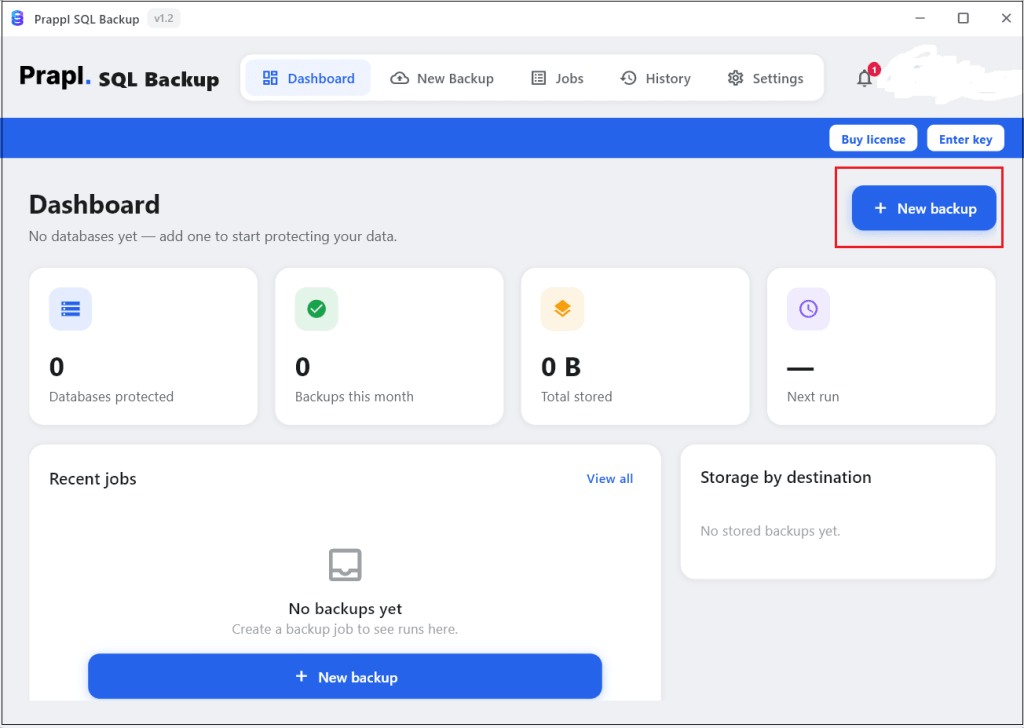
- Run the tool on your Windows PC and click on + New Backup.
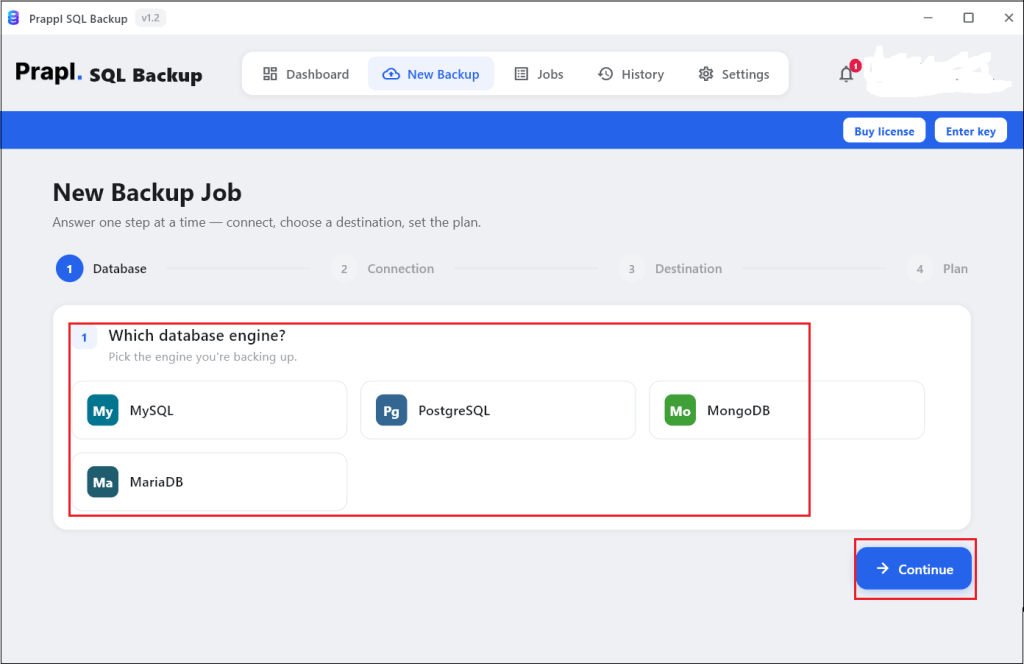
- Choose PostgreSQL database engine and click Continue.
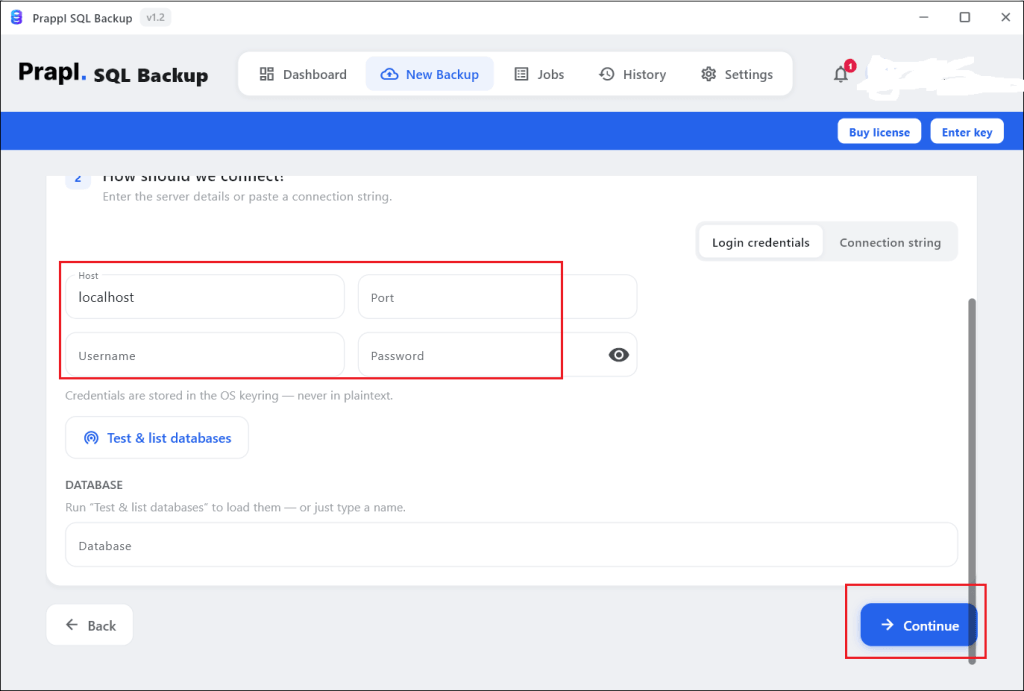
- Enter TimescaleDB database credentials such as localhost, port, username and password. After that, click on Test Connection to verify it.
- Choose location where you want to save backup file and tap on Continue.
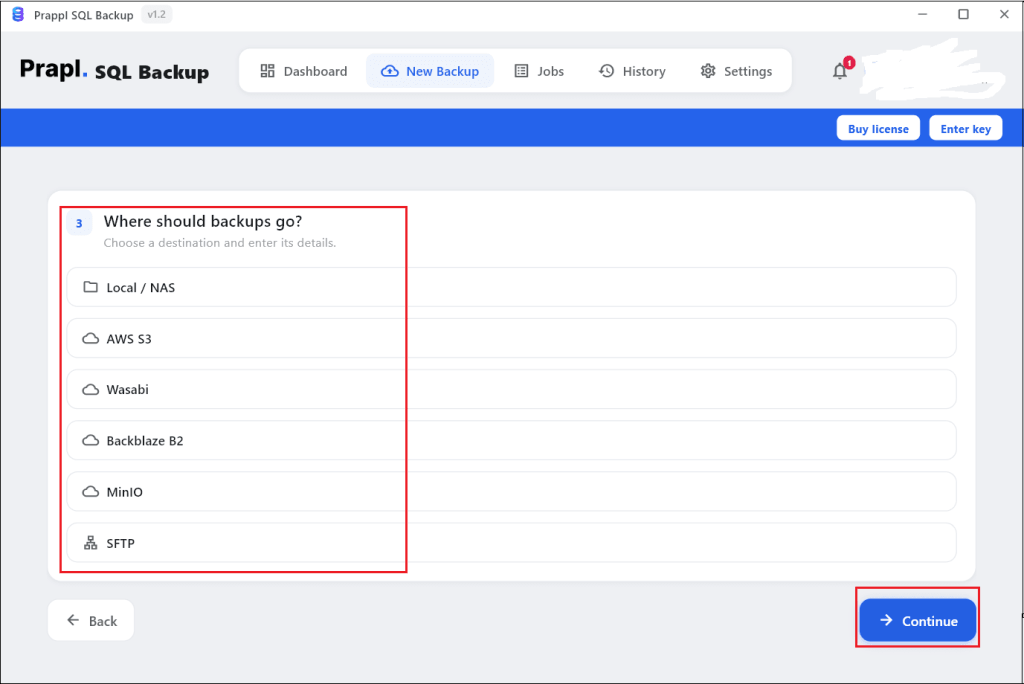
- Configure backup settings and click on Save & Run Now button.
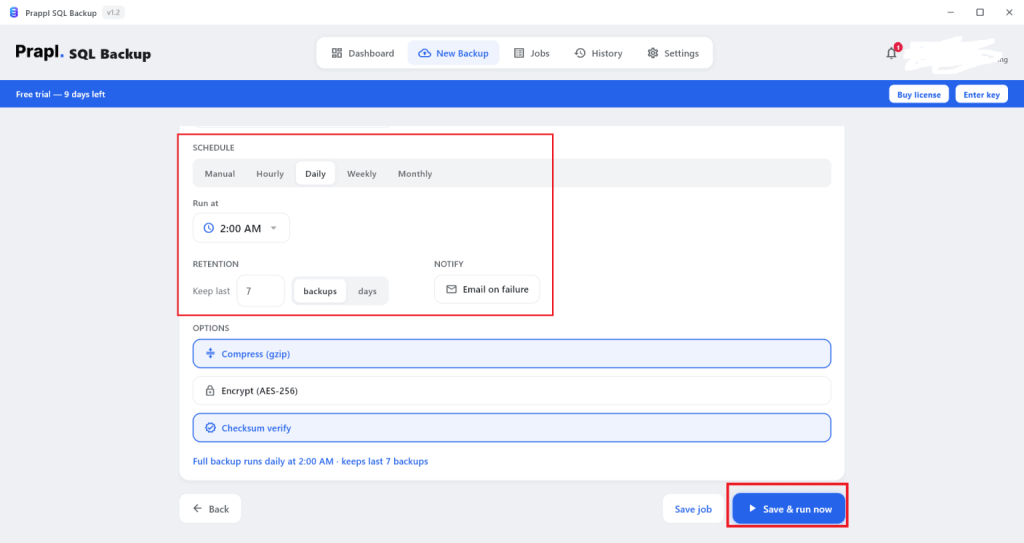
The software will start creating backup of TimescaleDB database as based on scheduled backup settings. Once the process is complete, you will get email alert.
Advantages of Using TimescaleDB Backup Software
- Automatic scheduling: The program will automatically schedule backups to run on an hourly, daily, weekly, or monthly basis. No forgotten runs, no cron.
- Save Anywhere: You can save the backup of TimescaleDB database on your local drive, NAS, Amazon S3, SFTP server, or cloud storage. The same backup can even be simultaneously pushed to several places.
- Retention Policy: Automatically delete old backups based on preferred retention policies. Thus storage stays clean without you managing it manually.
- AES-256 Encryption: Backups are encrypted before they are stored. Thus, data is encrypted both during transmission and storage. You alone have the key.
- Compression: Streaming gzip speeds up uploads and saves storage by decreasing backup files by 70–80%.
- Backup History and Email Alerts: Every run is documented and you do not need to open the program to get success or failure alerts.
- Simple Restore: Integrity tests that detect corruption can also be used to recover from encrypted, verified backups in single step.
Comparison Table: Manual vs Automated Backup Solution
| Feature | Manual pg_dump | Prapl SQL Backup Tool |
|---|---|---|
| Scheduling | Cron jobs you manage | Built-in (hourly/daily/weekly/monthly) |
| Setup Effort | Write and maintain scripts | Set up once |
| Storage Destination | Manual copy | Local, NAS, Amazon S3, FTP, SFTP, Cloud, etc. |
| Storage Limits | Limited by your own disk | No storage limits |
| Encryption | Do it yourself | AES-256 encryption |
| Retention | Delete old files yourself | Automatic |
| Compression | No | Yes |
| Restore | Manual scripts | Easy steps |
| Monitoring & Alerts | Build you own | Built-in history + email alerts |
Concluding Words
TimescaleDB database backups are necessary for protecting critical time-series data against unforeseen data loss. In this post, we have mentioned both manual and automated methods to backup TimescaleDB database. Native PostgreSQL utilities like pg_dump is reliable option for manual backup. For organizations that require scheduled backups, encryption and flexible storage destinations, an automated TimescaleDB backup solution offers more efficient long-term approach. You can choose any method that is most suitable for you.
Frequently Asked Questions
Q1. Can I backup TimescaleDB database with regular PostgreSQL tool?
Ans. Yes. TimescaleDB is PostgreSQL extension, so you can use native pg_dump and pg_restore.
Q2. Can I restore backup to newer TimescaleDB version?
Ans. Yes. Manual method does not allow you to restore backup to newer version but the software enables you to restore TimescaleDB backup to newer version or any other platform.
Q3. Is it possible to create TimescaleDB backup for free?
Ans. Yes. Prapl tool for TimescaleDB gives you 15 days free trial version that allows you to take backup without any limitation.
Q4. Will database performance impacted by TimescaleDB backups?
Ans. Backup operations may use network, CPU, memory and disk I/O resources. The impact on database performance is reduced when backups are performed during times of low activity.
Q5. What information is required in order to create backup connection to the TimescaleDB database?
Ans. It is necessary to have the database host, port, database name, username and password. These credentials allow access to the database.
Q6. I have 20 GB database. Can I back it up?
Ans. Yes. The manual pg_dump method is fine for small databases but if your database is around 20 GB then backing it up with the software is much easier. It handles database if this size smoothly.