 Abeer Arora
Summary: You don’t have to think about running daily automated backups yourself – that’s what the folks at DigitalOcean do every day (and helplessly enough for a lot of us). This means when we’re working with DigitalOcean managed databases we are already covered as long as our team can access the boxes. Unfortunately for some of us though there comes a time when the question “can we download these backups” or “would those backups survive an apocalypse if all hell broke loose?” arise from our more pragmatic natures. And while the answers to these might be somewhat unsurprisingly “no” for native options this guide explains how to back up DigitalOcean Managed databases on your own terms and in a way that ensures you get the portable copies you want and know exactly where they are and who controls them.

Whether you need to backup PostgreSQL database, MySQL or MongoDB instance, you’ll find everything you need here along with the right commands to make sure you’ve got automated offsite copy done.
Table of Contents
- What is DigitalOcean Managed Databases?
- What DigitalOcean’s Native Backups Actually Give You?
- Why is DigitalOcean Managed Databases Backup Important?
- How to Backup DigitalOcean Managed Databases?
- Method 1. Automated DigitalOcean Backups and Restore
- Method 2. Use Native Database Tools
- Why Manual Backup Methods Fall Short
- Method 3. Use Professional Backup Software
- Why Choose DigitalOcean Managed Databases Backup Software?
- Native vc CLI vs Dedicated Tool : Quick Comparison
- Concluding Words
- FAQs
Understanding DigitalOcean Managed Databases
DigitalOcean Managed Databases is a cloud service from DigitalOcean that hosts, manages and maintains databases. Instead of installing, configuring, patching, monitoring and maintain database servers manually, DigitalOcean takes care of the underlying infrastructure. DigitalOcean Managed Databases supports several popular database engines such as PostgreSQL, MySQL, MongoDB and Redis.
If you are building a website or an application and need a database to store its data. You have two options:
1. Manage the Server Yourself
- Install the database
- Configure security
- Set up backups
- Handle updates and maintenance
2. Use DigitalOcean Managed Databases
DigitalOcean handles all these tasks for you
- You simply use the database
- No worries about infrastructure management
What DigitalOcean’s Native Backups Actually Give You?
Every DigitalOcean Managed Databases cluster gets daily automated backups included in the basic price with no setup required. Point-in-time recovery (PITR) is available on PostgreSQL and MySQL, letting you restore to specific moment rather than just the last daily snapshot.
That’s genuinely useful bu it’s built around three constraints that matter:
- 7-day Retention: Native backups cover a rolling seven-day window. If you discover a problem on day eight or need copy for compliance requirement measured in months or years, the native backup can not help.
- You can Not Download Them: There is no export button and no API endpoint that hands you a backup file. Native backups only restore inside DigitalOcean to a new cluster. You can not move that data to another cloud from native backkup.
- They Live in the Same Account: Your backups sit in the same DigitalOcean account as the database they protect. If that account is suspended, compromised or inaccessible during an incident, both the database and its backups are out of reach at the same time.
Why is DigitalOcean Managed Databases Backup Important?
Although DigitalOcean provides automated protection features but additional backups remain important for several reasons:
- Protection against accidental data deletion.
- Recovery from application errors and corrupted records.
- Long-term data retention beyond standards backup policies.
- Database migration to another cloud provider or on-premises server.
- Compliance and auditing requirements.
- Creating development, staging and testing environments.
- Extra protection against ransomware and security incidents.
How to Backup DigitalOcean Managed Databases?
There are multiple ways to create DigitalOcean Managed Databases backup. Some users depend on the platform’s automated backup system while other use native database utilities such as pg_dump, mysqldump and mongodump. Organizations that require more data protection use dedicated backup software. With these tools, you can set up automatic creation of backups, run them according to predefined schedule, encrypt them, and store them at your selected backup location without manual intervention. Here, we will discuss all these methods in detail.
Method 1. Automated DigitalOcean Backups and Restore
DigitalOcean automatically creates backups for managed database clusters. These backups are designed to help users recover their databases when data loss, corruption and service issues occur. The automated backup process runs in the background without interrupting database operations. DigitalOcean manages the backup infrastructure, storage and restoration process. Use this for fast, routine recovery inside the 7-day window.
Steps to Use Automated Backups and Restore
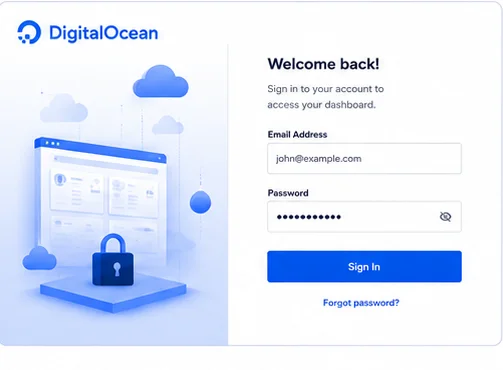
- Sign in to your DigitalOcean control panel.
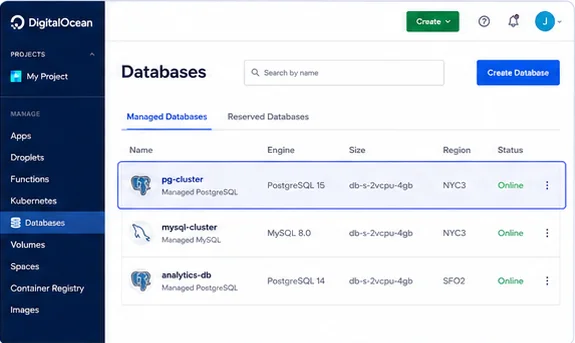
- Go to Database and select the managed database cluster that you want to protect.
- Backups are already running daily. No action needed to enable them.
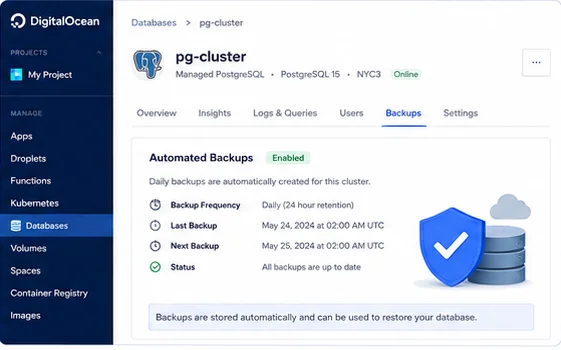
- To recover, open the cluster’s Actions menu and choose Restore from backup. For PostgreSQL and MySQL, you can pick the latest backup or specific point in time.
- Confirm the new cluster name and restore.
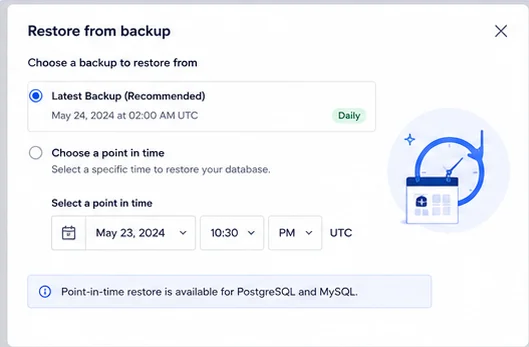
Important Point: This restore only to a new DigitalOcean cluster and only within the retention window.
Method 2. Use Native Database Tools
Making backups with database tools is another popular strategy. The database engine that powers your DigitalOcean managed database cluster will dictate what tool is used for backups.
PostgreSQL Backup – pg_dump
pg_dump "postgresql://doadmin:YOUR_PASSWORD@your-host:25060/defaultdb?sslmode=require" \
--no-owner --format=custom \
--file="do-postgres-$(date +%F).dump"
MySQL Backup – mysqldump
mysqldump --host=your-host --port=25060 \
  --user=doadmin --password=YOUR_PASSWORD \
  --ssl-mode=REQUIRED \
  --single-transaction --routines --triggers \
  defaultdb > do-mysql-$(date +%F).sql
MongoDB Backup – mongodump
mongodump --uri="mongodb+srv://doadmin:YOUR_PASSWORD@your-host/defaultdb?tls=true&authSource=admin" \

--archive="do-mongo-$(date +%F).archive" --gzip
Once you have any of these files, upload it to storage you control.
Automating an Offsite Copy
The real value of native tools comes from scheduling them. Here is the pattern: dump, compress, ship to an external bucket, clean up. Put this ina small script and run it from cron on lightweight Droplet with network access to your database.
#!/bin/bash
set -euo pipefail
TIMESTAMP=$(date +%F-%H%M)
FILE="do-postgres-$TIMESTAMP.dump"

pg_dump "postgresql://doadmin:YOUR_PASSWORD@your-host:25060/defaultdb?sslmode=require" \
  --no-owner --format=custom --file="$FILE"

# Ship to a bucket you control (Spaces/S3 via the AWS CLI or s3cmd)
aws s3 cp "$FILE" "s3://your-bucket/db-backups/$FILE" \
  --endpoint-url https://your-region.digitaloceanspaces.com

rm -f "$FILE"
Why Are Manual Backup Techniques Not Suitable?
Manual backup techniques are effective in small environment but when infrastructure expands, they can be challenging to maintain. Database administrators frequently have to keep track of backup schedules, confirm successful completion, rotate outdated files, control storage usage and keep eyes on recovery readiness. Missing just one backup cycle could leave significant recovery gaps as businesses become more and more reliant upon having this data available with increasing database sizes. As a result, businesses switch to automated backup systems that increase consistency and decrease human intervention.
Method 3. Backup DigitalOcean Managed Databases to PC
By automating the complete backup process, Prapl SQL Backup Tool makes database security easier. It can save time and work by directly creating backups of DigitalOcean Managed Databases. Simply set up backup tasks once and then the program will manage their execution on its own. You will have the flexibility to save your database to different locations for long-term to keep them for legal and compliance purposes.
You can download the software using the buttons below and following the instructions step-by-step will allow you to backup DigitalOcean Managed Databases.
Steps to Create DigitalOcean Managed Databases Backup Automatically
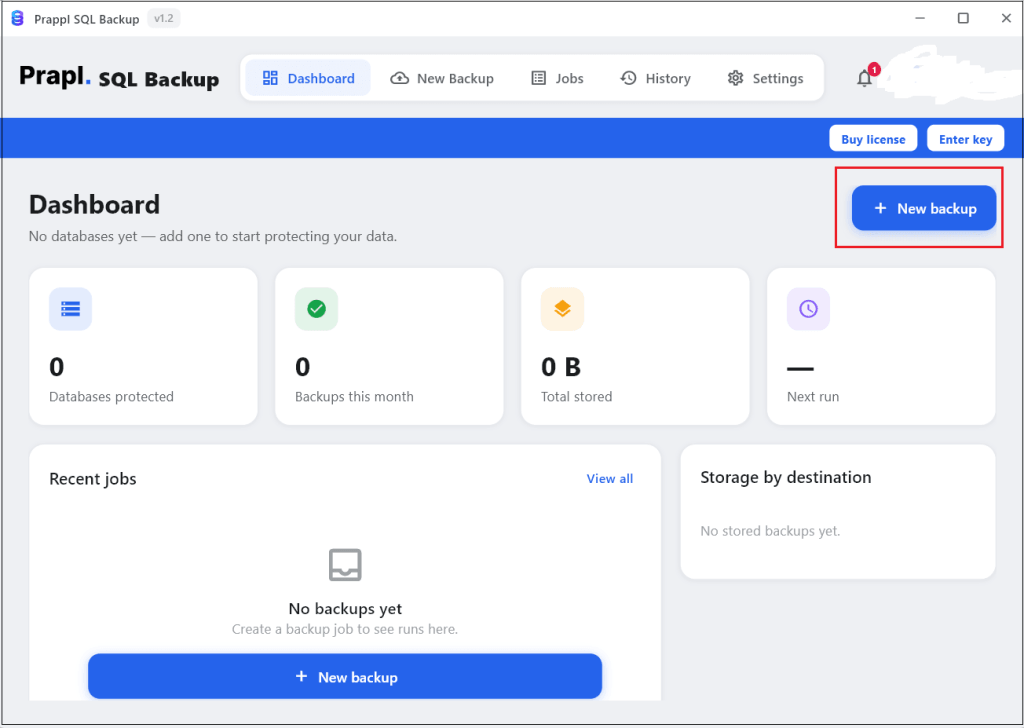
1. Run the SQL Backup Tool on your system and click on + New Backup option.
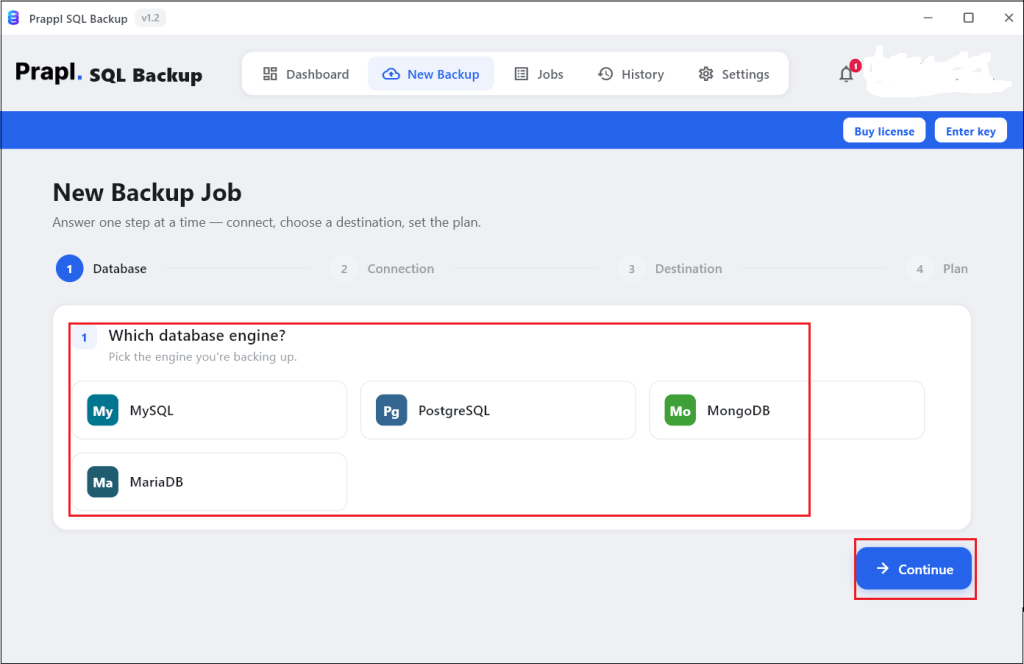
2. Choose the relevant database type for your DigitalOcean Managed Databases engine and click on Continue.
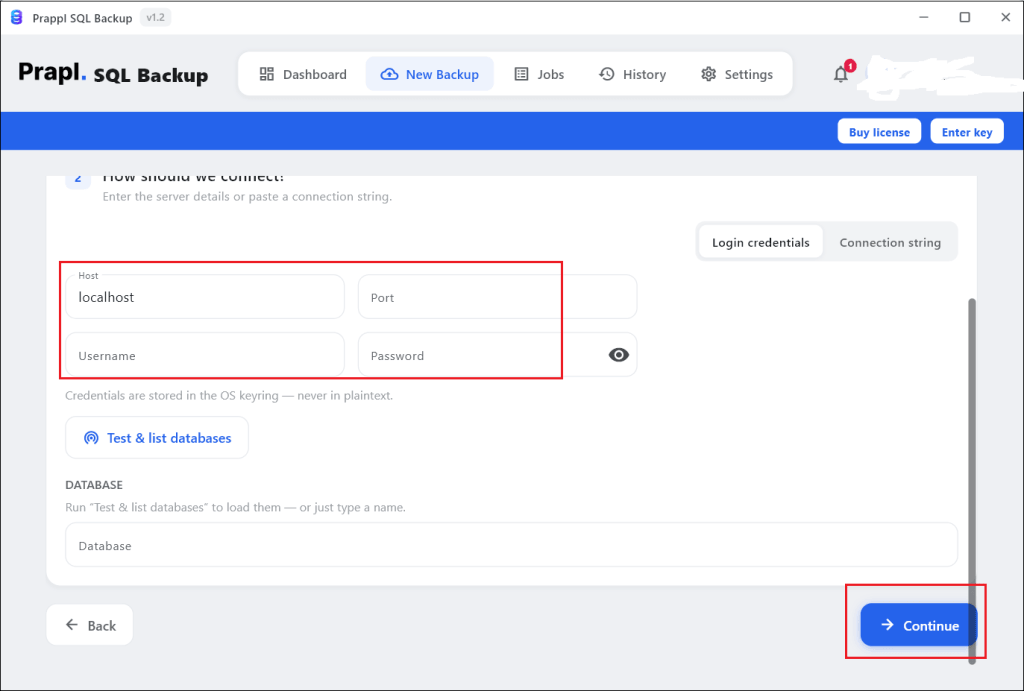
3. Enter your DigitalOcean Managed Databases credentials to set up the connection.
4. Once the connection is established, choose location to save backup file.
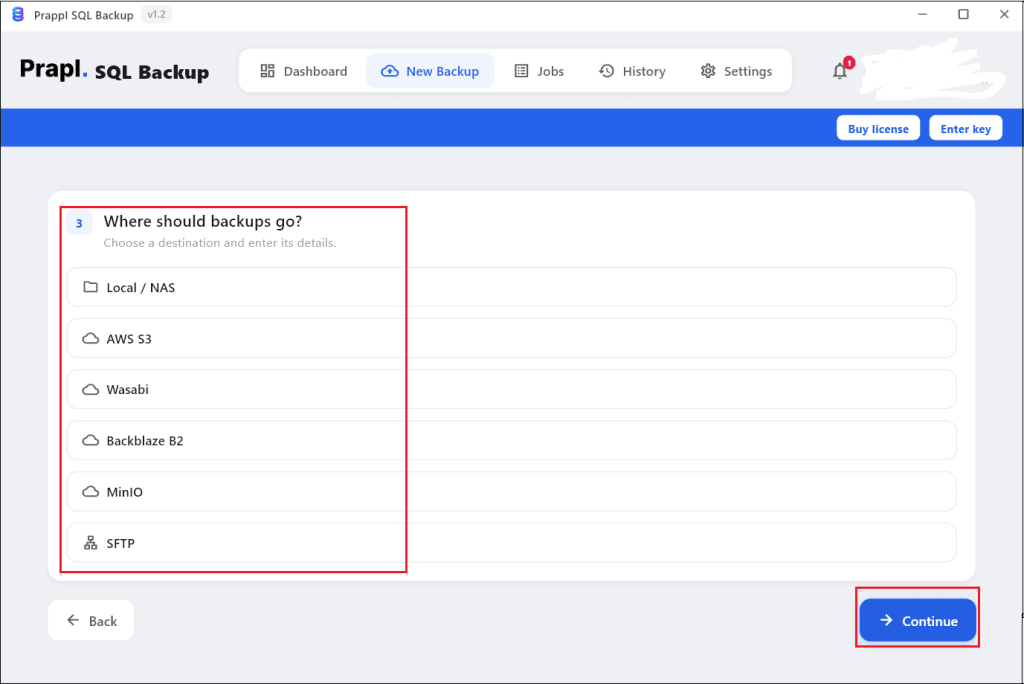
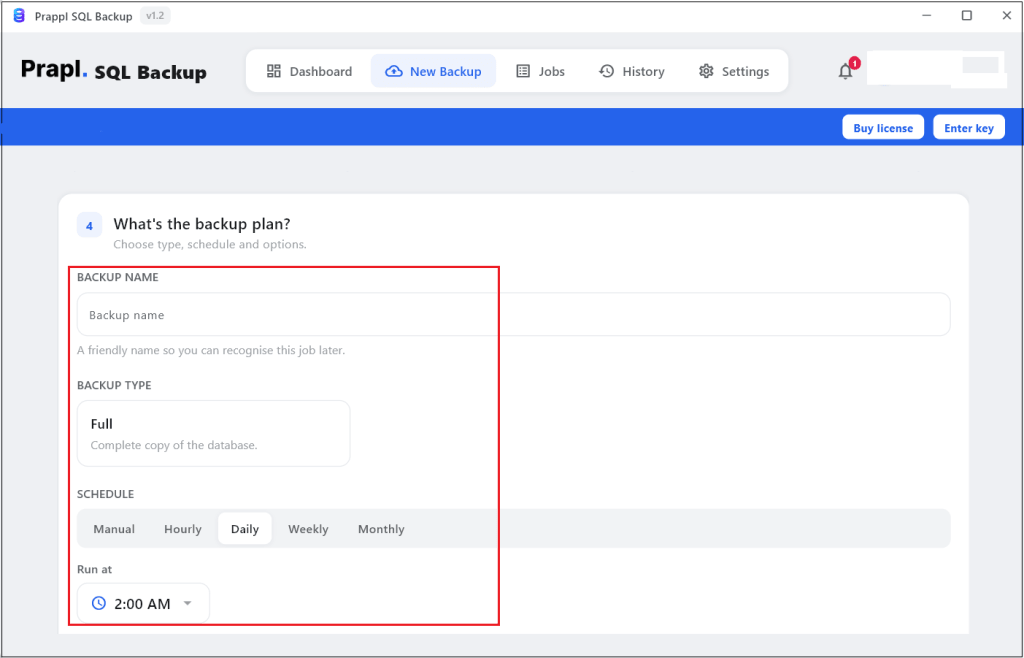
5. Configure Backup settings such as Backup type, Schedule, Retention and Run time.
6. After that, click on Save & Run Now button to begin the bakup process.
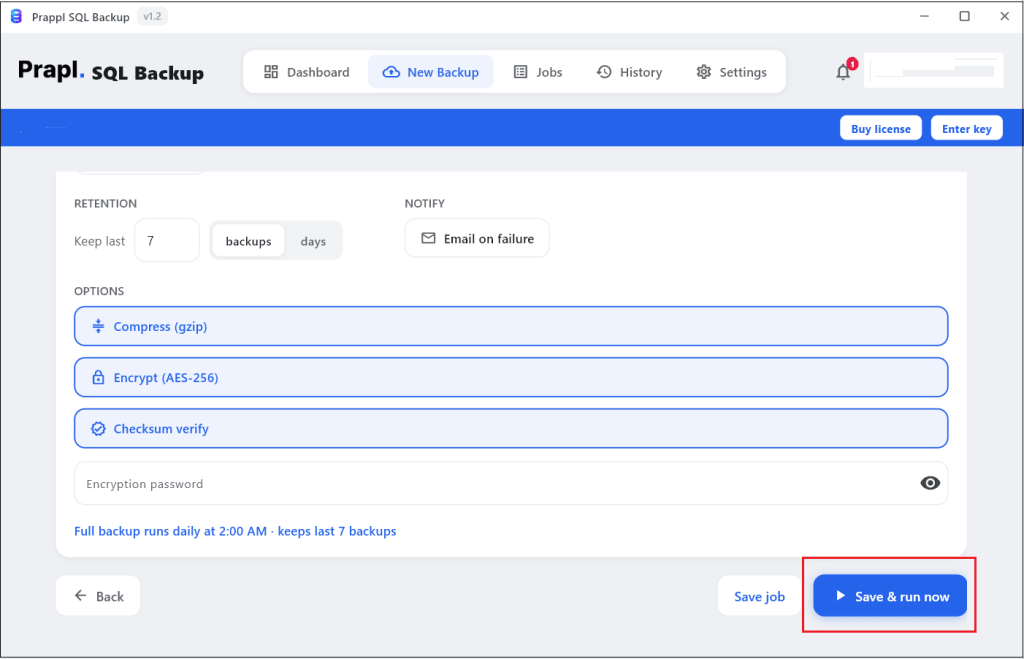
Once the process completes, you will be notified by email alert. Go to the destination location and check your database.
Why Choose DigitalOcean Managed Database Backup Software?
A dedicated backup solution provides several advantages over manual processes:
- Several options such as hourly, daily, weekly and monthly for automated backup scheduling.
- Use AES-256 encryption method to encrypt backup before sending to the storage location.
- Retention rules allow you to remove out-of-date backup copies as you see fit.
- Multiple destination location such as local drive, NAS devices, Amazon S3, FTP and SFTP to save backup in different location.
- Automatically compresses backup file while creating and reduces file size without slowing down the process.
- Supports all major databases available on DigitalOcean Managed Databases including PostgreSQL, MySQL and MongoDB.
Native vc CLI vs Dedicated Tool : Quick Comparison
| Feature | Automatic Built-in Backup | Command Line Dump | Prapl SQL Backup Tool |
|---|---|---|---|
| Setup Effort | None (built-in) | Some (Install the CLI) | Low |
| Automated scheduling | Automatic (Daily Only) | Manual | Yes |
| Portable File You Own | No | Yes | Yes |
| Stored Off Platform | No | Yes | Yes |
| Encryption You Control | No | If you encrypt it yourself | Yes |
| Restore Elsewhere | No | Manual | Yes |
| Failure Notification | NO | Manual | Built-in |
| PITR | Postgre/MySQL only | No | Built-in |
Conclusion
DigitalOcean Managed Databases provide built-in backup facility for database protection. However, only relying on a single recovery mechanism is not sufficient for every organization. Additional backups can help with long-term retention, compliance, migration and disaster recovery planning.
In this guide, we provided three methods to backup DigitalOcean Managed Databases including automated backups, native database utilities and professional backup software. All methods will help you to implement a consistent backup strategy to protect valuable business data.
Frequently Asked Questions
Ques 1. Can I backup MySQL databse running on DigitalOcean?
Ans. Yes. You can use MySQL native utilities such as mysqldump or automated MySQL backup tool to create independent backups.
Ques 2. Should I encrypt database backups?
Ans. Yes. Encryption helps to protect sensitive business and customer information from unauthorized access.
Ques 3. How long does DigitalOcean keep database backups?
Ans. Backup retention depends on the database service and plan. Check your cluster settings for the current retention period.
Ques 4. Is it possible to store backup to another server?
Ans. Yes. Native backup utilities and professional backup solutions support storing backup to another server.
Ques 5. Is a manual backup better than an automated backup?
Ans. Every strategy has advantages of its own. Automated backups reduce human error but manual backups provide greater control over certain procedures.